Most media buyers do not understand the technical side: when buying proxies, they look only at GEO, carrier, and price. The difference between network protocols is usually ignored, and standard HTTP proxies are connected with the expectation that the antidetect browser will hide all device data by itself.
As a result, accounts get sent to checkpoints or receive Risk Payment even before the first spend. Such bans are usually blamed on an ad network storm, poor farming, or card issues.
But the reason is often a simple technical mismatch: the anti-fraud system sees inconsistent parameters and reads the real IP address through WebRTC, which bypasses the HTTP proxy.
In this article, we break down in detail why SOCKS5 proxies are needed for running traffic, how WebRTC exposes the real IP, and how to properly configure a profile in an antidetect browser before launch.
What WebRTC is and why it can expose the real IP
WebRTC is a built-in tool in Chromium-based browsers, which most modern antidetect browsers use. All connections within this technology use the UDP protocol.
The anti-fraud systems of Facebook, Google, and TikTok use WebRTC to check the device's network parameters. When a page is opened, the ad network's scripts send a request through WebRTC to obtain the address of the current connection and compare it with the IP address used to load the website.
This request goes through the UDP protocol. Standard HTTP proxies work only with TCP and cannot transmit data over UDP. Therefore, the browser sends the request not through the purchased proxy, but directly through your internet connection.
As a result, social network anti-fraud systems receive two different addresses: the proxy IP when loading the page and your real IP through WebRTC. Because of this mismatch, the account is immediately sent to a checkpoint or receives Risk Payment.
The difference between HTTP and SOCKS5 in practice
The difference between these proxy types lies in support for network protocols and the transmission of different data formats.
HTTP proxies
HTTP and HTTPS were created for loading regular websites. This protocol works over TCP and transmits only web traffic: HTML code, images, and scripts.
The UDP protocol used by WebRTC requests is not technically supported by a standard HTTP proxy.
When ad network scripts request data through WebRTC in a running antidetect browser profile, the browser cannot send the UDP request through the connected HTTP proxy. At this point, the request goes directly through your internet connection.
As a result, the data does not match:
-
The advertising platform opens from the IP address of the purchased proxy.
-
The WebRTC request sends your real IP address to the advertising network.
The anti-fraud system sees the difference between the addresses and immediately bans the account.
SOCKS5 proxies
SOCKS5 works as an end-to-end tunnel and transmits any network packets, including UDP traffic.
When an ad network script launches a WebRTC check in an antidetect browser profile, the UDP request goes through the proxy server. The external resource receives the request from the proxy IP address and returns the data through the same channel, while your real internet connection is not involved in the process.
The advertising network sees the same IP address both when loading the page and in the WebRTC parameters. There are no network address mismatches in the setup, so the anti-fraud system does not ban the account because of a real IP leak.
Parameter mismatch: how anti-fraud detects spoofing
The anti-fraud systems of social networks do not evaluate profile parameters separately. Algorithms collect the entire digital fingerprint and compare network data with each other. If even one parameter does not fit the overall picture, the account is immediately sent to a checkpoint or banned.
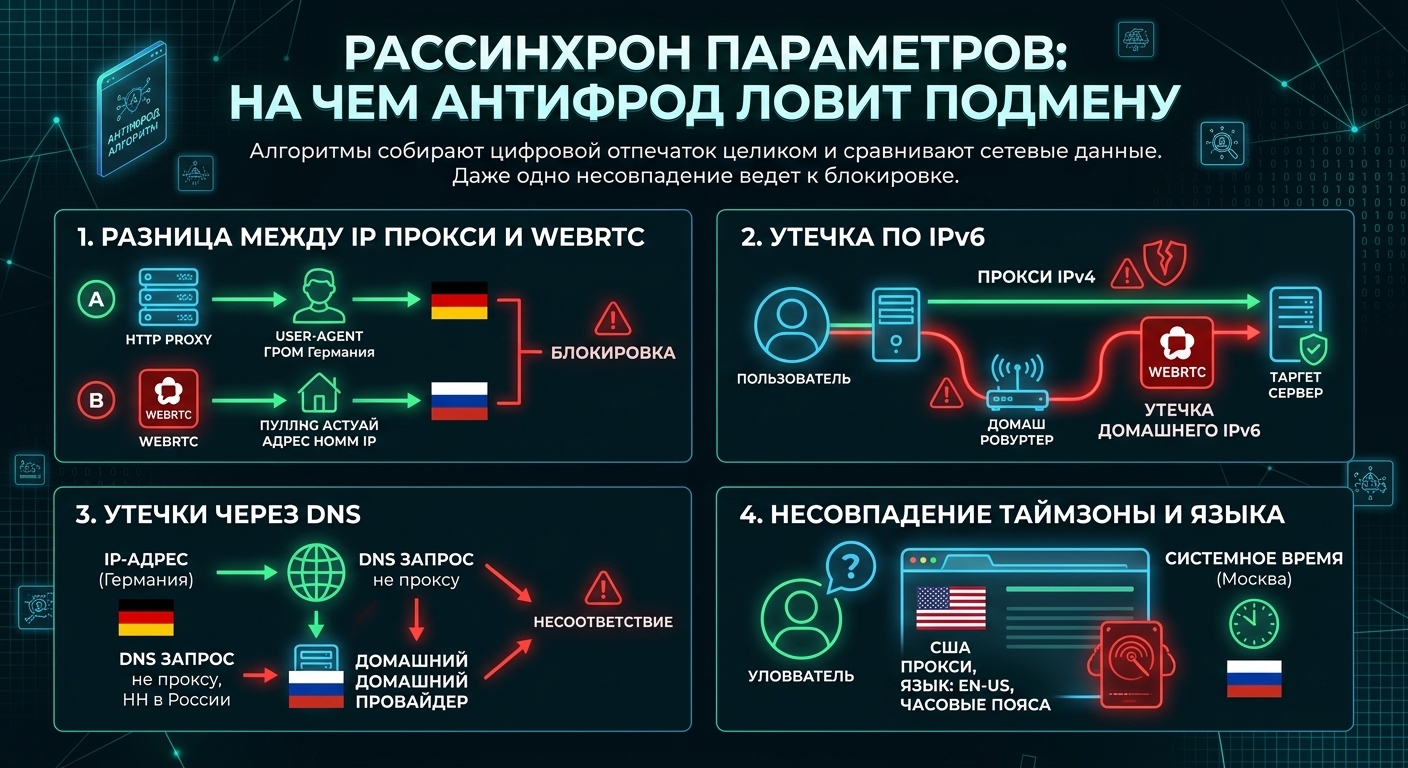
Bans most often happen because of four mismatches:
-
Difference between proxy IP and WebRTC. The main problem when working through HTTP proxies. The advertising network page opens through a mobile proxy from the required country, while WebRTC simultaneously exposes the IP address of your real internet connection. The anti-fraud system sees two different addresses within one session and blocks the profile.
-
IPv6 leak. Most media buyers purchase proxies using standard IPv4. At the same time, home internet connections often use IPv6. If the antidetect browser does not block IPv6 inside the profile, WebRTC sends requests through it and exposes your real IPv6 address to the advertising network.
-
DNS leaks. When opening any website, the browser first contacts DNS servers to find the required address. With SOCKS5, this request goes through the proxy itself. With standard HTTP proxies, the browser often sends it through your home ISP's DNS. Because of this, the IP may show Germany, for example, while DNS points to an ISP in Russia or Georgia. The anti-fraud system sees this difference and bans the account.
-
Timezone and language mismatch. The timezone, system time, and language in the antidetect profile must match the proxy country. If you log in through a US proxy while the profile time is set to Moscow, the anti-fraud system immediately sends the account for review.
Why you cannot simply disable WebRTC in an antidetect browser
When configuring a profile, it may seem that the easiest solution is to completely disable WebRTC so that the browser does not leak the real IP address.
But such a solution only gets the account banned faster. In standard Google Chrome, WebRTC is always enabled by default. Regular internet users do not even know this technology exists and do not think about changing the browser's system settings.
When the advertising network's anti-fraud system checks the connection and sees that WebRTC is disabled, the profile immediately stands out from the crowd. The algorithms detect manual interference with browser parameters, so the account is sent to a checkpoint even faster.
When working with an antidetect browser, there is no need to disable WebRTC. In the profile settings, this function is left enabled and the spoofing mode is set to use the proxy IP — such an option is available in almost all modern antidetect browsers.
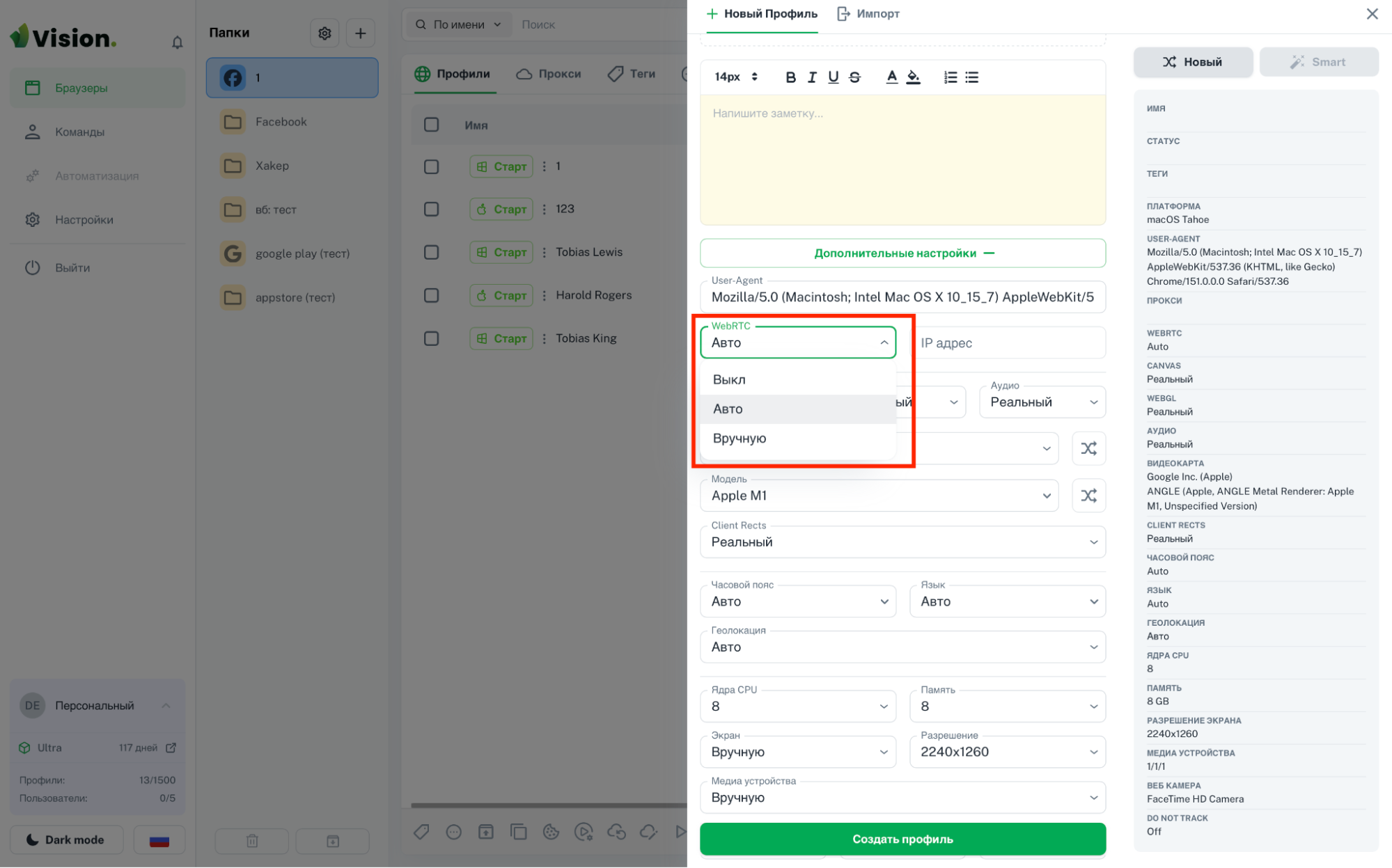
With this setting, the antidetect browser intercepts the browser's system requests and substitutes the connected proxy's IP address in the response. The technology continues to work normally, so the advertising network's anti-fraud system sees the same address both when loading the page and in the WebRTC parameters.
How to check a profile for leaks before launching traffic
Before launching ads, the profile in the antidetect browser must be checked. If there are mismatches in the parameters, the account will be banned immediately after logging into the ad account.
The BrowserLeaks service, WebRTC Leak Test section, is used for checking.
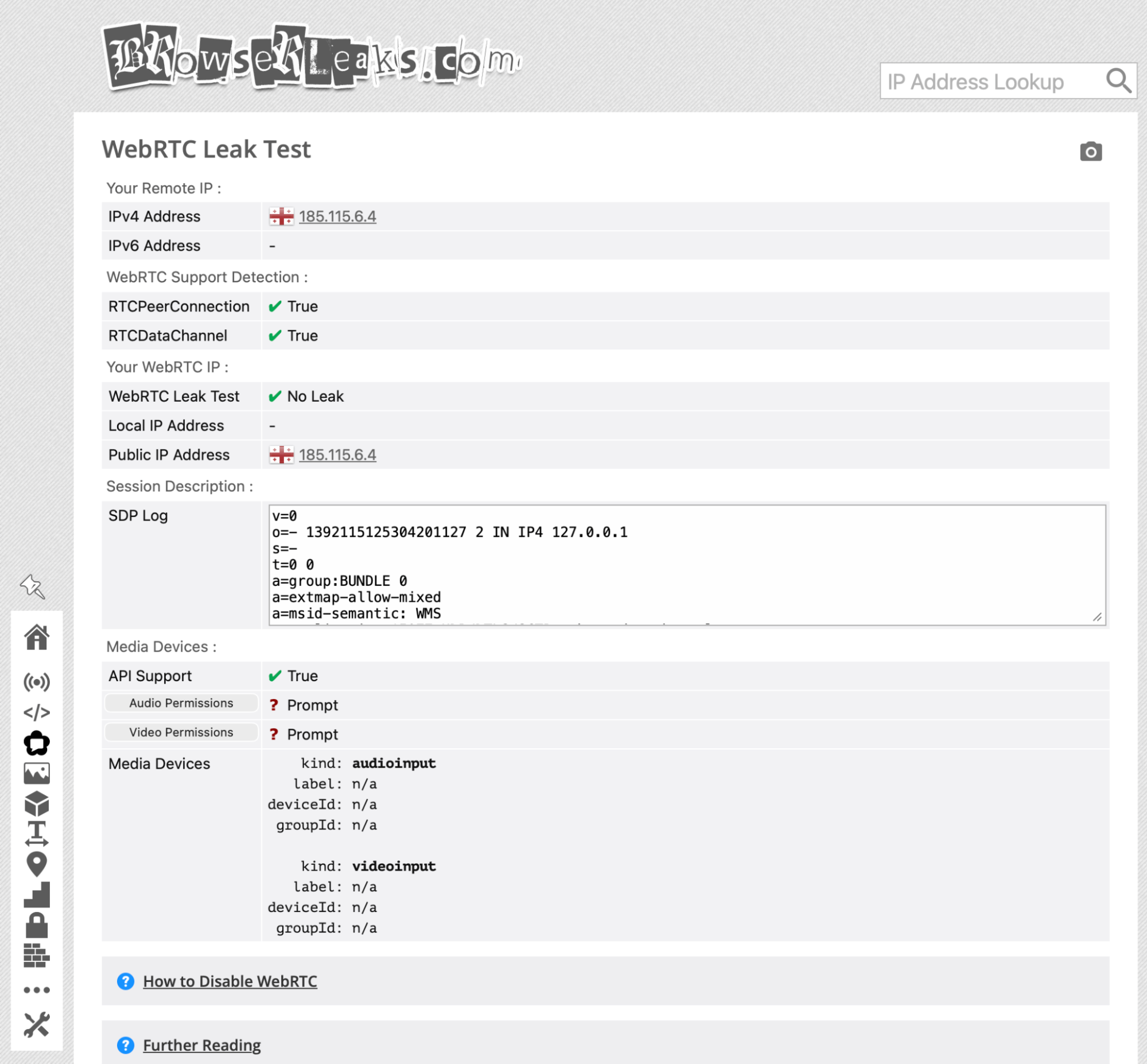
Three parameters are checked in the report:
-
Public IP and WebRTC IP. The purchased proxy's IP address should be displayed in both lines. If your home internet IP appears in the WebRTC line, the proxy does not support UDP or spoofing is not enabled in the antidetect browser settings.
-
IPv6 line. When working with standard IPv4 proxies, there should be no addresses in this field. If the checker shows an address, the browser is exposing your real internet connection. In this case, IPv6 must be completely disabled in the antidetect profile settings.
-
DNS servers. The country and DNS provider must match the proxy GEO. If the checker shows your home internet provider, the anti-fraud system will detect the location mismatch and ban the account.
When all three parameters show the data of the purchased proxy, the profile is ready to work. With these settings, social network anti-fraud systems see only the proxy parameters and do not detect data spoofing.
How to choose an antidetect browser
Not all antidetect browsers handle network parameter spoofing equally well. If a browser masks fingerprints superficially, even high-quality mobile SOCKS5 proxies will not protect accounts from bans.
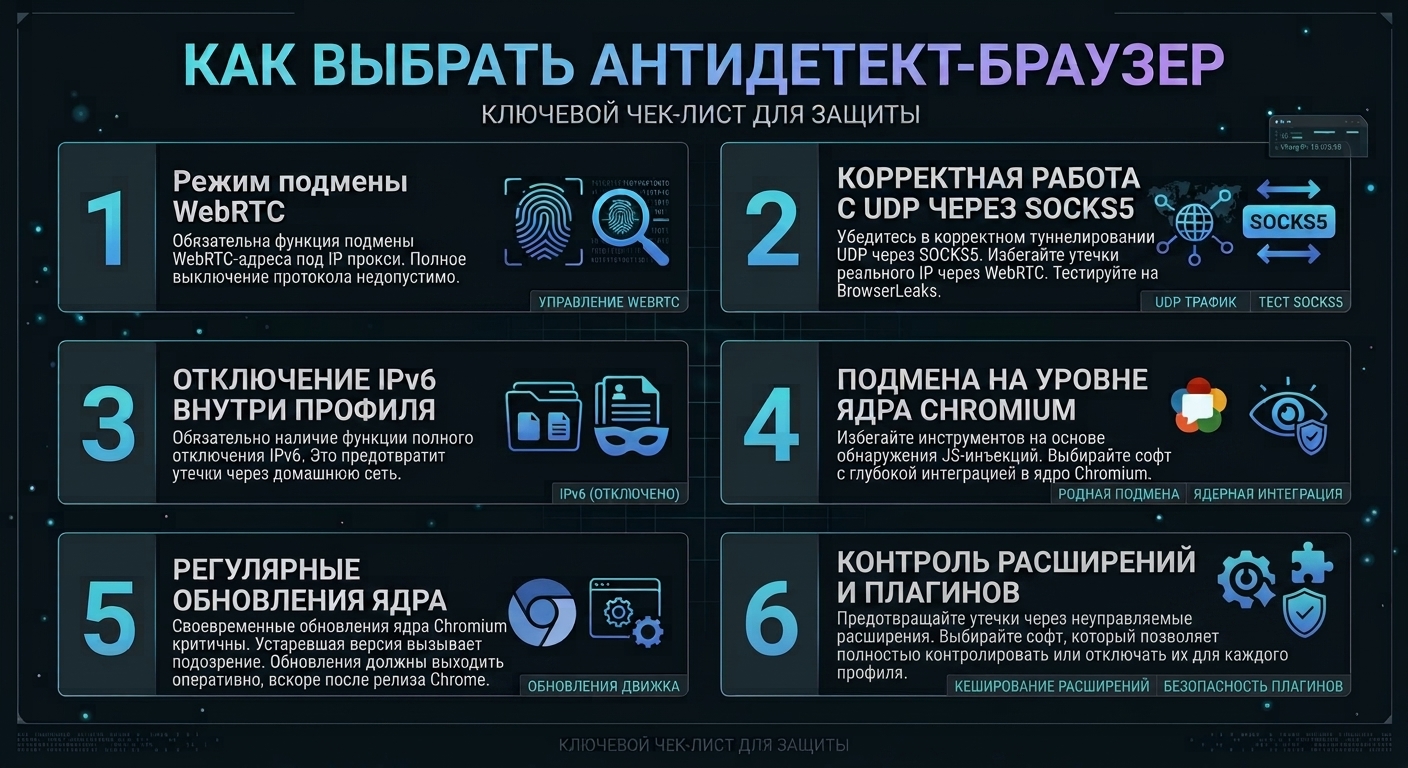
When choosing an antidetect browser for work, you need to pay attention to five key parameters:
-
WebRTC spoofing mode. The profile settings must include a function for spoofing the address to match the proxy IP. If the software only offers the option to completely disable the protocol or leave the real address, such a browser should not be used.
-
Proper UDP support through SOCKS5. Some antidetect browsers support SOCKS5 only nominally: web pages open normally, but the software cannot route UDP requests through the proxy tunnel. Because of this, WebRTC still bypasses the proxy and goes through your internet connection. Before paying for a subscription, you should get a trial and check through BrowserLeaks whether the software routes UDP through SOCKS5.
-
Disabling IPv6 inside the profile. Most home ISPs now assign IPv6 addresses to users. The antidetect browser should have an option to completely disable IPv6 so that the browser physically cannot send a network request through your home connection.
-
Spoofing at the Chromium core level. In basic antidetect browsers, parameters are changed by injecting external JavaScript scripts. Social network anti-fraud systems can easily detect such injections in the page code and immediately trigger a checkpoint. Reliable software makes changes directly to the Chromium core, so the spoofing looks natural to protection systems.
-
Regular core updates. Social networks track the browser version used to access the ad account. If the antidetect browser's core is several months behind the official Google Chrome version, the profile immediately looks suspicious to the algorithms. Developers should release updated engine versions within a couple of weeks after the official Chrome release.
Conclusion
When running traffic from Facebook, TikTok, or Google, you need to understand the basic technical side: how an antidetect browser works with network protocols and why real IP leaks occur. Once you understand these processes, choosing the right browser and configuring the required settings becomes much easier.
Before paying for a plan, it is enough to take a free trial and check the profile with your proxies through a checker. This will help you immediately evaluate the quality of the spoofing and filter out unsuitable browsers before you start spending money on resources.