Farming and Warming Google Ads Accounts in 2026
By 2026, Google has fully switched to analyzing behavioral factors in accounts through neural networks. Simply aging an account without activity has long stopped giving trust. If a profile does not have a deep digital footprint and history of interaction with the system of services, it gets sent for security check or suspended on the payment side already at the stage of linking a card.
Now farming is about creating a full-fledged digital personality whose actions completely imitate the behavior of a real person.
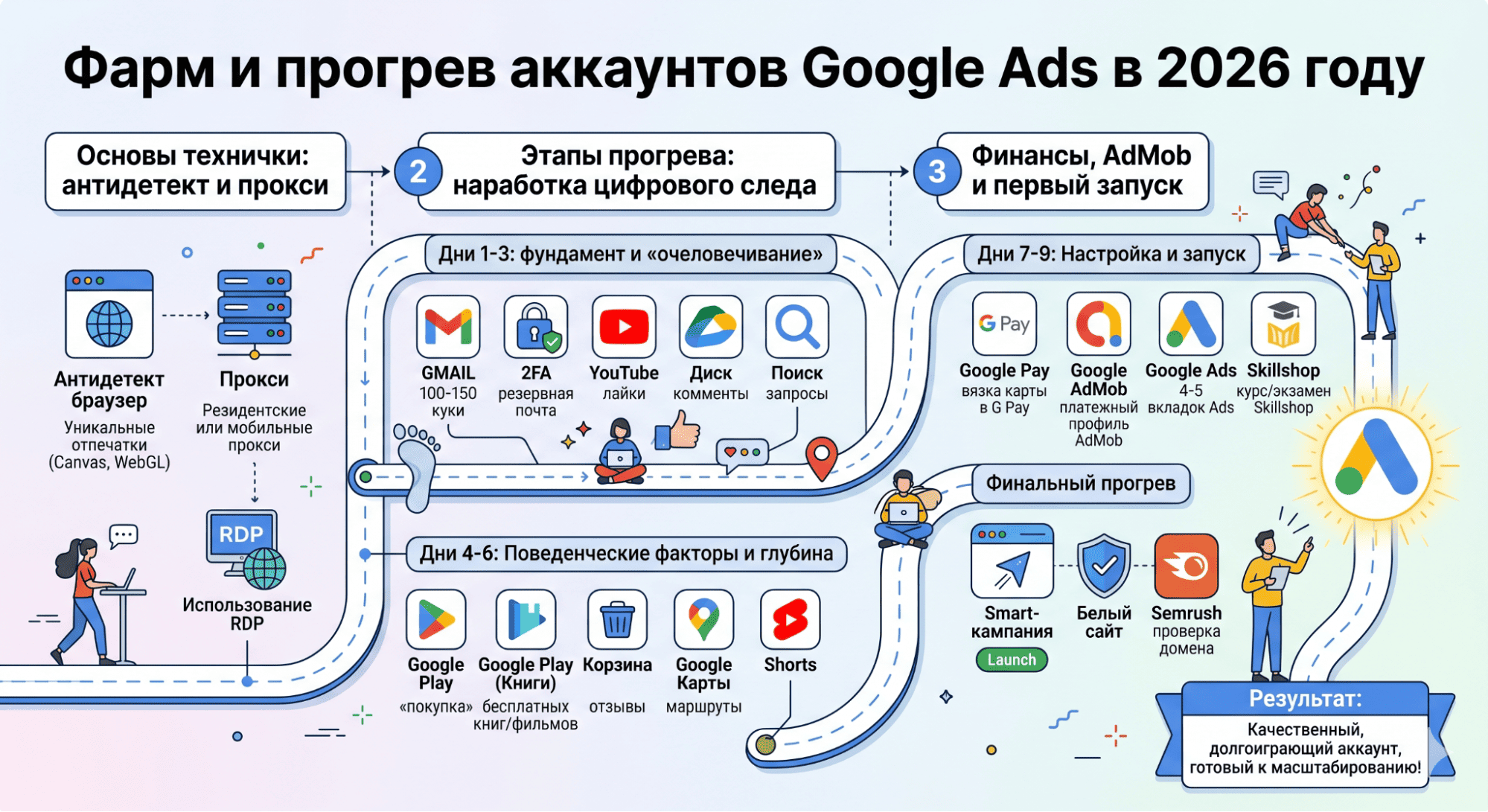
Technical Basics: Antidetect and Proxies
Before authorizing in Google Ads, you need to build a technical base. Any mistake in the technical setup will make further farming pointless.
-
Antidetect browser. Use profiles with unique Canvas, WebGL, and audio context fingerprints. It is important not to disable these parameters but to replace them with real values through Noise mode. Google sees empty fingerprint fields as a clear sign of automation.
-
Proxies. Forget about server solutions. Use only mobile or high-quality residential proxies. The GEO of the proxies must match the GEO of the future account.
-
Using RDP (remote desktops). For working with particularly complex GEOs (USA, Germany, UK), buyers use antidetect on a remote desktop. This imitates logging in from a real device in the target region, which significantly increases the survival rate of self-registered accounts.
Stages of Warming Google Ads Accounts
Starting work requires gradual building of trust, where every action convinces anti-fraud systems that the account is being used by a real person.
Days 1-3: Foundation and “Humanizing” the Account
Day 1. Start by filling the cookie base (100-150 cookies) by visiting popular local sites, news portals, and marketplaces. Only after that, register a Gmail. Be sure to add a backup email and enable two-factor authentication. Save the backup codes — for Google this is a signal that the account is being created by a human.
Now go to YouTube and set 144p (saving traffic on proxies looks logical for mobile internet). Watch videos, subscribe to a couple of channels, like them, and write 2-3 comments. At the end of the day, upload a couple of files to Google Drive and make 5-7 search queries.
Day 2. Continue activity in Search and YouTube. Fully fill out the profile: add an avatar, specify specialty, place of work, and city. All this data must match the GEO of the account. Bots rarely fill in optional profile fields, so for the algorithms this is an important signal of account quality.
Day 3. Log in via Google account on 3-5 third-party sites (forums, classifieds, local marketplaces). In the account itself, add a couple of contacts to the address book and mark 2-3 events in the calendar (Google will see that the user is making plans).
Days 4-6: Behavioral Factors and Depth of Farming
Day 4. Imitate a real user in Google Play: “buy” free books, comics, and movies. Spend 2-3 minutes on product description pages, imitating reading reviews and descriptions before purchasing.
Day 5. Now imitate online shopping: search for products, visit online stores, add items to the cart. Be sure to use Google Maps: search for any establishments (cafes, stores, services) by the ZIP code of your GEO, build routes to the establishments. Rate an establishment or write a short review.
Day 6. Standard additional farming: watch Shorts on YouTube, make 5-7 search queries on previously warmed interests. Log in to 2-3 new resources. The account should maintain a stable rhythm of activity without sharp spikes or complete inactivity.
Days 7-9: Finance, AdMob and First Launch
Day 7. Link a card to Google Pay. To minimize the risk of suspension on the payment side, use a workaround through Google AdMob. Register an account in AdMob, fill in the data strictly according to the profile’s GEO, and create a payment profile through the internal interface. After the payment data is fixed in AdMob, go to Google Ads. The card should automatically pull up to the account. Go through 4-5 tabs of the Ads interface, imitating studying the settings.
Day 8. Now go to Google Skillshop, link the advertising account, and complete a random course or exam for trust. Having certificates and activity in Google’s educational section is a powerful antidote against blocks.
Day 9. Final warming. Make 1-2 subscriptions to Google services. Launch the first Smart campaign. Use a clean white site with a clean history for the link. Before launching, be sure to check the domain through ad monitoring services (for example, through Semrush) so that ads have not been run on it before.
If all stages are passed without sharp spikes in activity, by the ninth day the account receives the required level of trust to work with campaigns. Proper warming through Google services minimizes the risk of being sent for security check when linking a card and allows stable scaling, while the accumulated digital footprint becomes protection during subsequent moderations.
Working with the Site
The trust of a Google Ads account is closely linked to the quality of the landing page.
-
Using Google Analytics 4 (GA4). If your site has Google Analytics installed and configured, linked to the same account, it gives a powerful boost to trust. The system sees a transparent connection: ad → click → behavior on the site.
-
Domain trust. Freshly registered domains with no history live much shorter. Try to use aged domains and land traffic on constructors like Google Sites or Blogger at the first warming stage.
What to Do in Case of Block (Suspension)
If the account still gets banned for suspicious payments, it is not the end of the world.
-
Filing an appeal. Submit an appeal only after 24 hours from the moment of the ban.
-
Evidence base. Attach a statement from the payment service/bank.
-
Manual review. Thanks to deep farming in Google Maps, Calendar, and YouTube, during manual review the moderator will see the history of a real person, which significantly increases the chances of unban compared to empty autoregs.
Is It Possible to Buy Ready-Made Accounts
If you don’t have that much free time for manual farming, the market offers consumables for any budget and tasks. However, buying an account is always working with someone else’s technical setup, so it is important to understand the difference between a cheap autoreg and a high-quality trusted profile.
Main Types of Purchased Accounts
-
Autoregs. The cheapest and riskiest option. These are empty accounts with no history. Suitable only for mass tests.
-
Warmed-up accounts. Profiles with activity history that have gone through basic farming (YouTube, search, cookies).
-
Premium and trusted. Accounts aged 1+ year, with real payments and a high level of trust. Often sold with a linked BM or as agency accounts.
-
Agency accounts (Agency Accounts). The most reliable profiles for large budgets. This is already renting a cabinet from an advertising agency that has direct support from Google.
Conclusion
The success of driving traffic now depends not on the number of accounts, but on the quality of the accumulated digital footprint. If your setup combines clean technical infrastructure, deep behavioral warming, and a transparent financial history, you will get a high-quality, long-lasting account capable of surviving storms and scaling budgets in any vertical.