In WhatsApp, users read up to 80% of incoming messages. For comparison, a good open rate in email newsletters or standard push notifications is considered to be 15–20%. A user might ignore an email or close a website banner, but they almost always open a messenger notification.
The main challenge with this traffic source is anti-fraud protection. Meta's defense systems monitor account behavior, sharp spikes in activity, mass sending of identical messages, and links to external resources. If you buy a newly registered account and blast a bulk campaign with an offer link right away, the number will get banned after the very first few messages.
The survival rate of your setups now relies on three core factors:
-
Purchasing or farming aged accounts with a warm-up history;
-
Mandatory profile warm-up through simulated dialogue;
-
A two-step funnel where the link to gambling, nutra, or dating offers is shared only after the user responds to the initial message.
Below, we break down the full drive process: from selecting and warming up accounts to scraping phone databases and setting up a secure funnel.
Starter Consumables & Setup
Running WhatsApp messaging campaigns requires a solid operational setup consisting of accounts, proxies, and hardware. Standard emulators and cheap virtual numbers are quickly flagged by anti-fraud systems today, so network operators usually rely on physical SIM cards, aged farmed accounts, and real Android hardware.
Accounts and SIM Cards
WhatsApp ties each account to a phone number. For messaging campaigns, media buyers typically use two options:
-
Physical SIM cards. The number remains fully controlled by your team, allowing you to re-verify via SMS if prompted. SIM cards can be inserted directly into smartphones or connected via GSM gateways when managing large account networks.
-
Farmed and aged accounts. Pre-registered profiles with aging history and past activity. These are bought ready-made when you don't have time to manually register and warm up a network yourself.
When buying farmed accounts, look beyond just account age. How the profile was registered, whether you retain access to the phone number, and what actions were performed during warm-up are all critical factors.
Proxies
For an account network, isolate profiles across separate IPs while maintaining GEO consistency. If you use an Indonesian number, pair it with an Indonesian proxy: logging in from multiple countries triggers security verifications.
Media buyers primarily use two proxy types:
-
Mobile Proxies. Mobile carrier IP addresses. These are ideal for registering and managing multiple accounts at scale. Mobile proxies often support IP rotation on a timer or request, making them convenient for large networks.
-
Residential Proxies. Home ISP addresses. These are primarily used when a stable IP without constant rotation is required.
Avoid placing your entire network on a single IP address. Determine the optimal account-to-IP ratio through testing, as there is no universal safe limit that fits every proxy provider and account type.
Software & Mobile Farms
Managing a large network requires solving two main challenges: where the WhatsApp accounts will run, and how to automate the messaging workflow.
-
Android Smartphone Farms. These are real physical phones linked into a single network and connected to a PC. Each device runs its own WhatsApp account, while the entire farm is controlled centrally from a computer. This approach suits high-volume operations but requires investing in physical hardware.
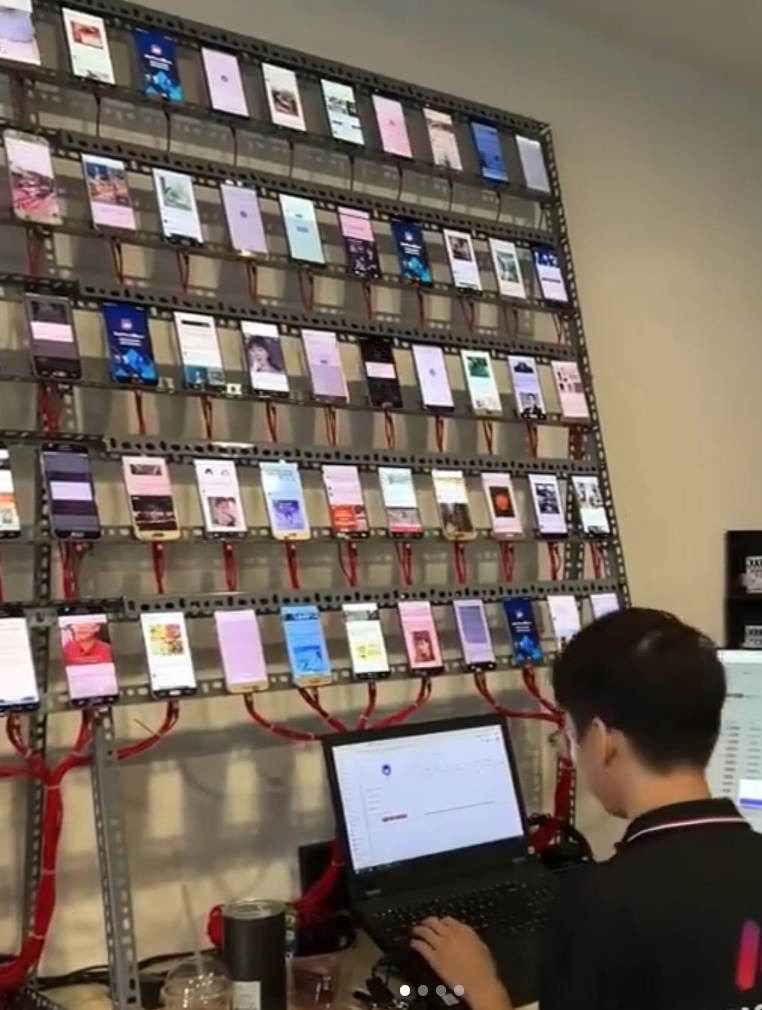
Example of a mobile farm using real smartphones
-
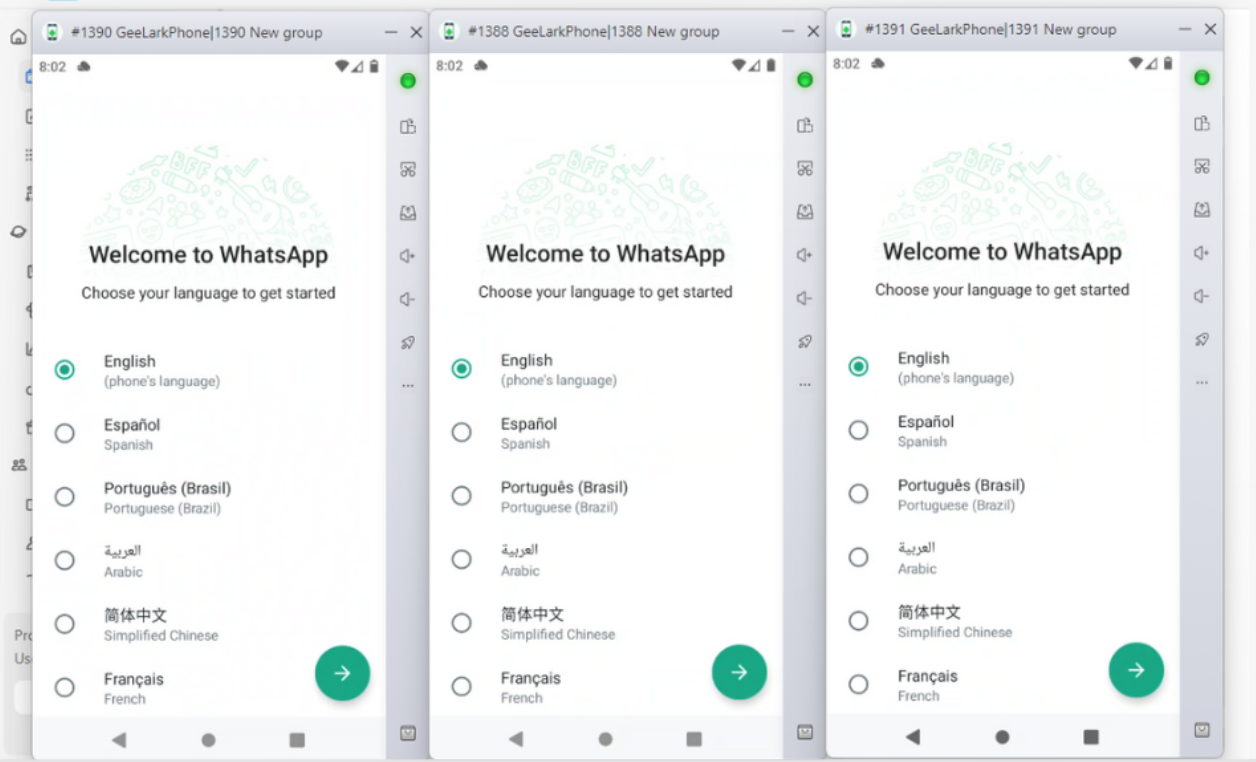
Mobile Anti-Detect Browsers / Cloud Android Systems. An alternative to managing dozens of physical phones. These platforms allow you to create isolated Android profiles, configure distinct device parameters and proxies for each, and manage them all from a single PC (e.g., GeeLark and other cloud-based Android anti-detect environments).
-
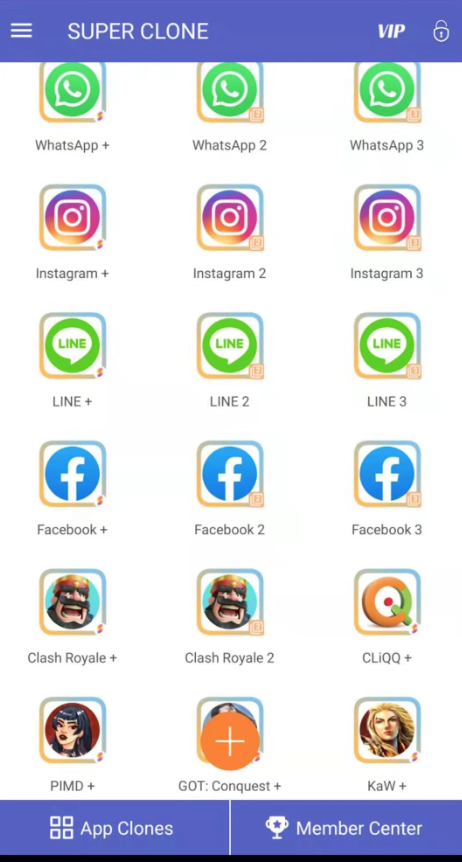
App Cloners. App cloners create multiple distinct copies of WhatsApp on a single Android device. Each clone operates with its own isolated application data and account, while advanced solutions offer additional device fingerprint customization.
-
Bulk Messaging Software & Autoresponders. Rather than replacing hardware or anti-detect environments, these tools automate outreach execution. You upload your phone database, connect accounts, configure text templates, and set delay intervals. The software then distributes messages across profiles and automatically responds to incoming replies based on pre-set scripts.
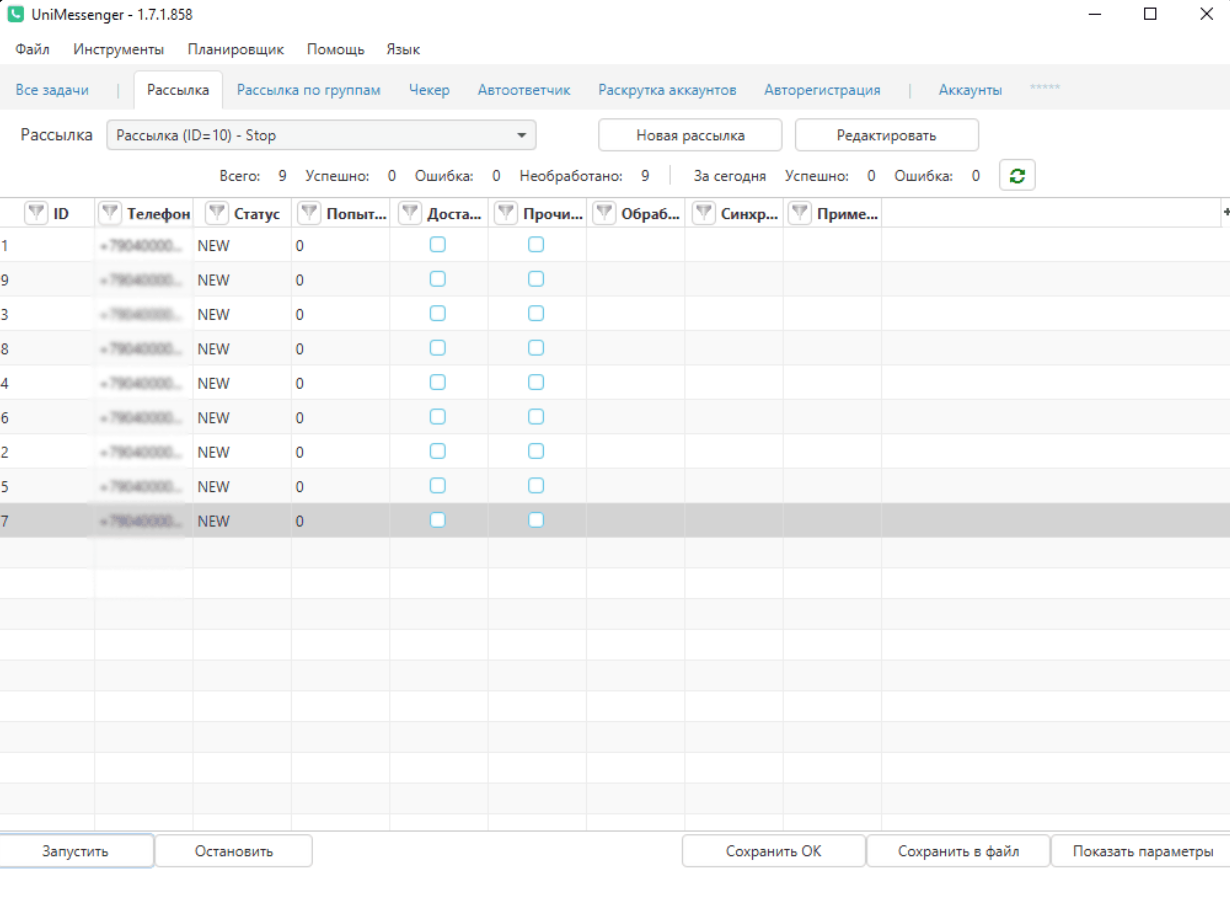
Warming Up WhatsApp Accounts Before Launch
Even high-quality aged or farmed accounts shouldn't be pushed into bulk campaigns immediately. For newly registered accounts, the risk is even higher: a sudden spike in outbound messages without prior chat history quickly triggers anti-fraud systems.
Before launching campaigns, build an organic activity history: incoming/outgoing chats, voice calls, and a gradual increase in daily engagement.
The Account Warm-Up Process
When managing an account network, most of the warm-up process can be automated with specialized software. Accounts are pooled together, and the software simulates conversations and interactions between them. For instance, tools like UniMessenger WA feature auto-warmup modules that pair accounts, exchange contact details, and execute randomized actions.
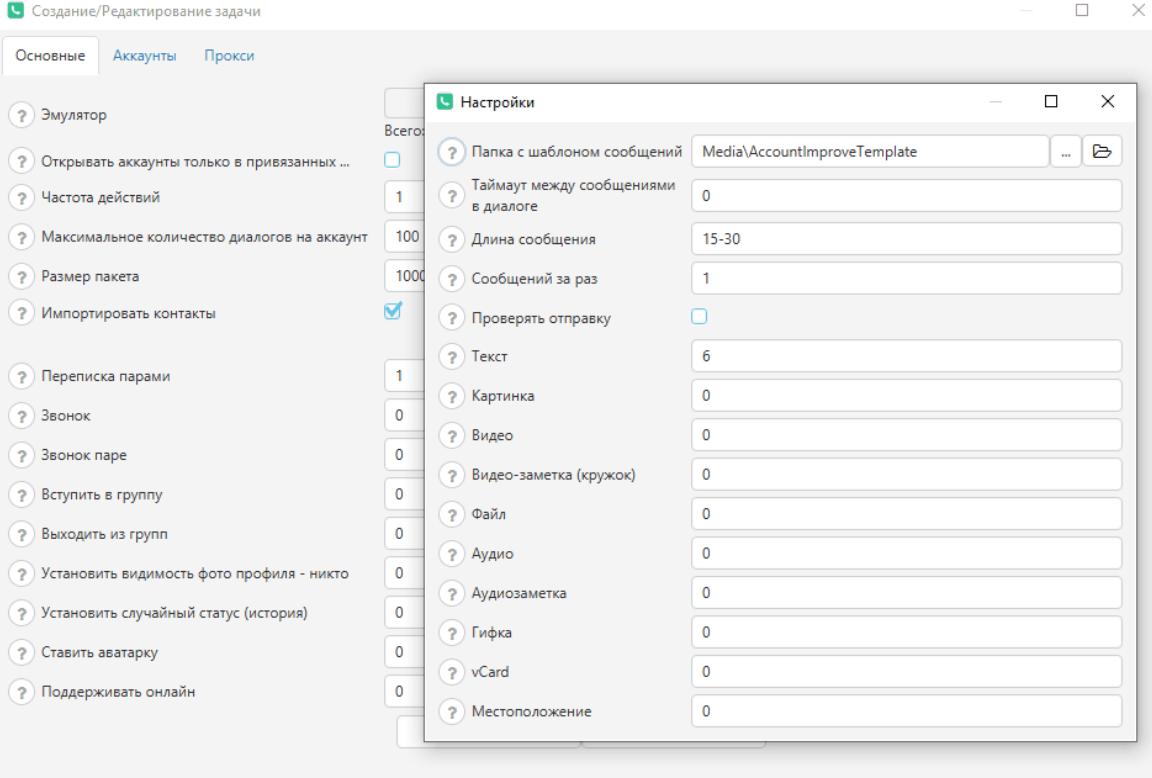
A structured warm-up flow generally follows these steps:
-
Complete Profile Setup. Add a display name, profile picture, and bio description. Use unique text and images for each account to avoid creating a network of identical profiles.
-
Simulate Inter-Account Conversations. Configure your software to run automated chats between accounts in your pool. Vary message lengths and alternate between plain text, voice notes, images, and stickers.
-
Generate Incoming Activity. Set up warm-up routines so accounts initiate chats, receive messages, and respond to incoming prompts. This builds a realistic two-way communication history for every profile.
-
Save Contacts to Phonebooks. Save a subset of accounts into each other's phone contacts before launching dialogs to mimic real user behavior.
-
Incorporate Additional Actions. If supported by your software, include WhatsApp voice calls, group joins, and status updates into the warm-up routine. Expand activity types gradually rather than all at once.
-
Scale Activity Gradually. Keep volume low during the first few days, then progressively increase chat frequency and interaction depth. Set randomized delays and execution windows in your software so accounts don't operate on identical synchronized schedules.
Sourcing Phone Databases for WhatsApp Outreach
Lead database quality directly dictates campaign ROI. Outreaching random numbers results in missed target demographics and rapid account bans due to user complaints. Every offer requires a tailored audience combining target GEO precision with topic-specific interest.
Sourcing Methods
You can source phone contact databases through three main methods:
-
Manual Scraping. For small-scale testing, gather numbers manually from open sources: niche communities, classified ad listings, directories, and public contact boards. While time-consuming, this allows precise GEO and interest targeting.
-
Automated Scraping. For larger volumes, use scraping tools and services to extract public contact details from platforms like Telegram channels, web directories, and classified boards. Scrapers export structured data into CSV or TXT format based on custom search criteria. Note that standard scrapers can only extract publicly visible phone numbers.
-
Purchasing Ready-Made Databases. The fastest option for acquiring niche-specific contacts in a given GEO. However, database quality varies: lists may contain duplicate entries, inactive numbers, accounts without WhatsApp registered, or poor audience alignment.
Database Cleaning and Validation
Never upload raw database files directly into your messaging tool. First, remove duplicate entries and format phone numbers into standardized international format with country codes (+1, +44, etc.).
Next, run the list through a WhatsApp number checker to verify active user registrations. Filtering out unregistered numbers saves software cycles and prevents failed delivery attempts. Verification can be performed via standalone tools or built-in modules within messaging software.
The Outreach Funnel: Initial Bait and Follow-Ups
The sole goal of the initial message is to hook the user and elicit an incoming reply. Once the user responds, you can safely proceed with your script and guide them down the funnel.
Crafting the First Message
Keep your opening message concise and low-friction. Instead of pushing a full promotional pitch immediately, use a casual conversation starter that invites an easy response.
Tailor your hook to the database source and audience interest. If contacts were scraped from a sports betting community, reference an upcoming match or prediction. Dating offers require a completely different personal angle.
For example, instead of sending a direct casino ad with an affiliate link, send a short query regarding an exclusive offer: "Got a no-deposit bonus for new accounts. Want the link?"
This clearly states the value proposition while giving the user a reason to reply. Never include external links in the first message: wait for an explicit user response before triggering the next funnel step.
Avoid sending identical text across your entire network. Mass distribution of static templates allows anti-fraud algorithms to instantly flag spam patterns. Prepare multiple script variants or utilize Spintax syntax to automatically randomize words and phrases per message.
Automating the Post-Reply Funnel
Once an incoming reply is detected, an autoresponder or chatbot takes over the conversation. At this stage, you can elaborate on the offer, ask qualifying questions, and direct the user toward conversion.
A standard conversion funnel follows this sequence:
First Message → User Reply → Auto-Reply → Qualifying Question → Offer Link.
When a user replies with "yes" or "+", the software detects the trigger and advances the sequence: delivering details, asking a qualifying follow-up, or sending the link. If the user opts out, the automated sequence halts.
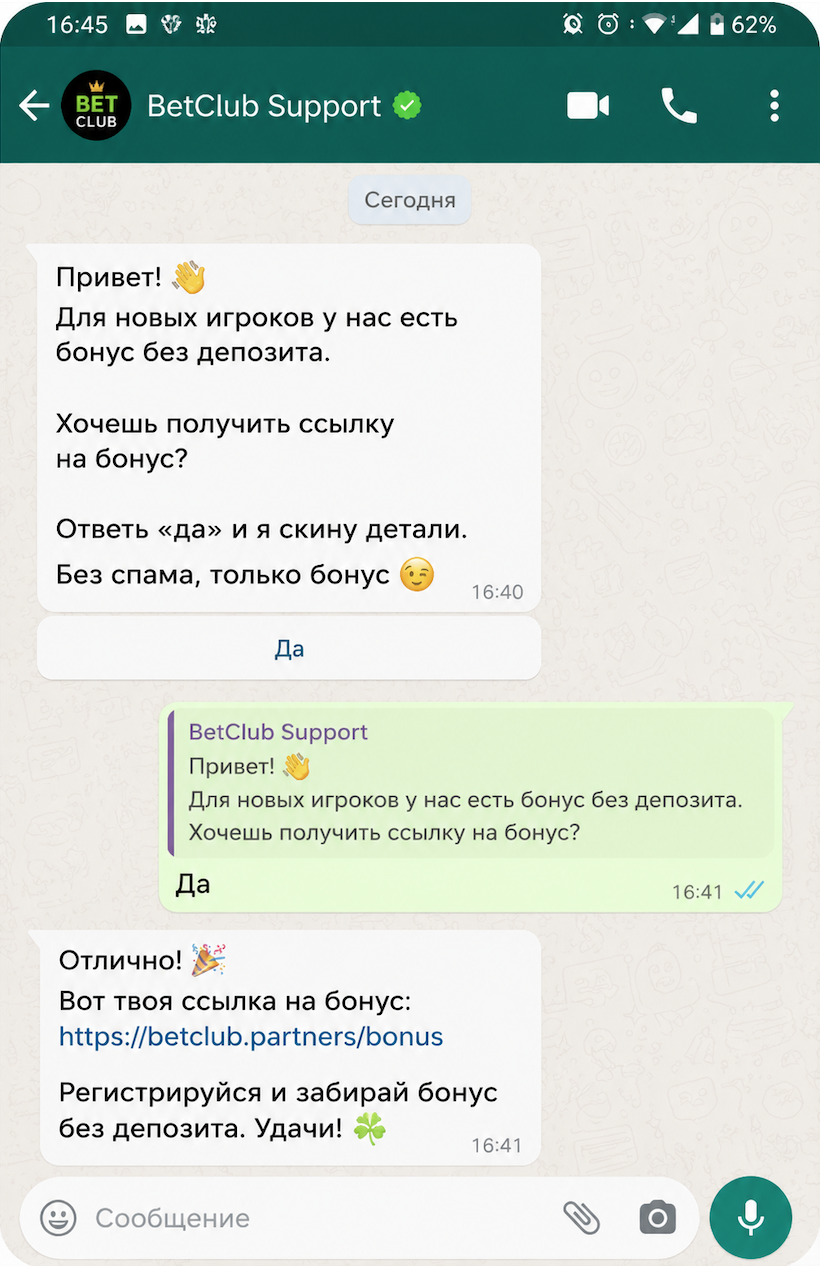
Placing affiliate links is safest after active user engagement is established. Depending on the vertical, direct users to a registration page or bonus offer for gambling, a product pre-lander for nutra, or a profile/questionnaire page for dating.
Scaling Campaign Volumes Safely
After warming up, avoid jumping directly to high message volumes. Launch test campaigns on a small database sample to evaluate how your account network handles the load.
Focus on three key performance metrics during initial testing:
-
Bans & Restrictions. If accounts get banned rapidly, do not scale volume.
-
Delivery Rates. A sudden drop in delivered messages indicates setup issues or platform throttling.
-
Response Rates. Higher initial reply rates indicate strong audience targeting and effective opening hooks.
If account retention is stable, delivery remains high, and response rates meet benchmarks, scale volume gradually. Should ban rates rise or delivery drop, pause scaling to inspect your accounts, proxies, database quality, and messaging templates.
Conclusion
WhatsApp remains a lucrative organic traffic source (UBT) due to exceptionally high message open rates and direct communication channels. With a well-structured technical setup and targeted lead lists, you can generate a consistent traffic stream and scale profitable setups.
Always test new setups on small batches and monitor core metrics: account survival rates, user response rates, and conversion numbers. These indicators dictate whether to scale your campaign or refine your setup first.