The launch of advertising in ChatGPT Ads immediately caught the attention of media buyers: a huge audience, an ad auction that isn't oversaturated yet, and the opportunity to show an offer at the exact moment someone is trying to solve a specific problem in a conversation with the model.
However, the familiar approaches from Facebook or Google won't work here. The ad account has no gender or age targeting, you can't select interests as you would on Facebook, or build a keyword list as you would on Google.
Instead, you need to carefully select intents — formulate real questions and conversation scenarios in which someone turns to AI for a solution to a problem related to a specific offer.
In this article, we'll explain how the ChatGPT Ads advertising dashboard works: where to get accounts, how to properly collect queries for an offer, and which technical details to pay attention to during setup. We've also included insights from a media buyer who has already tested running traffic from this source to gray-hat verticals.
What ChatGPT Ads is and how advertising works within conversations
The main ad format in the dashboard — is the Chat Card. It's a block containing an image and text that appears below the AI's response to a user's query.
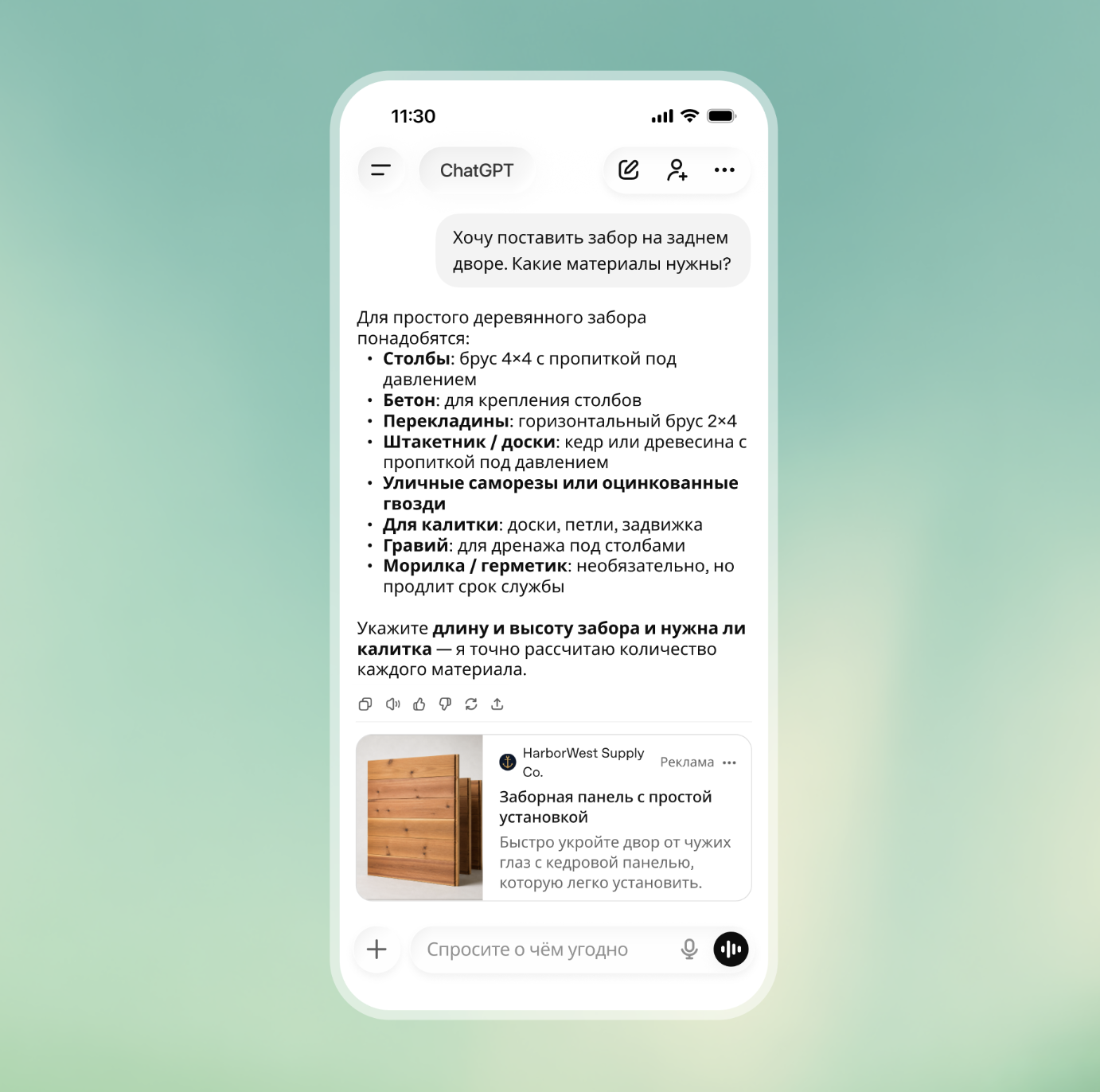
Ads are shown only on the free Free and Go plans. Users with Plus, Pro or Enterprise subscriptions don't see ads.
At first glance, it might seem that advertising here works the same way as search advertising in Google Ads: collect keywords, set bids and wait for clicks. But people behave differently in ChatGPT.
On Google, someone usually enters a short query such as «how to stop hair loss» and visits websites from the search results. In ChatGPT, however, they share a detailed story: «I'm 30 years old, my hair has been falling out badly for the past six months after a stressful period, regular shampoos don't help, which doctor should I see and what tests should I take?». That's why ads need to be tied to the context of the conversation rather than individual keywords.
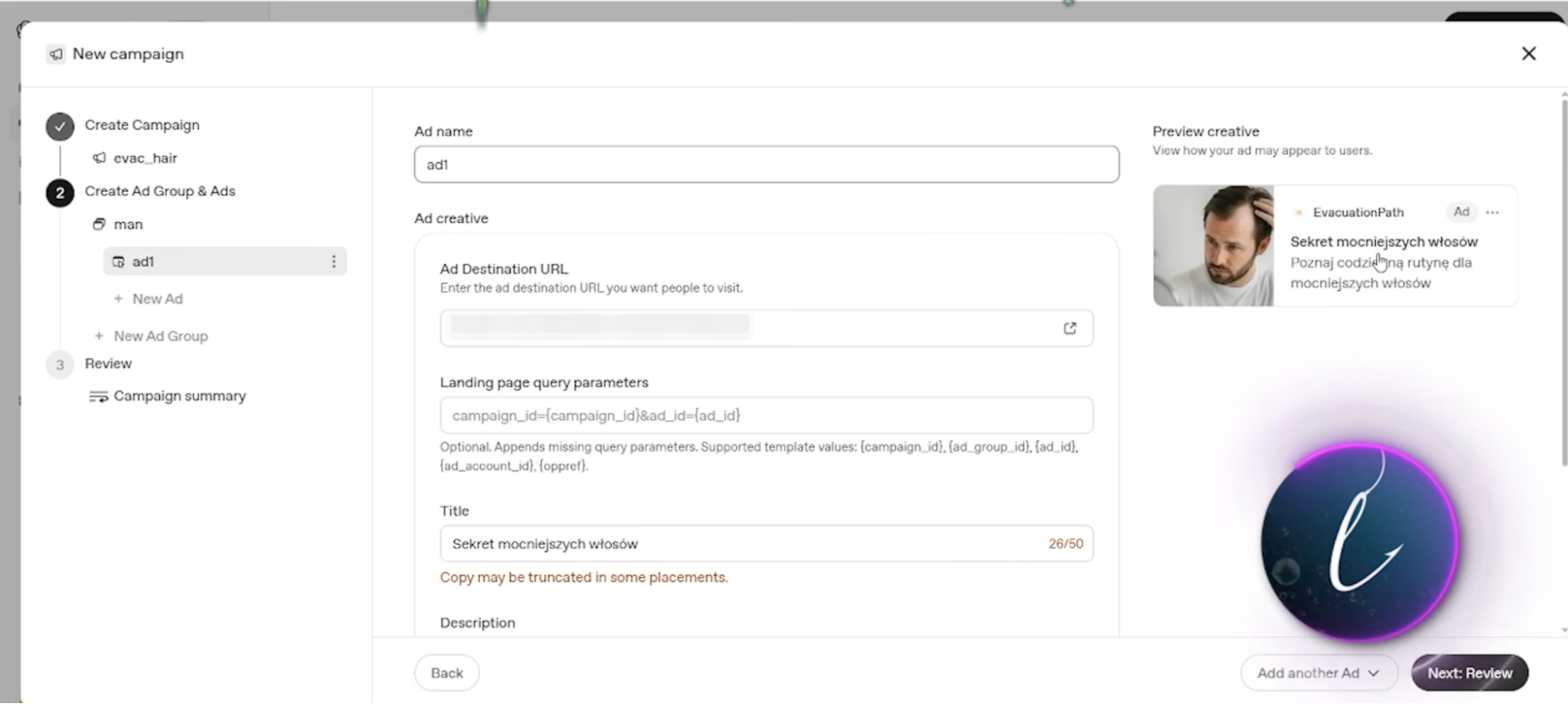
The ad itself consists of four elements: a logo or favicon (at least 256×256 px), a square image (at least 640×640 px), a headline and text.
The headline can contain up to 50 characters, while the description can contain up to 100. However, the dashboard's documentation recommends keeping headlines within 25 characters and descriptions within 50 so that the entire text fits on the screen.
But staying within these recommended limits isn't mandatory. If you write longer text, the system simply truncates the phrase with an ellipsis. This allows you to use the approach of traditional teaser advertising (for example: «To stop hair loss, try a simple homemade...») and increase the ad's click-through rate through curiosity.
Setup and consumables: agency accounts vs. self-registered accounts
You can't launch an advertising campaign directly from Russia or CIS countries. OpenAI Ads is officially available in approximately 50 countries, including the US, Canada, the UK, EU countries and parts of Latin America. When creating an ad account, OpenAI immediately requests the details of a foreign legal entity, so the system won't allow you to enter a company registered in Russia or Kazakhstan.
Because of these restrictions, media buyers have two ways to get started: rent an agency account or create self-registered accounts.
Agency accounts are suitable for quickly testing the traffic source without dealing with manual setup. Sellers charge a one-time setup fee of up to $300 for providing such an account and take a commission of 5% to 10% when you top up the balance. The account can be funded with cryptocurrency, and moderation is noticeably more lenient toward agency profiles.
The main technical limitation of agency ad accounts — is their strict connection to a specific website. The seller provides a profile linked to a particular white-hat domain, so you'll have to direct traffic strictly to that domain. The OpenAI Ads dashboard simply won't allow you to use a direct affiliate link leading to a third-party landing page.
If you don't want to pay a percentage to intermediaries, you can create self-registered accounts. To create an account, you need to visit ads.openai.com using an IP address from any country where advertising is officially available. You also need to prepare a White Page in advance with the genuine company details of a foreign legal entity.
The key consumable during setup — is a proxy. You must access the dashboard and link a bank card strictly through clean mobile or private residential proxies matching the GEO of the selected company. If OpenAI's antifraud system considers the IP pool to be spammed, the bank card linking form won't even load in the billing interface.
Payment methods also require some effort: the OpenAI advertising dashboard doesn't accept every bank card. Sellers keep working BINs secret, so suitable payment services have to be found through trial and error. For this reason, experienced media buyers usually use agency accounts for their initial campaign tests and move on to creating their own self-registered accounts when scaling a profitable campaign setup.
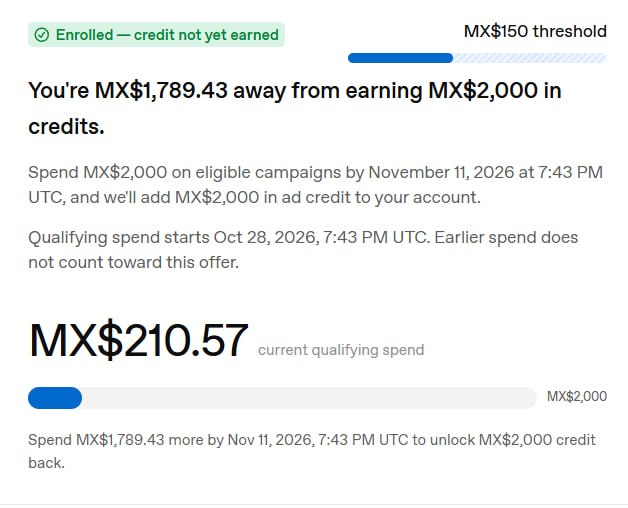
There's also a useful trick for those who want to save money on testing: self-registered accounts can be created for the Mexico GEO. In this case, the advertising dashboard offers a bonus: after spending the first 2,000 Mexican pesos (about $100), another 2,000 pesos are credited to the balance as advertising credit. A separate progress bar appears in the billing interface, showing how much you need to spend to receive the bonus.
Targeting without keywords: how to collect Context hints
In Google Ads search campaigns, advertising is tied to keywords: a keyword list and bids on specific phrases. ChatGPT Ads doesn't use keywords; targeting works through contextual hints (Context hints).
Context hints are formulated questions or descriptions of situations in which someone might need a product. The algorithm doesn't look for exact word matches in a query but evaluates the overall meaning of the conversation.
The setup principle is simple: one intent per ad group. You shouldn't put someone asking «why does hair fall out after stress» in the same group as someone asking «which serum is best for stopping baldness».
The first conversation requires an informational approach and an explanation of the causes, while the second allows you to immediately suggest a specific product. Each situation needs its own hints and separate ad copy.
The dashboard has no gender or age targeting settings. At the same time, ChatGPT has a young audience: around 85% of users are under 45.
Because of this, offers targeting older audiences aren't profitable. For example, if you launch a product for joint pain or arthritis, the ads are shown to people under 35 who simply aren't interested in the topic. Users over 50 make up only about 15% of the service's audience, so achieving a reasonable cost per lead for such products won't be possible.
That's why, within the nutra vertical, only products targeting audiences under 45 work here: hair loss treatments, weight loss and potency products.
There are two ways to collect effective intents for an offer:
-
Ahrefs' free keyword generator. Enter the offer's main keyword (for example, hair loss) and open the «Questions» tab. The service provides a list of real search queries: how to stop hair loss, what causes hair loss or which vitamin deficiency causes hair loss. You can copy these phrases directly into the Context hints field.
-
Asking ChatGPT directly. You can ask the AI itself to generate a list of questions and real-life situations for a specific offer. This method is less precise than collecting data from actual search results, but it helps gather additional phrases for testing.
Preparing White Pages and passing moderation
With agency accounts, you can't simply create a white-hat website and drive traffic directly to your offer. The seller provides a profile with a domain already linked to it, which was used to warm up the account, and you won't be allowed to change that address in the settings.
You also can't create a direct White Page for a hair loss or weight loss product on that same domain because of the platform's rules. For advertising any medicinal products, dietary supplements or other supplements, OpenAI requires official medical and pharmaceutical licenses. If you publish a page promising to cure baldness, OpenAI will immediately request documentation and reject the ad.
Leaving the seller's default page unchanged isn't an option either. The moderation bot checks the ad copy and compares it with the website's content. If the ad talks about hair restoration while the website sells construction equipment or offers legal services, the ad will be rejected immediately with the reason landing mismatch.
That's why you need to create a separate page on the linked domain that logically connects the original White Page with your offer. For example, you could publish an informational article on a company's blog about how constant work-related stress, schedules or frequent flights affect hair loss. The text must not contain direct medical promises so that moderation doesn't classify it as pharmaceutical advertising and request licenses.
Moderation in ChatGPT Ads itself is automated. A creative with an aggressive teaser headline and a photo of a bald spot can be approved in literally a minute, while a neutral version may fail moderation.
This problem can be solved through mass duplication. A rejected ad is simply copied 10–15 times in a row without changing the image or text. Apparently, OpenAI hasn't tightened its antifraud controls yet, so even such a simple and obvious manipulation works: 2–3 duplicates from a batch consistently get approved and start running.
Campaign setup in Ads Manager: hidden limits and dangerous toggles
Many advertisers launching campaigns have encountered a situation where there are no impressions and the ad receives the Not serving status.
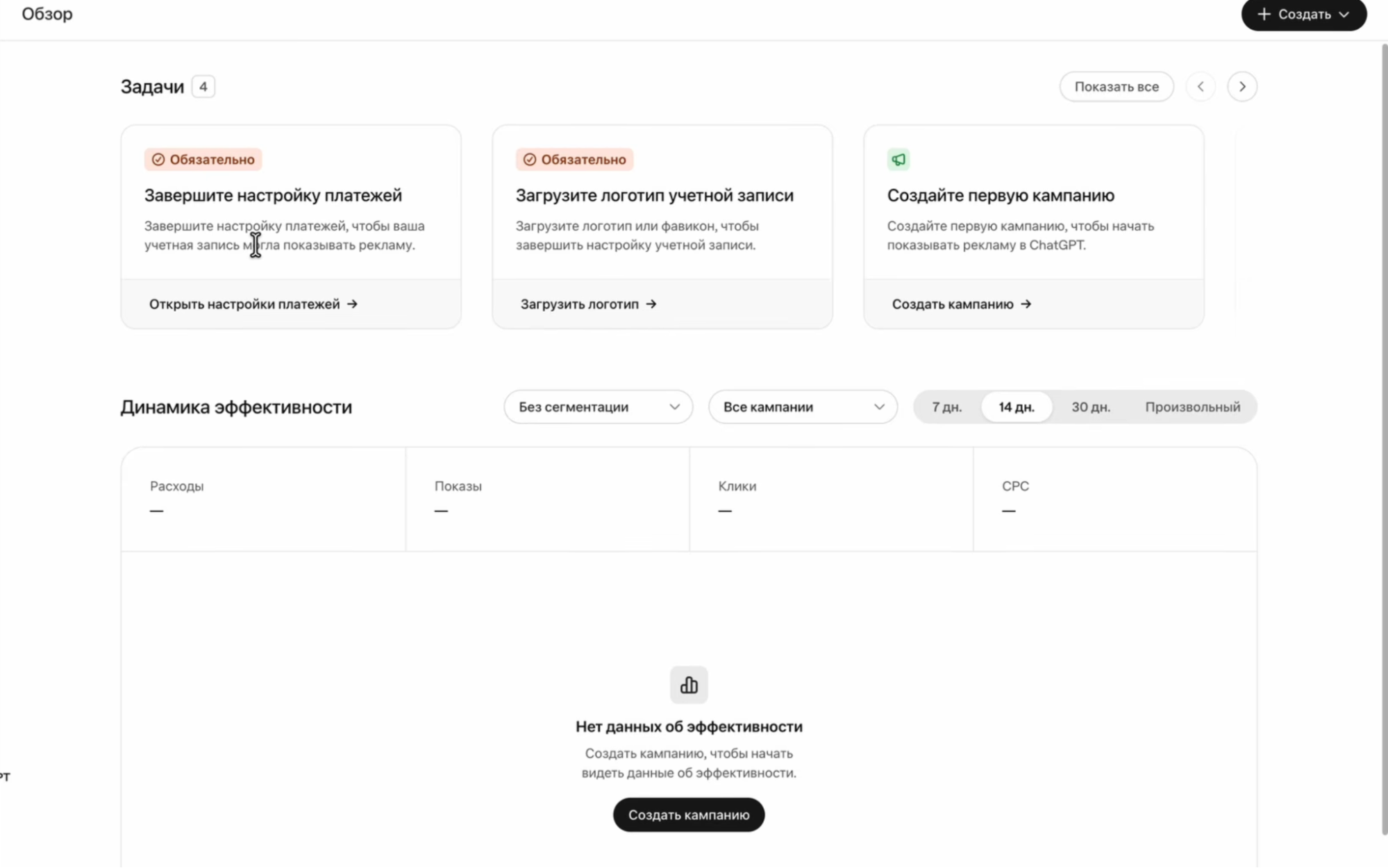
The reason is the Tasks section in the upper-right corner of the Overview page. As long as there are tasks marked Required, the campaign won't start delivering. To enable impressions, you need to complete two mandatory steps: link a card in the Billing section and upload a profile avatar or logo. Only then will the ad change to Active status.
The second point — is budget calculation. The Daily budget field sets the average daily spend, not a strict daily limit. OpenAI Ads may spend twice the specified amount in a single day.
If you set a budget of $25 per day, up to $50 may be spent in one day. However, the total weekly spend won't exceed $175 (seven times the daily budget), provided you don't manually change the settings. This is important when funding your account: if you deposit just $50 expecting to run an ad for a couple of days, the entire balance may be spent on the very first day.
Before publishing a campaign, you need to open the Advanced section — it's initially hidden in the interface. It contains two important settings:
-
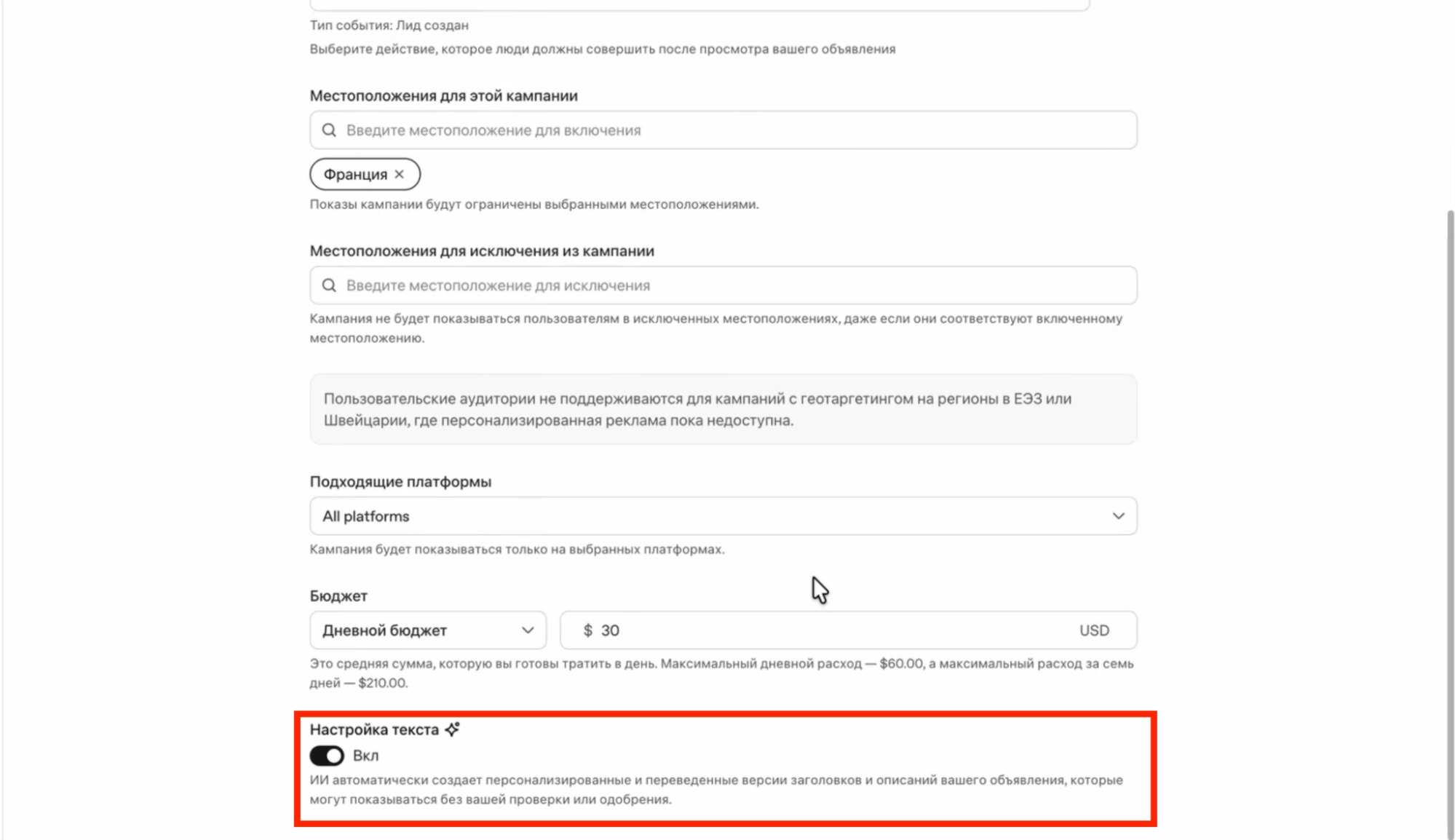
Text customization toggle. This feature is enabled by default and allows algorithms to rewrite, shorten and translate creatives without confirmation. If you leave it enabled, OpenAI Ads may turn a clickable headline into a generic, bland phrase or awkwardly translate the text into the language of the selected country. You should turn this toggle off immediately.
-
Landing page query parameters. You need to add tracker macros to this field for analytics: {campaign_id} for the campaign ID, {ad_group_id} for the ad group and {ad_id} for the specific ad.
Conversion tracking: pixel, S2S and the API key trap
The dashboard has a Tools → Conversions section for tracking results. You can use it with a standard pixel code or through server-side events (S2S).
When working with gray-hat verticals, the tracking method depends on the landing page. For example, in nutra, the pixel code must be placed strictly on the «Thank you» page after order confirmation. You can't add the script to the landing page or pre-landing page itself: OpenAI bots will detect content substitution during their checks and ban the account for cloaking.
For gambling or trading campaigns where traffic is directed to a Telegram channel, user actions are sent through server-side events (S2S) via the API. However, it's easy to make mistakes in the parameters during manual integration and lose the first conversions.
The main mistake when integrating S2S — is choosing the API token. The dashboard has two different keys. The first is located in the general profile settings (Settings → General), while the second is hidden inside Tools → Conversions behind a small key icon.
If you copy the token from the general settings and paste it into your tracker or give it to the affiliate network, postbacks won't arrive: the dashboard will simply ignore the data, and leads won't be recorded. The working key for server-side events must be taken specifically from the Conversions section.
Inside Tools → Conversions, you should also check the Identifier coverage parameter. It shows what percentage of events include user data: a hashed email address, phone number or session cookies.
If this metric stays close to zero, the algorithm can't identify who performed an action after seeing the ad, so a campaign optimized for conversions won't be able to complete its learning phase.
When analyzing results, it's important to account for reporting delays. Current-day spending and generated leads appear in the dashboard with a delay of up to 24 hours: today's ad spend is only reflected in reports tomorrow. That's why you can't evaluate cost per lead or draw conclusions about a campaign's profitability based on the first few hours of delivery.
Campaign experience: a nutra case study vs. trading traffic to a Telegram channel
Media buyers are already actively testing OpenAI Ads for driving traffic to gray-hat verticals. For example, Kirill, the author of the Telegram channel «Leads Without Fluff», gave a detailed breakdown of his experience launching nutra and trading campaigns in a video on the GoAff YouTube channel.
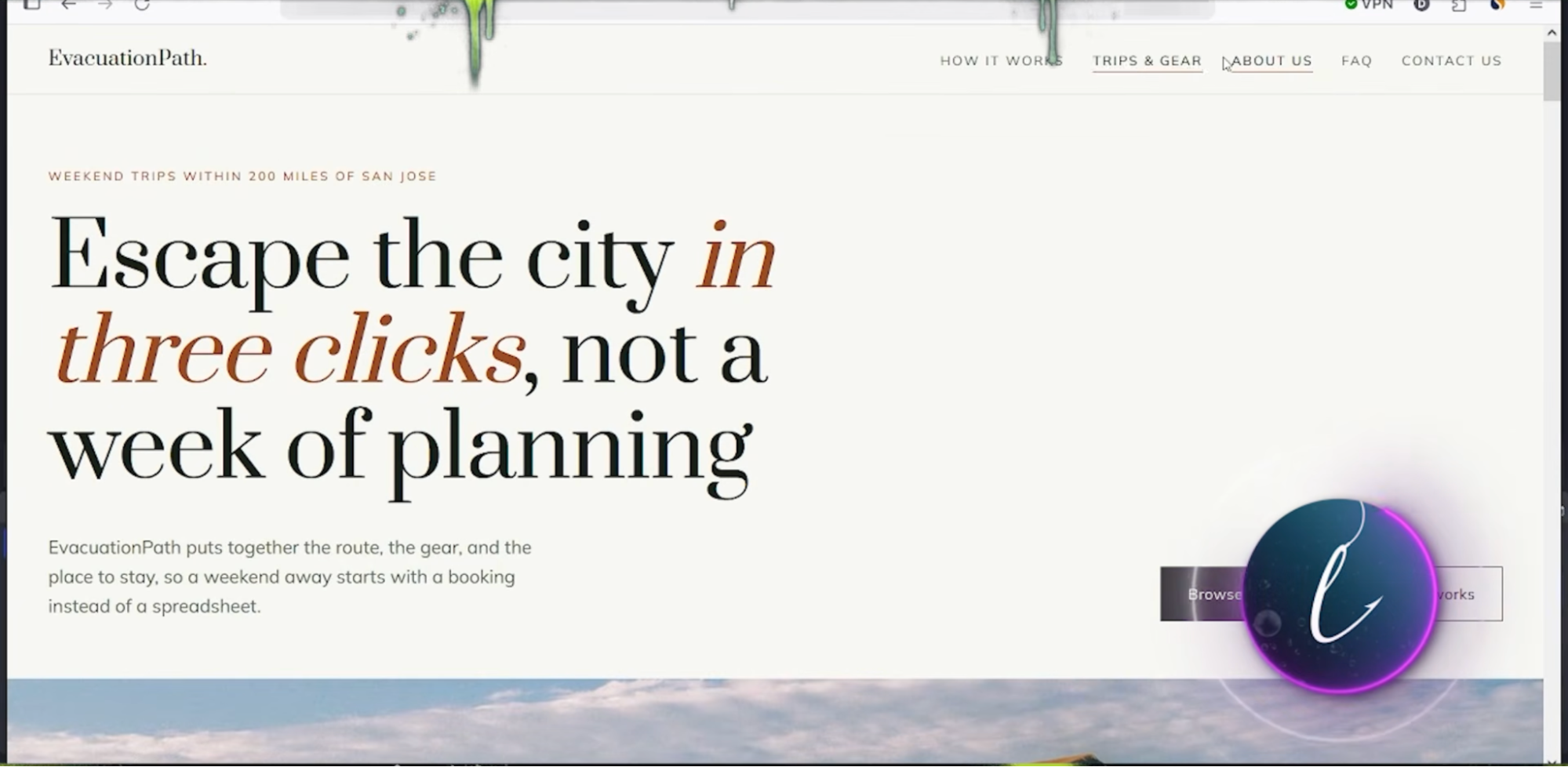
For his first test, the author launched a hair loss product in Italy — the Tricomax offer from the Traffic Light affiliate network. The campaign was primarily intended to warm up an agency account before switching to trading. To bypass a landing mismatch rejection, a White Page was generated as a travel blog, linking frequent flights with stress and hair loss. Cloaking was configured through Adspect, with the target page loaded in an iframe.
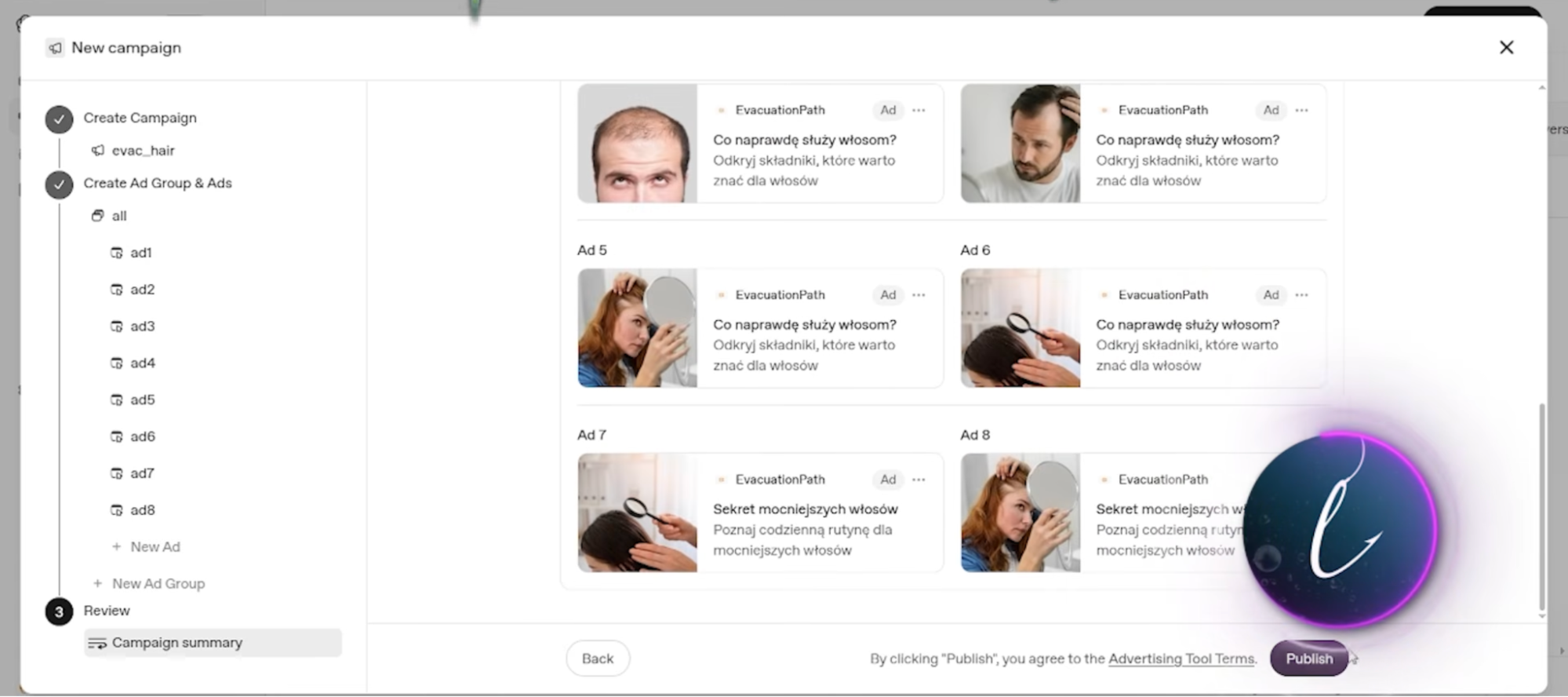
The campaign ran on a CPC model with a per-click bid and a daily budget of $25. Moderation approved a teaser creative featuring a photo of a balding man and the word «secret» in the text.
Over several days, the test consumed around $200. The result was 6 leads and 4 confirmed orders with a payout of $23 each. Revenue totaled $92, while net ROI dropped to minus 50%. The account was warmed up, but the campaign wasn't continued because the cost per lead was too high.
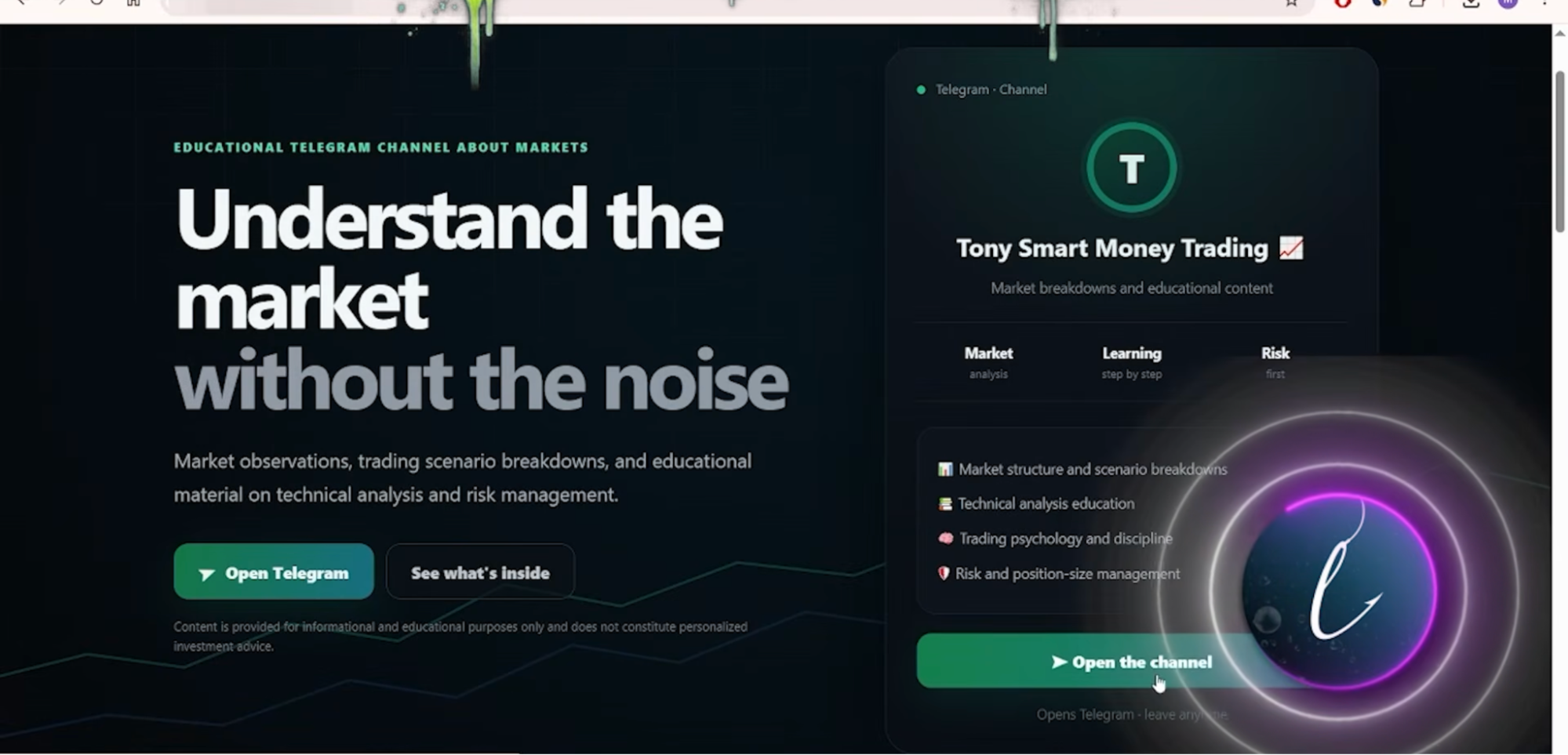
After warming up the account, the author switched to Tier-1 trading, directing users to a private Telegram channel with trading signals. A fixed payout per lead would leave almost no margin, so they agreed with the advertiser to work on a percentage of deposits (RevShare). In Tier-1 countries, the average deposit is around $400.
For the campaign setup, they prepared an intermediary page with a script that immediately opens the Telegram app on the phone. For moderation, they created a White Page featuring a story about a travel retreat for beginner traders.
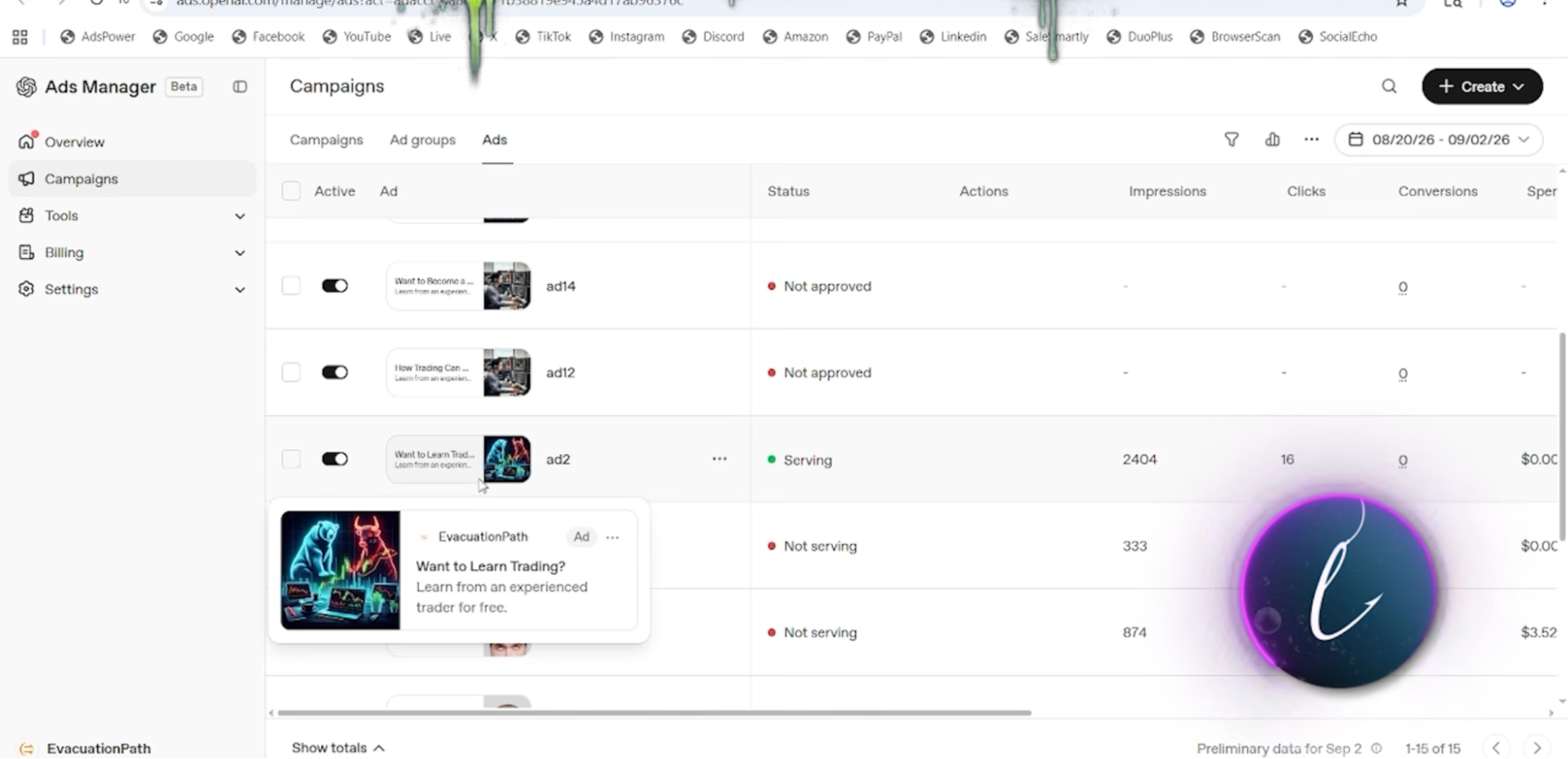
The campaign was launched in the United Kingdom (UK) with the creative «Want to Learn Trading? Learn from an experienced trader for free».
When driving traffic to the Telegram channel, user actions were tracked through server-side events (S2S) via the API. Three steps were configured: subscribing to the channel, opening a conversation with the admin and making the first deposit.
At first, the author mistakenly copied the API key from the dashboard's general settings, as we mentioned earlier, which caused some of the initial subscriptions to go unrecorded in the statistics. After replacing the token with the key from Tools → Conversions, the data started being recorded correctly.
In the campaign using pay-per-click bidding, the average cost per subscriber was $12. Once the campaign had accumulated its first conversions, the author recreated it with lead optimization, and the cost per subscriber dropped to $5–7.
Other GEOs performed worse: Telegram has low adoption in Scandinavia, while in Brazil, subscribers were inexpensive (around $3), but there were no conversions. The UK ultimately delivered the best results.
A total of around $800 was spent over 10 days. The campaign generated 95 Telegram channel subscribers, 24 conversations and 3 first deposits. Thanks to RevShare payouts, the campaign covered its advertising costs and became profitable during the initial testing stage.
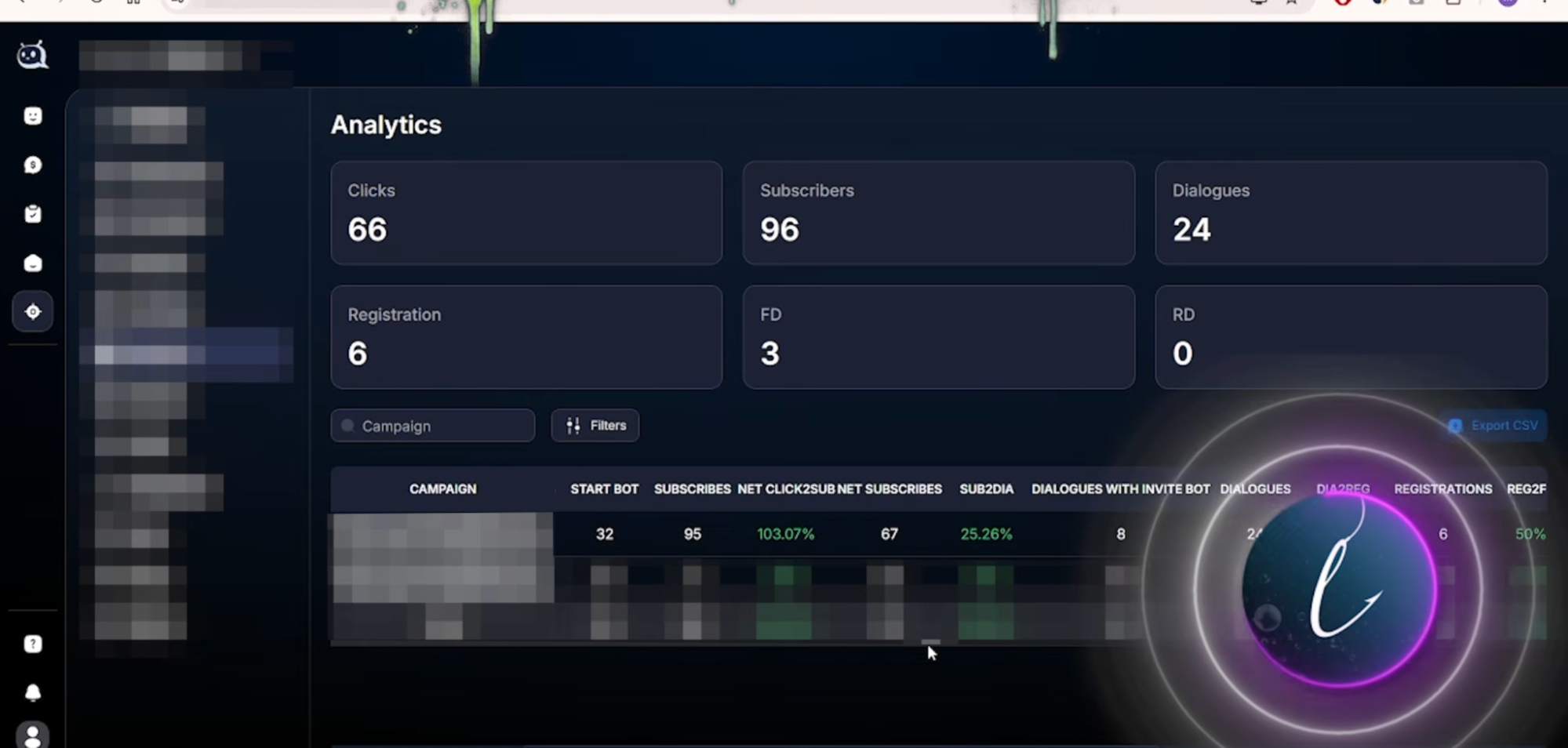
Running ChatGPT Ads campaigns on a CPC model makes little sense — clicks are expensive, and the audience isn't well targeted. A campaign setup starts working properly only when optimized for conversions, so immediately after the initial account warm-up, you need to configure S2S and switch the campaign to optimization for a specific action.
Conclusion
Right now, ChatGPT Ads offers an opportunity to buy traffic without intense competition in the ad auction. However, familiar approaches from Facebook or search advertising won't work here: the dashboard has no age targeting settings, and ad delivery is tied to the context of conversations.
For initial tests, it's more practical to use a ready-made agency profile, create a White Page on the seller's domain and test the campaign setup immediately rather than manually dealing with farming self-registered accounts and selecting bank cards that pass antifraud checks.
While the platform has only recently opened to advertisers and moderation still approves creatives through simple duplication, it's possible to generate inexpensive clicks and collect leads. The rules will almost certainly become stricter over time, so it makes sense to start testing this traffic source and different approaches now.