How to farm TikTok accounts in 2026: a complete guide
In 2026, farming TikTok accounts has become a distinct part of working with conditionally free traffic. The platform tracks multi-accounting, IP quality, device settings, and post-registration profile behavior more strictly than ever. Because of this, cheap accounts from random sellers often fail to gain reach: videos get stuck at zero views and never hit recommendations.
In this article, we broke down how to register and select TikTok accounts for driving traffic today. We covered iOS and Android configuration, choosing a registration GEO, working with proxies and virtual numbers, purchased accounts, reasons for shadowbans, and adding links to profiles.
Why farming TikTok accounts became harder in 2026
In 2026, TikTok is much stricter regarding mass account registration. The main issues arise not after launching creatives, but during the farming phase itself: a dirty IP, multiple profiles on a single device, an unsuitable GEO, or an old SIM card can instantly trigger a shadowban.
A TikTok shadowban is particularly frustrating because it isn't always visible immediately. The account opens and videos upload normally, but there are virtually no views. The video fails to hit recommendations, isn't indexed by hashtags, and gets stuck at zero even with a solid creative. Therefore, it is crucial to filter out such profiles before driving traffic.
Most often, issues arise with purchased accounts. Many sellers register batches of profiles using the exact same proxies, neglect device isolation, and sell accounts without a proper aging period. As a result, the media buyer saves money on the purchase but wastes time on profiles that will never gain reach from the start.
That is why TikTok farming now starts with technical preparation: a clean IP, properly configured GEO, a factory-reset device, and a limited number of accounts per session. If this stage is executed poorly, neither unique text modifications, hashtags, nor a high-quality creative will save the campaign.
Device setup: why it's better to start with iOS
Before farming TikTok accounts, you need to prepare the device. This is especially crucial when working with gray verticals, where any unnecessary trigger can lead to a shadowban. First and foremost, this concerns the SIM card, region, language, geolocation, and system services that might leak your real environment.
For beginners, it's best to start with an iPhone. iOS poses fewer setup challenges, and TikTok's anti-fraud system generally reacts more leniently to these devices compared to Android. The basic setup looks like this:
-
Remove the SIM card.
-
Reset network and privacy settings.
-
Change the region, system language, and time zone to match the target GEO.
-
Disable location services, Find My iPhone, iCloud Backup, Drive, and background app refresh.
-
Remove extra languages from the keyboard and dictionary.
-
Disable tracking in privacy settings.
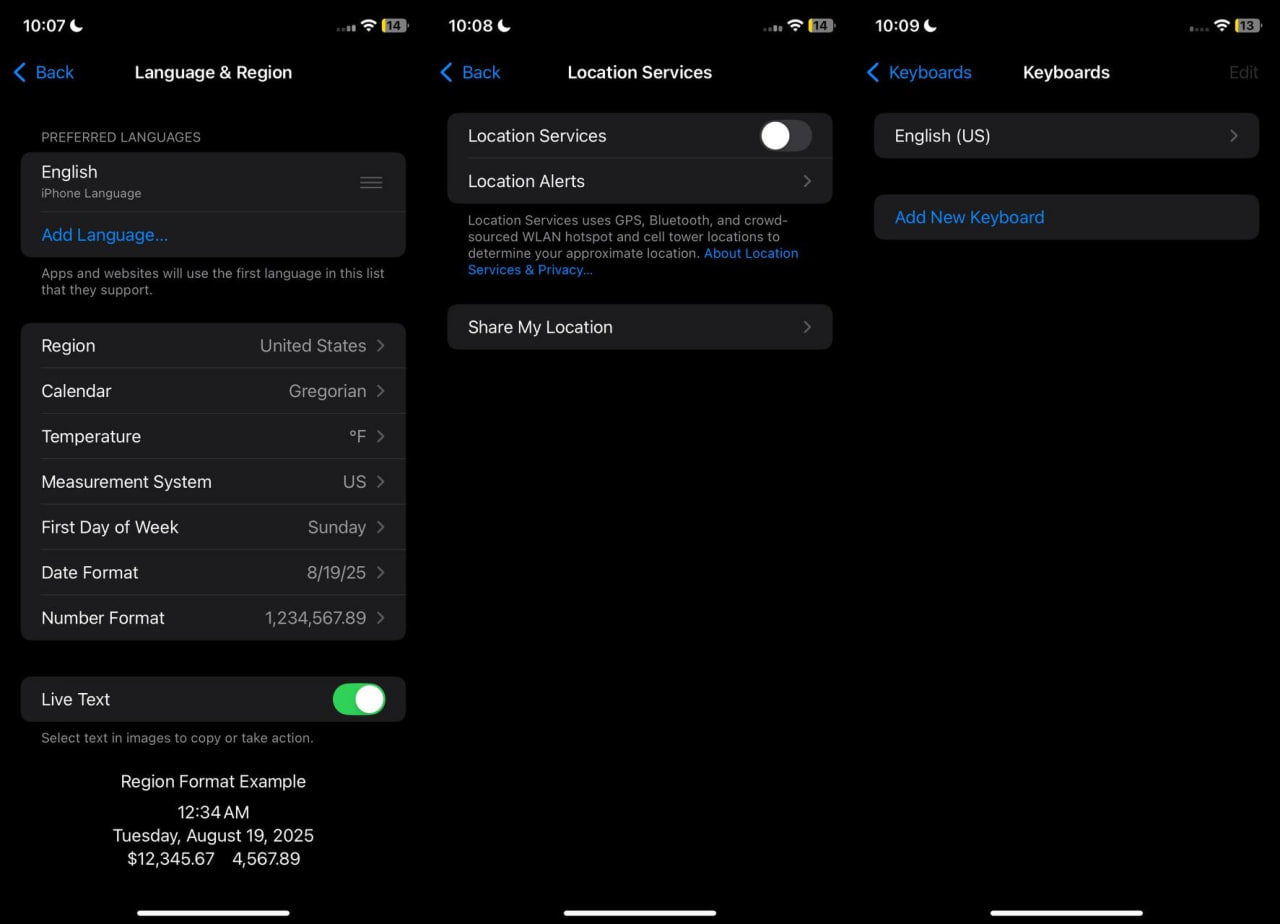
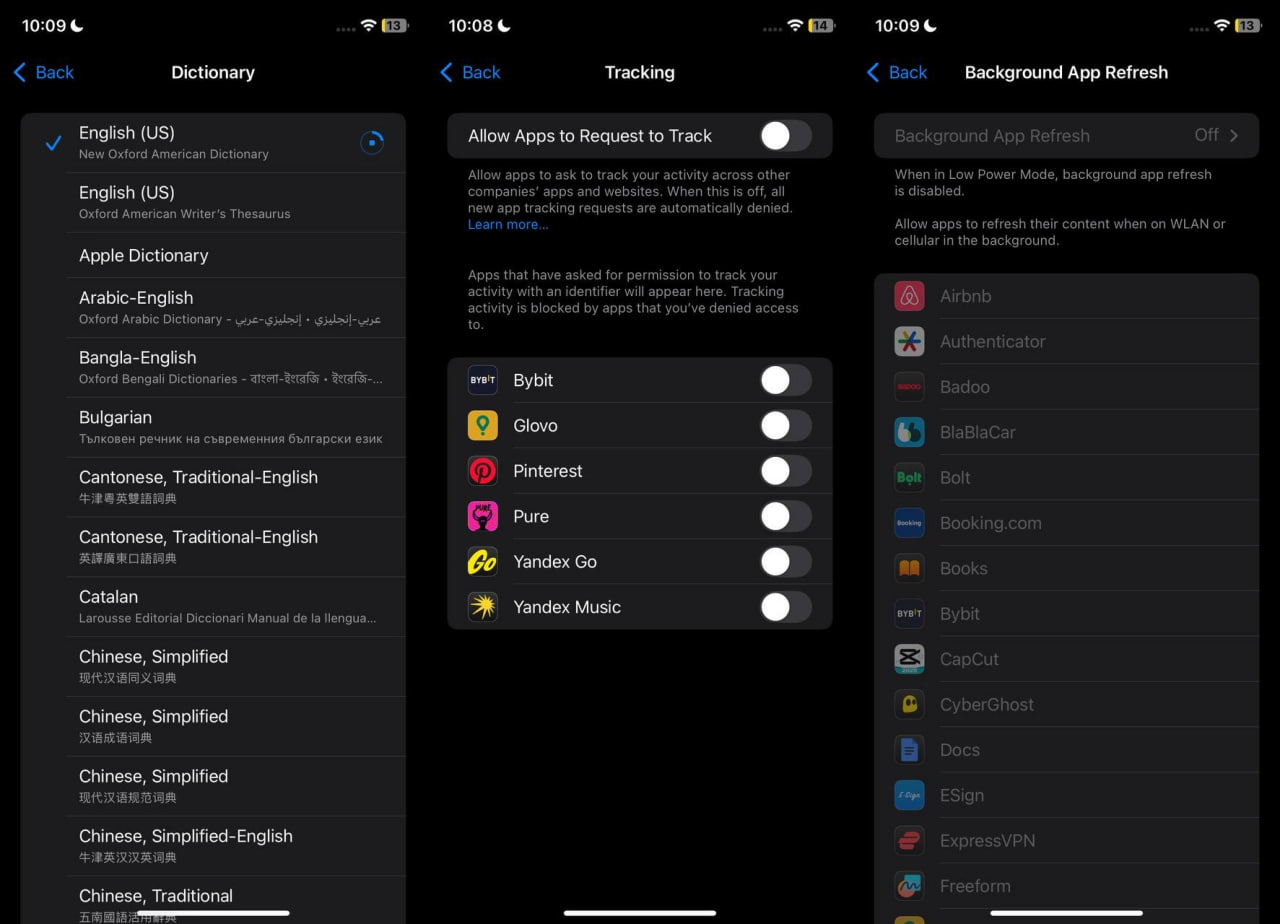
After this, you can install TikTok and proceed to account registration. It's important not to keep too many profiles in a single session. In practice, after 2–3 accounts, it's best to delete TikTok, change the IP, and reset the network settings again. If you try to register a whole batch in a row, some profiles may go straight into a shadowban.
Working with Android is more difficult. TikTok conducts deeper checks on such devices, so shadowbans and zero views occur more frequently. Before farming, it is advisable to perform a full factory reset, remove the SIM card, set the region, language, and time zone for the target country, remove the Russian keyboard, disable location services, and install the latest system update.
If the device has already been used for TikTok, a hard reset is almost mandatory—especially during algorithm updates or storms when the platform tightens its anti-fraud measures. Therefore, Android is better left to those who already understand how to quickly clean a device and troubleshoot the causes of shadowbans.
Choosing a registration GEO: how moderation shifting works
In TikTok, the strictness of moderation depends on the country the account is registered to. On Tier-1 GEOs, creatives are checked more harshly: Europe and the US ban adult, gambling, aggressive CTAs, and any hints of gray verticals much faster. In Asia, the CIS, and parts of Tier-3, moderation is usually more lenient, so accounts set up for these countries often face fewer issues.
This is exploited during farming via GEO shifting. First, the account is registered in a country with more lenient moderation, and after an aging period, the device is reconfigured for the target traffic GEO. Most often, Kazakhstan, Georgia, Bulgaria, Vietnam, or Armenia are used for registration. There is no universal solution: TikTok regularly updates its anti-fraud systems, so working countries need to be periodically tested.
The process itself looks like this: the phone is configured for the chosen GEO, a proxy from the same country is connected, and then the account is registered via email or a virtual number. After registration, the profile is left to age for at least 24 hours. Then, TikTok is deleted, network and privacy settings are reset, and the phone is reconfigured for the country where you plan to drive traffic.
It's important not to mix GEOs unnecessarily. If an account is registered to Georgia and an hour later it's accessed from a different country's IP, TikTok might lock the profile or demand a verification code. Therefore, it is better to set up accounts with direct email access from the start.
Account registration: how many profiles to make per device and IP
After configuring the device, you can move on to account registration. For farming, you will need clean proxies of the target GEO, emails or virtual numbers, and a pre-prepared phone.
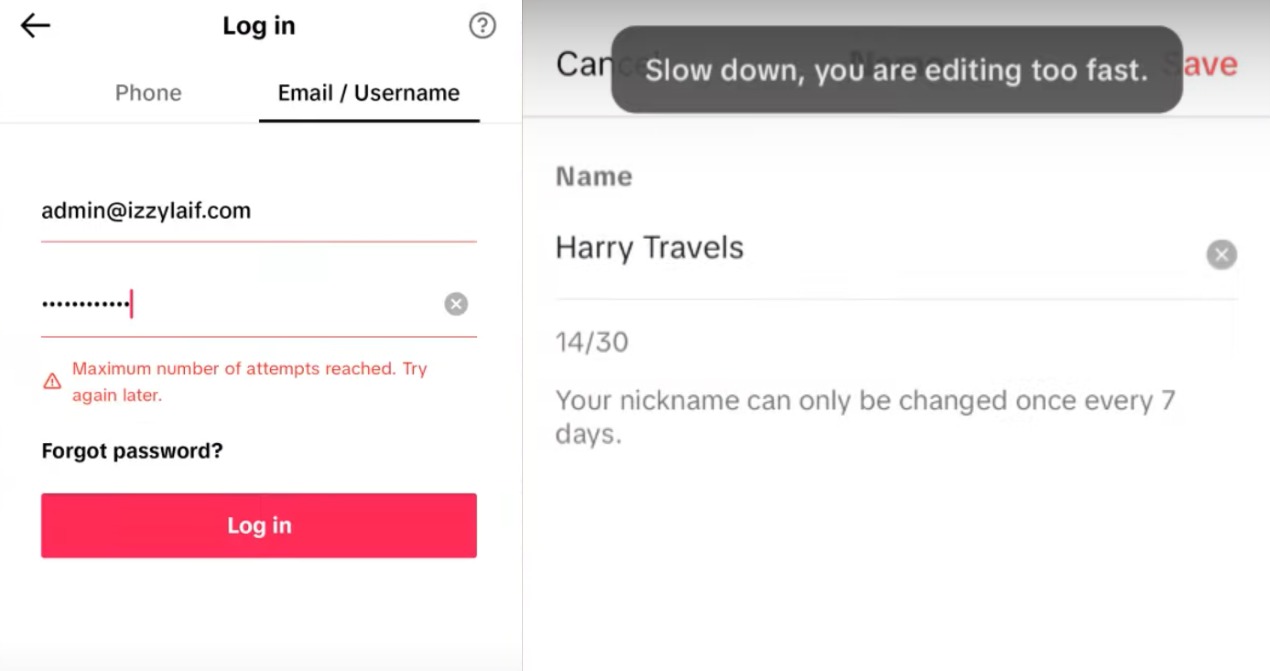
Usually, no more than 2–3 accounts are made on a single IP. After that, you need to change the external address or proxy server. If you keep registering profiles from the same IP, you might trigger a "Too many attempts" error.
The logic is the same for the device. On an iPhone, after a few registrations, it's best to delete TikTok and reset the network and privacy settings. On Android, after 5 accounts, you often have to perform a full factory reset. This takes more time, but otherwise, some profiles might enter a shadowban even before the first video upload.
During registration, do not fill out the profile completely right away. It's better to change the nickname, avatar, and bio carefully, avoiding sudden actions. If TikTok displays a "Slow Down" error while editing the profile, the issue is usually due to a poor registration IP. It's easier to set such an account aside than to keep trying to work with it.
After registration, accounts are allowed to age for at least 24 hours. Warming up an account in TikTok doesn't play as significant a role as it does in Instagram or YouTube, so there's no sense in spending weeks watching the feed and leaving likes. It is far more important that the account was registered within a clean environment and didn't catch a shadowban at the start.
Link in bio: which accounts are suitable for driving traffic
A clickable link in TikTok doesn't appear on all accounts. Therefore, when farming, it's vital to check in advance whether the selected GEO provides a website field after switching to a Business Account.
The easiest way to add a link is to switch the account to business mode. After registration, you need to choose a category, verify the email or number, and see if the website field has appeared. In certain GEOs, this is enough: the link is added instantly and remains saved after restarting the app.
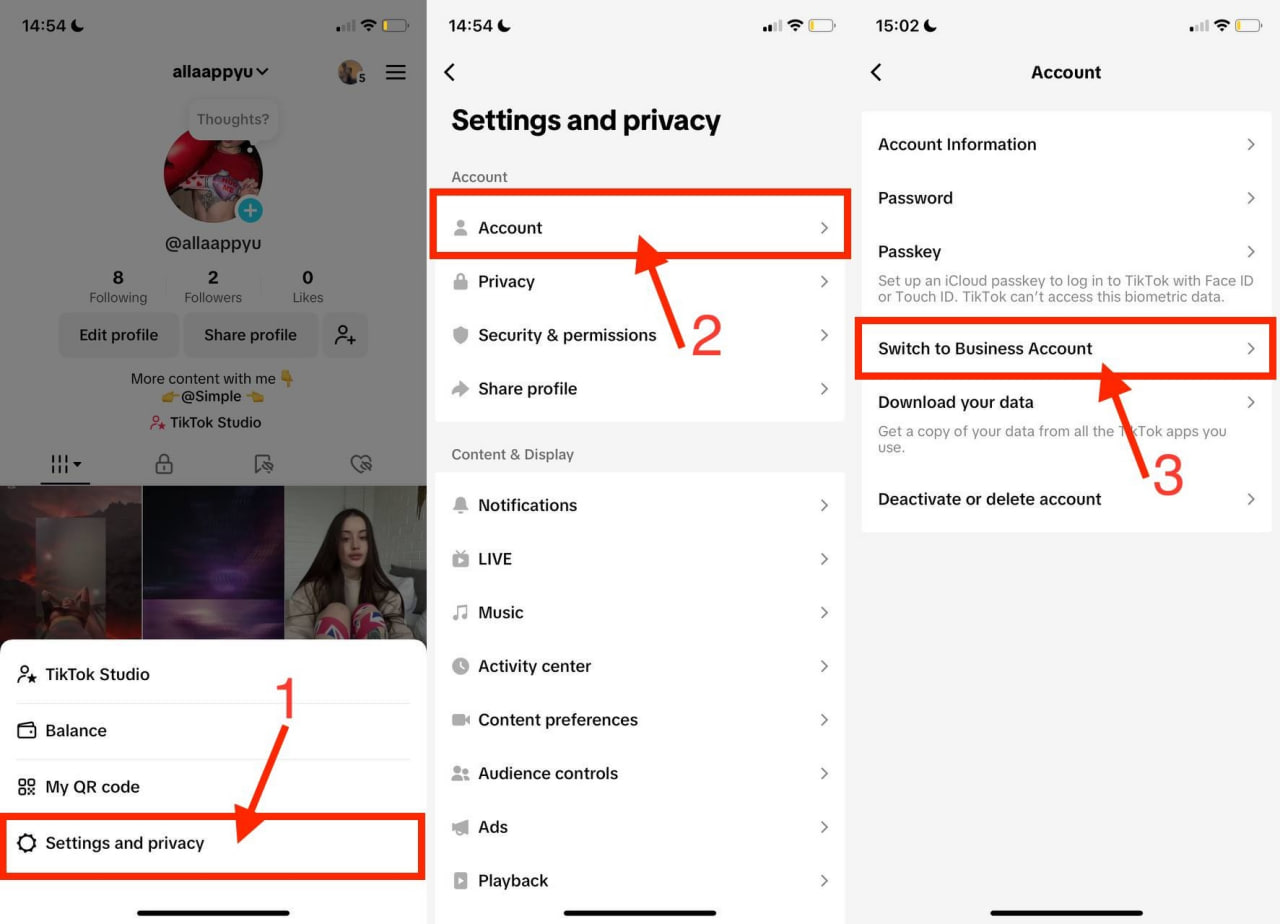
However, this method works poorly for the USA and Canada. TikTok frequently requests business documentation, and without it, the website link cannot be added. Therefore, these countries are inconvenient for mass farming if the accounts are needed specifically for driving traffic elsewhere.
It is easier to test GEOs where business mode still provides a link without requiring documents. Most often, webmasters use Kazakhstan, Georgia, Bulgaria, Armenia, and Vietnam. Separately, media buyers test Scandinavia: Norway, Sweden, and Denmark.
When registering, it is crucial not to jump between countries. If an account is being set up for Kazakhstan, then the IP, device region, and phone number should all remain configured for Kazakhstan. When a profile is registered in one GEO and then immediately logged into from a different IP to switch to business mode, TikTok is more likely to request additional verification or refuse to save the link.
After registration, you shouldn't immediately load the account with creatives. First, verify the ability to add a link: switch the profile to a Business Account, insert the website, restart the app, and check if the link remains in the profile. If the field doesn't appear or the website fails to save, such an account is unsuitable for driving traffic.
Conclusion
In 2026, the quality of registration is the most important factor when farming TikTok accounts. Before creating a profile, you must prepare the device, remove the SIM card, set the required region, pick a clean IP, and avoid registering too many accounts in a single session. A long warmup process will not compensate for mistakes made at this stage.
After registration, the account is tested with a standard video free of links, calls to action, or controversial topics. If the video gains views from recommendations, the profile can be used for driving traffic.