Is it even necessary to warm up a FanPage before running ads? Some media buyers are convinced that launching without a warm-up is a bad idea. Others routinely create a FanPage and jump straight to advertising.
There is no universal answer here. Much depends on the account, the vertical, and the team's workflow. However, there are standard steps most buyers follow almost every time: design the page, publish the initial posts, let the FanPage "age" briefly, and only then launch the ad campaign.
Let's break down how FanPages are warmed up today, how long it typically takes, what steps are genuinely worth taking before launching, and which advice has long turned into affiliate marketing myths.
Why Warm Up a FanPage Before Running Ads
Warming up is most commonly used when working with newly registered accounts (autoregs) and grey-hat verticals, where any minor red flag can trigger a ban. If the profile, ad account, domain, and FanPage were created almost simultaneously, the trust level of such a setup is naturally low.
Warming up alone will not shield you from bans. Moderation outcomes are influenced by the account, ad account, creative asset, and domain. However, a blank FanPage created minutes before launching an ad can serve as an additional trigger for manual inspection.
In short: warming up is one phase of campaign preparation. It does not guarantee successful moderation, but it helps minimize unnecessary risks before the ad campaign goes live.
Do Not Confuse Account Warm-up with FanPage Warm-up
Before moving on to creating a FanPage, one crucial point needs clarification. Beginners often confuse warming up a FanPage with warming up the main Facebook account, even though these are distinct processes.
This article focuses specifically on warming up a FanPage. We will proceed under the assumption that your ad account and Facebook profile are already prepped and ready for operation, allowing us to focus directly on page creation and preparation.
Which to Choose: Create a FanPage or Buy a Pre-warmed One
Prior to launching ads, you have two options: create a FanPage from scratch or purchase a pre-warmed one.
If you build a FanPage yourself, you must complete every preparation stage. This involves creating the page, designing it, publishing several posts, letting it age slightly, running a warm-up campaign, and only then moving to live ads. All of this requires time.
A ready-made FanPage eliminates most of this workload. Instead of spending time on prep work, you can proceed directly to setting up ads and launching your campaign. For this reason, many buyers prefer purchasing prepped pages.
When purchasing a ready-made FanPage, pay attention not only to the page's age but also to its type. This determines which tasks it is best suited for.
Three main options are predominantly available on the market:
-
NFP (New Pages Experience) — modern format pages that operate under Facebook's updated interface model. These are the most common FanPages today, making them the easiest starting point for beginners.
-
PZRD FanPages — FanPages that have already passed an identity check or review following advertising restrictions. These pages command higher prices because they possess a history of ad activity and are generally regarded as higher trust.
-
King (Aged) FanPages — older pages created several years ago with a long-standing history on Facebook. They typically cost more than other options, but many media buyers select them for managing large ad spends or running complex verticals.
Which option to choose depends on your objectives, budget, and launching methodology. For initial runs, a standard new FanPage is usually sufficient, whereas for scaling or running high ad spends, many teams prefer aged pages.
If you decide to create a FanPage manually, below is a step-by-step breakdown of the prep process — from creation to warming it up before launch.
How to Create and Prepare a FanPage for Warm-up
Before warming up, the page must be created, customized, and populated with initial posts.
Creating a FanPage
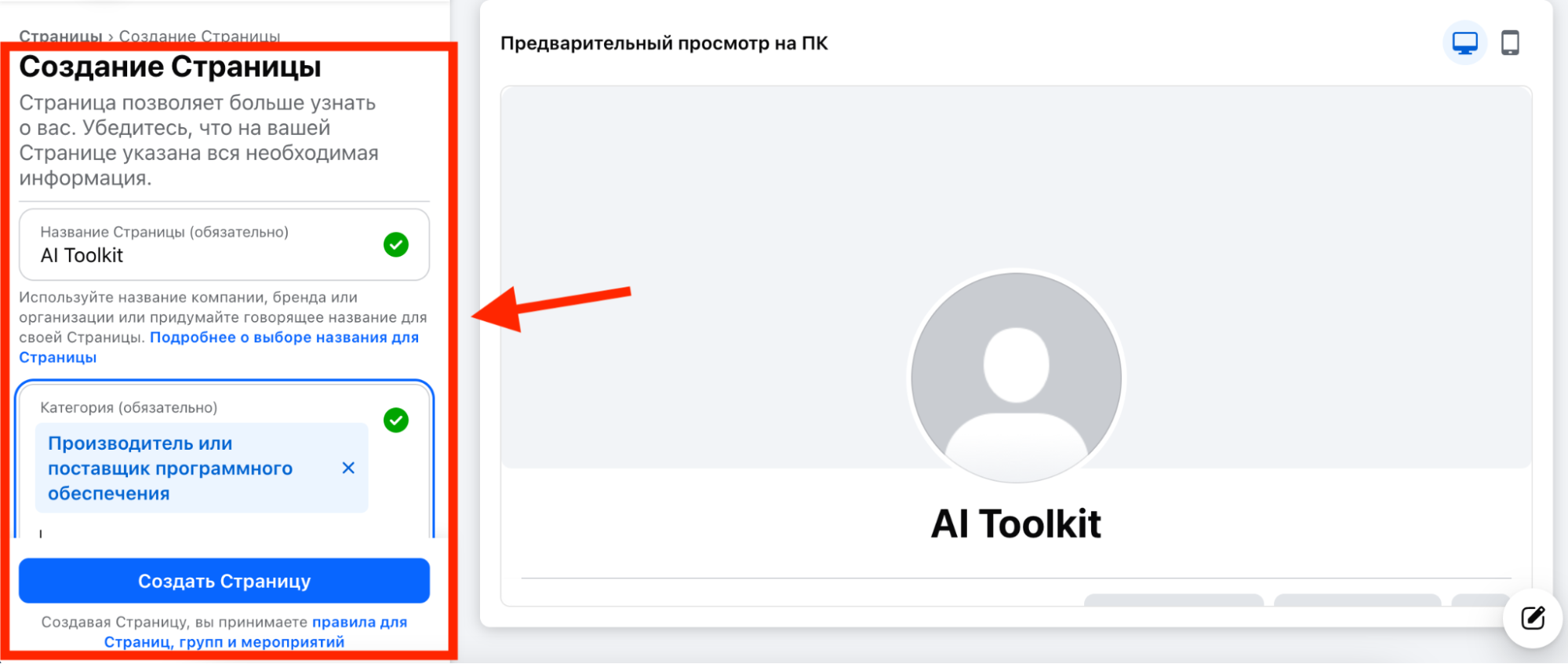
Navigate to the "Pages" section in your Facebook account, click "Create New Page", and fill in the primary fields:
-
Page name;
-
Category;
-
Bio / Short description.
Select a name that aligns with the topic of your upcoming FanPage. As an example, let's create a page called AI Toolkit — a small project focused on artificial intelligence tools.
For the category, we'll choose "Software Company". This fits well for a page that will eventually promote an AI service or digital product.
Designing the FanPage
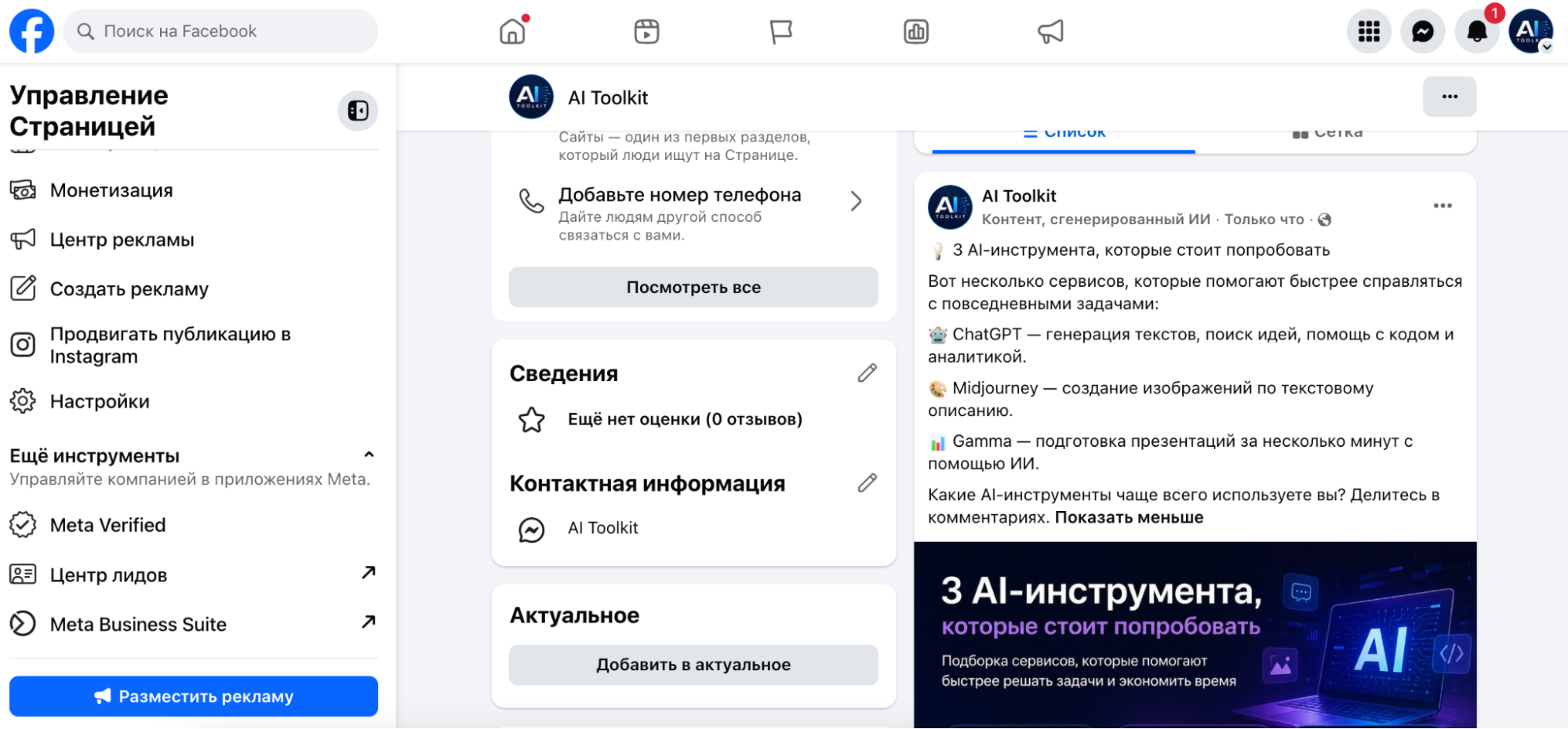
Once the page is created, upload a profile avatar, cover photo, and complete the short description. A fully designed FanPage looks natural and inspires more trust than a blank page lacking images or info.

After populating the core information, the FanPage will look like a legitimate page. At this point, basic design is complete — you can proceed to the actual warm-up phase.
Publishing Initial Posts
Prior to launching ads, publish 3–5 posts related to the page's niche.
For AI Toolkit, these could include:
-
Neural network reviews;
-
Curated lists of useful AI tools;
-
Workplace automation tips;
-
Artificial intelligence industry news.
Avoid dumping all content at once. It is better to space posts out over a few days: for instance, publish one or two posts on day one, and add the rest over the following two days.
Once the FanPage is styled and contains initial content, you can advance to the next step — warming up the page directly before running ads.
Manual vs. Automated Warm-up: Which to Choose
If you are new to working with Facebook, warming up a FanPage manually is simpler. Creating a page, designing it, making a few posts, and launching a small boost campaign does not take much time.
The scenario changes when managing dozens or hundreds of FanPages simultaneously. In this case, manual prep becomes excessively time-consuming, leading many teams to use specialized software for bulk automation. Such tools automatically upload avatars, cover photos, posts, and populate fields with minimal buyer intervention.
In these workflows, media buyers typically use tools like Dolphin, FB Tool, or NPPR TEAM to bulk-upload posts, avatars, covers, and other data across multiple FanPages at once.
How to Warm Up a FanPage Before Launching Ads
Once your FanPage is designed and populated with initial posts, you can begin the warm-up process.
-
Launch an initial post boost. Do not start with your main conversion campaign right away. Select one of your published posts and launch a boost set to the "Engagement" objective or via standard post promotion.
-
Use a modest budget. A budget of around $5–7 per day is sufficient for warming up. Keep the campaign active for 2–3 days. During this window, the page will gain impressions, post engagements, and initial user activity.
-
Targeting location (GEO). If your main campaign targets a specific country, it is best to use that same GEO for the warm-up run.
-
Optionally run a white-hat offer. Instead of boosting a post, you can run an ad for a white-hat offer fully compliant with Meta policies. This method also works well to warm up a FanPage prior to your main traffic launch.
How to Prevent Page Restrictions During Transfer
If a FanPage was created or warmed up on one account but will be used for advertising by another, avoid instantly changing the page ownership. For Facebook, a sudden admin swap can look suspicious.
It is safer to first grant administrative access to the new account via Business Manager or assign it an admin role, keeping both accounts on the page for at least 24 hours. After a short cool-down period, the original account can be safely removed from the admin list.
This tactic is widely used by media buying teams to avoid unnecessary restrictions when transferring prepared FanPages.
Pre-Launch Checklist
Before launching your primary campaign, confirm that the FanPage is completely ready for operation.
-
Add a Call to Action (CTA) button if required by your offer setup.
-
If driving traffic to a website, link it in the page's About section.
-
Add the FanPage to your Business Manager. This makes managing the page far easier, particularly when multiple team members work on the campaigns.
With these steps completed, your FanPage is ready for your main ad campaign launch.
Conclusion
There is no single universal warm-up blueprint, and every team eventually refines its own workflow over time. However, core principles remain consistent: avoid launching ads from a blank FanPage, customize it beforehand, add content, and only then proceed to running traffic.
The rest comes with practice. After a few launches, you will determine exactly how much warm-up time your FanPages require and which actions yield tangible results.