When running ads on Facebook, Google or TikTok, moderation often rejects ads before they receive their first impressions. Platform rules are regularly updated, and campaigns can be blocked even when promoting white-hat products.
And if you work with gray verticals such as nutra, gambling, crypto or dating, passing moderation with a direct link to the offer is practically impossible: the account will immediately get banned.
To launch such offers and give campaigns a chance to spend their budgets, affiliate marketers use cloaking. The method works by separating incoming traffic: moderators and verification bots are shown a neutral website that fully complies with the platform's rules, while targeted users are directed to the actual landing page with the offer.
In this article, we will explain how cloaking works: which parameters a tracker uses to distinguish bots from real people, how to prepare a White Page and how to set up traffic distribution in Keitaro step by step.
What cloaking is in simple terms
Cloaking — is a page substitution technique in which different visitors see completely different content when opening the same link from an ad.
To understand the logic, let's look at how ad reviews work on platforms such as Facebook or Google. When you launch a campaign, the platform does not immediately start showing ads to real people.
First, the advertising network's bots visit the link. If the algorithm has doubts or the ad receives complaints, human moderators get involved. Their task is simple: open the website, scan the text and images, and check whether the page violates advertising policies.
If you promote white-hat products, such as phone cases or sneakers, there are no problems: the moderator sees an online store and approves the ad.
But if you launch gray verticals such as nutra, gambling or adult, a direct link to the offer will inevitably result in the ad account being banned before impressions even begin. No major platform will approve a landing page promising to cure high blood pressure in three days or a page featuring roulette and a first-deposit bonus.
This is where cloaking comes in. Instead of linking directly to the landing page, traffic passes through a tracker filter and is split between two separate landing pages.
White Page (white page or white)
This is a neutral website created exclusively for moderation and verification bots. It contains no prohibited keywords, aggressive promises or questionable order forms.
The main requirement: the White Page must logically continue the topic of the ad so that reviewers do not notice inconsistencies in the content.
If you plan to run nutra traffic, for example, for a hypertension product, the White Page should be designed as a healthy lifestyle blog: with articles about sleep management, herbal tea recipes and light exercise.
The moderator follows the link, sees ordinary useful advice, finds no violations and approves the ad for delivery.
Black Page (target page or black)
This is the landing page with the actual offer, where potential buyers should be directed. This page contains the order form for those blood pressure capsules, casino registration or deposit options.
If you submit a link to such a landing page directly in the advertising dashboard, the ad will be immediately rejected and the account banned. That is why the Black Page is shown only to real users who click on ads in their feeds.
TDS and tracker filters
Between the ad link and these two websites is a tracker with a built-in traffic distribution system (TDS, Traffic Distribution System). At the moment of the click, the system instantly analyzes the visitor's digital footprint: country, IP address, device type, browser and the presence of suspicious proxies.
If the tracker detects that the visit comes from Facebook or Google servers or a suspicious data center, it sends the visitor to the White Page. If the parameters fully match those of a real smartphone user from the target country, the system redirects them to the actual landing page with the offer.
As a result, the campaign successfully passes moderation and starts running in the feed, while the target audience reaches the sales page and submits leads.
How trackers distinguish bots from real people
When a user or bot clicks an ad in the feed, the tracker captures the visit before the page even loads on the screen. At that moment, the system reads the technical parameters of the visit and decides which website to display.
To separate moderation checks from the target audience, filtering is configured using several main parameters.
IP addresses and data center subnets. This is the main filtering criterion. Verification bots from Meta, Google or TikTok do not access websites from ordinary user devices. They run directly on servers in major data centers such as Amazon AWS, Microsoft Azure or Google Cloud.
Many cloaking services have built-in databases of IP addresses belonging to these server pools. If the tracker detects a visit from an Amazon data center or Facebook servers in Dublin, it identifies the click as a bot and opens the White Page.
A real person accesses the internet through a mobile network or home Wi-Fi from a local provider — these IP addresses are classified as residential or consumer IPs, so the tracker allows the click through to the actual landing page.
User-Agent and device parameters. User-Agent is a technical string that a device sends to a website when visiting it. It indicates which operating system is installed on the phone, which browser version is being used and the screen resolution.
Advertising network bots often scan websites without even opening a graphical browser window: specialized software simply requests the page code in the background to check it for prohibited words.
In such cases, the software either explicitly identifies itself as a bot in the User-Agent string or produces inconsistent parameters. For example, the string indicates that the website is being opened in mobile Safari on an iPhone, but the system detects a graphics card and processor from a regular desktop computer. When such inconsistencies appear in the device parameters, the tracker sends the click to the White Page.
Country of origin. Suppose a campaign is targeted strictly at Spain. A real buyer clicks the ad from Madrid: they have a Spanish IP address, local time zone and Spanish browser language.
Platform moderators and bots often access the website from completely different locations: US data centers, offices in Ireland or hubs in India. If only Spain is allowed in the tracker settings, any visit from the US or another country is immediately redirected to the White Page.
Use of VPNs and proxies. When reviewing ads, human moderators access websites while posing as ordinary residents of the target country using VPNs or proxies.
Trackers can identify the connection type and easily distinguish mobile internet or home Wi-Fi from VPNs or server proxies. If a click comes through an anonymizer, the tracker does not allow it to reach the landing page and instead displays the prepared White Page.
Browser language. Every browser transmits its system interface language in its settings. If a campaign targets Spain, a local user will have Spanish (es) as the first language in the list.
When a visit appears to come from a Spanish IP address but the browser's system language is set only to English (en-US), the tracker detects this inconsistency and redirects the user to the White Page.
HTTP Referer. The referrer indicates which page a person came from. If a user clicks an ad inside the Facebook or Instagram app, the referrer always contains the social network's address.
Moderation bots often check links directly from their internal systems without clicking the ad in the feed. If the referrer field is empty or contains a third-party address, the tracker immediately sends that visit to the White Page.
Click parameters (Click ID). When an ad is clicked, the advertising network automatically adds a unique parameter to the link: for example, fbclid for Facebook or gclid for Google.
If a bot opens a direct link to the website without this parameter, the tracker understands that no ad click occurred in the feed and redirects the visit to the White Page.
Preparing a White Page to pass moderation
A White Page serves one specific purpose: to pass moderation and allow the campaign to start running in the feed without problems. If you make a mistake in the website structure or choose an irrelevant topic, the ad will be rejected during the initial review.
Main requirements for a White Page
To prevent the page from raising questions among platform moderators and bots, four rules are considered when preparing it.
1. Relevance to the creative
The website must logically continue the message of the ad. If a weight-loss product is being promoted, the White Page is designed as a fitness trainer's website with basic workout programs, daily calorie intake calculations and hydration advice.
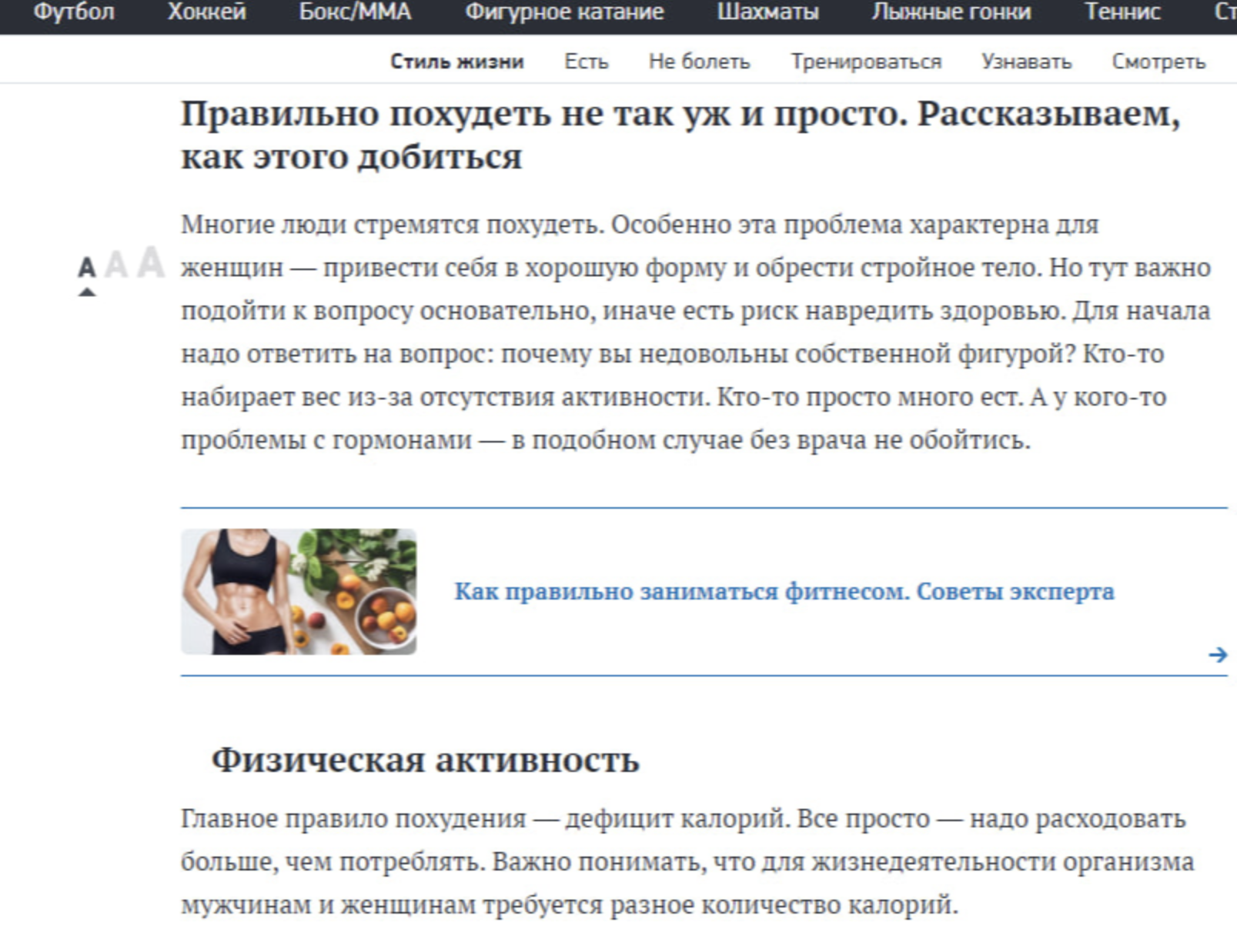
If the creative discusses weight loss but the link opens an auto parts store or an apartment rental website, moderation will immediately reject the ad for a category mismatch and misleading content.
2. Clean content without prohibited keywords
The text on the White Page is kept neutral: no promises of instant results, guaranteed cures, fake doctor reviews or discount countdown timers. Any aggressive wording immediately triggers the platform's filters, so the website is designed as an ordinary informational resource.
3. Legal pages in the footer
Moderators pay attention to mandatory legal pages. The website footer must include:
-
Privacy Policy;
-
Terms of Service;
-
Contact Us (contact details with an address and contact form);
-
Disclaimer.
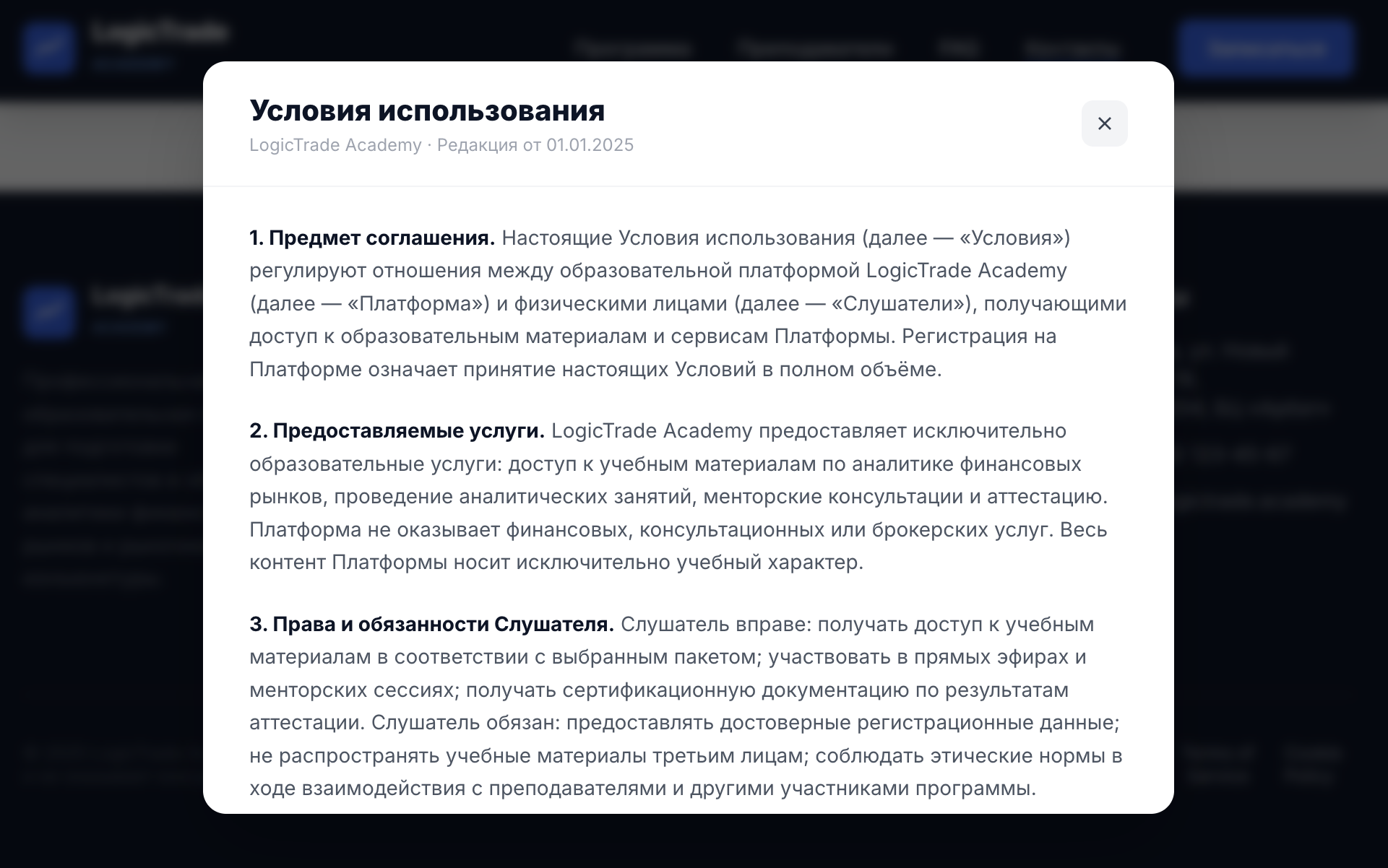
If a moderator sees a single-page website without legal sections and contact details, trust in that domain immediately decreases.
4. Loading speed and mobile-friendly layout
Most traffic comes from smartphones, so the White Page must display correctly on all screen sizes and load quickly over mobile internet. If the website takes more than a few seconds to load or its layout breaks, it is easier for the platform to reject the ad for technical reasons.
Where to get a White Page
Depending on the volume of campaigns and preparation time, three main methods are used:
-
Generation using AI tools. The fastest option for testing. With ChatGPT, for example, you can build the basic structure of a single-page website in HTML and CSS with neutral text in the required language in just a few minutes, add basic legal pages and upload the files to hosting. By the way, we recently published a guide on our blog showing how to create White Pages for Facebook using Claude in 5 minutes — we recommend checking it out.
-
Downloading other websites. Using tools such as Cyotek WebCopy or scrapers, you can find ready-made neutral blogs in the search results of the target country, download them completely and remove third-party scripts, tracking pixels and external links from the code.
-
WordPress websites. A reliable option for long-term use. Install regular WordPress on a clean domain, choose a neutral template for a cooking, gardening or sports blog, and publish 5-10 relevant articles. Such websites have the highest level of trust among moderators because they look like complete, active resources.
Setting up cloaking in Keitaro for nutra: step-by-step guide
Before creating filtering flows, you need to prepare the tracker itself, connect the affiliate network and add an offer. Without properly connecting these elements, you will not see lead statuses, and moderators will be able to detect the cloaking.
Step 1. Basic bot filtering setup
By default, some built-in databases are disabled after installing Keitaro. To prevent the tracker from allowing moderation bots to reach the landing page with the offer, these settings must be enabled.
In the left menu, go to Settings, select the Bots tab and enable all the main tracking toggles.
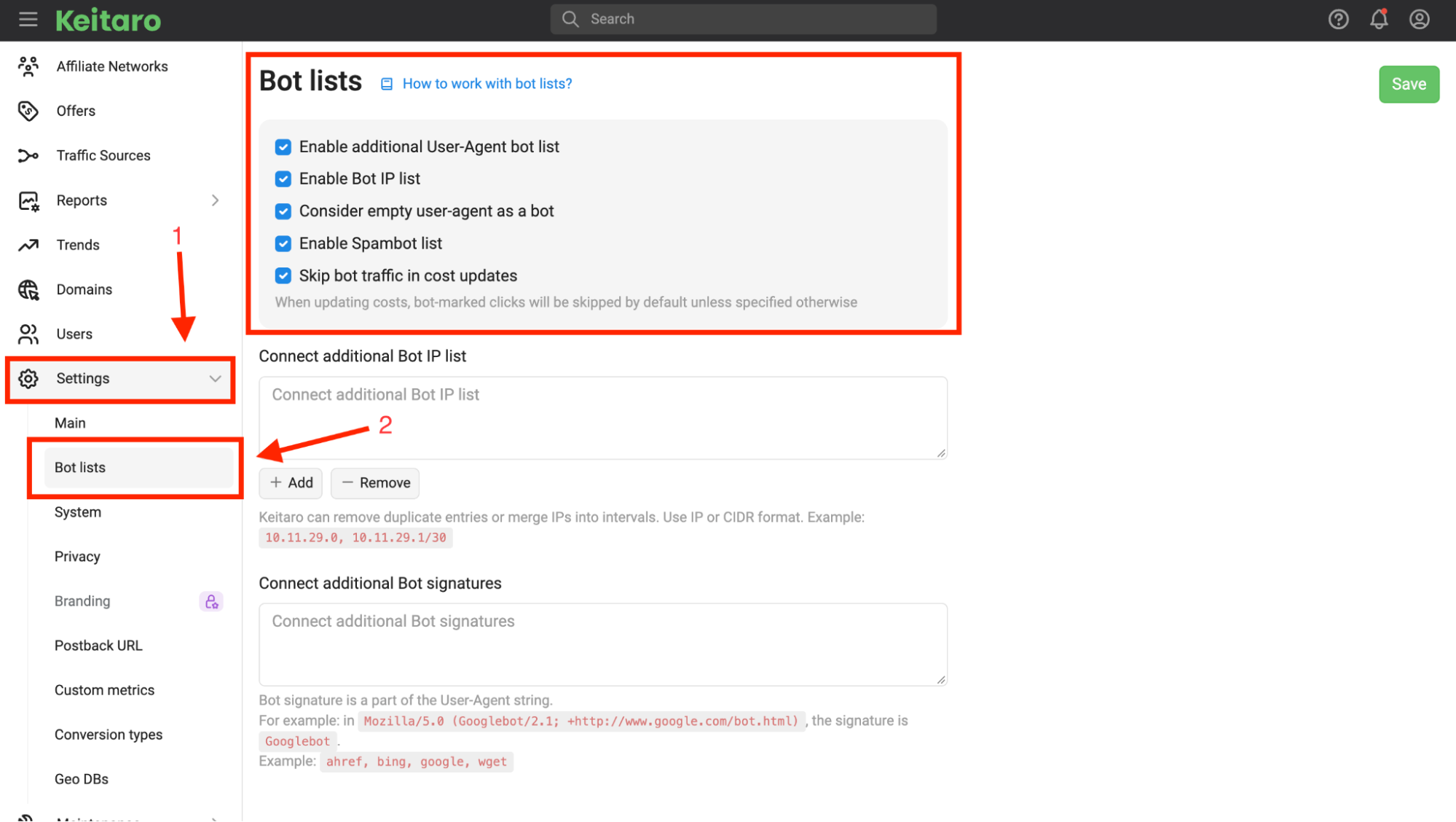
Keitaro has its own built-in bot databases, but you should not rely on them alone: advertising networks regularly update their server subnets, and standard lists do not always keep up with these changes. To strengthen protection, up-to-date IP address ranges are manually added to the tracker.
Most affiliate marketers use the public repository lord-alfred/ipranges, where the author regularly updates IP range lists for Facebook, Google Ads, TikTok and other networks' verification systems.
Go to the repository, select the required platform, copy the address list and return to Keitaro.
In the same Bot lists tab, find the Connect additional Bot IP list section, paste the copied ranges into the field and click the + Add button.
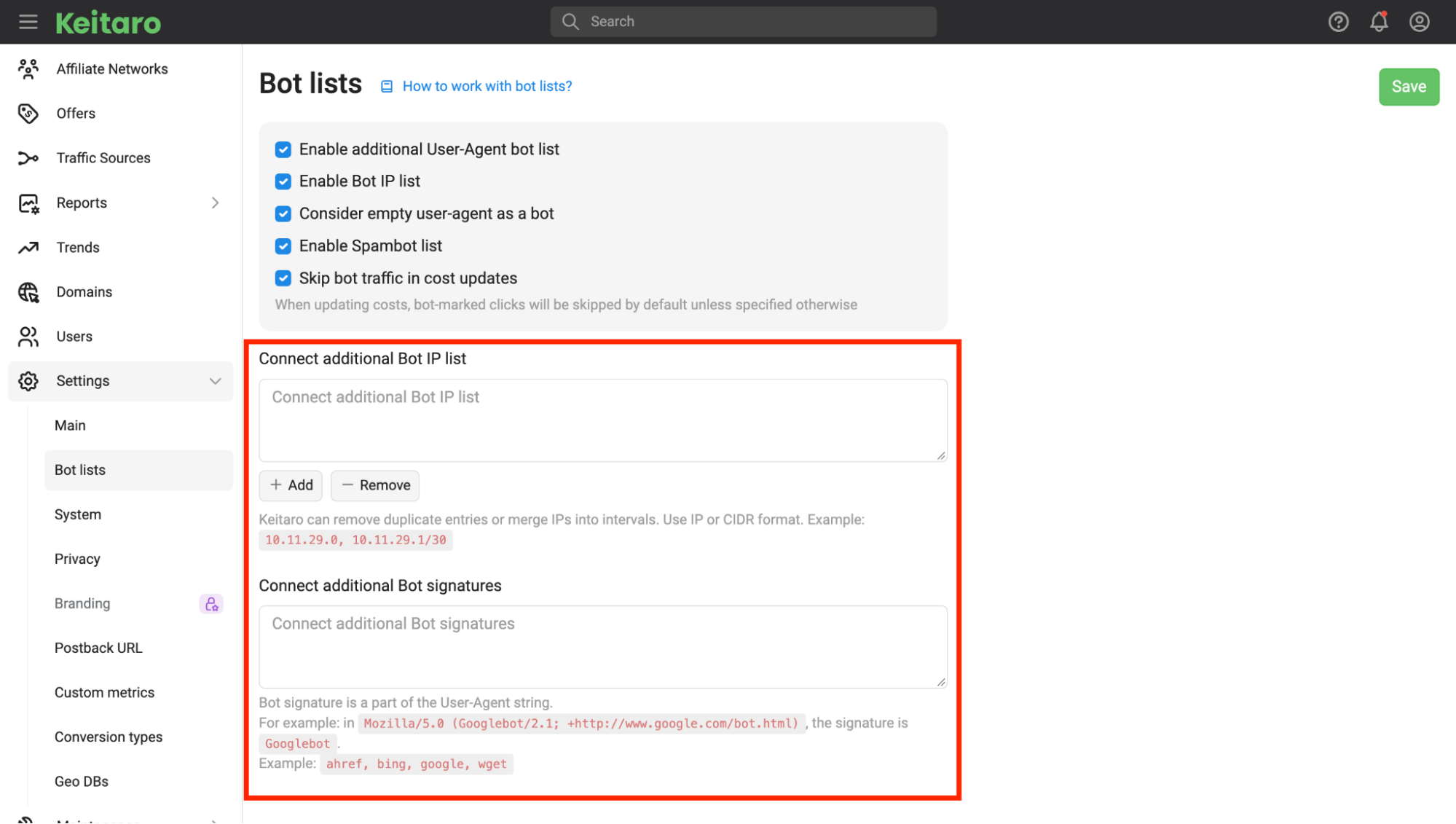
Below, in the Connect additional Bot signatures field, you can add specific User-Agent signatures in the same way, then click the green Save button in the upper-right corner.
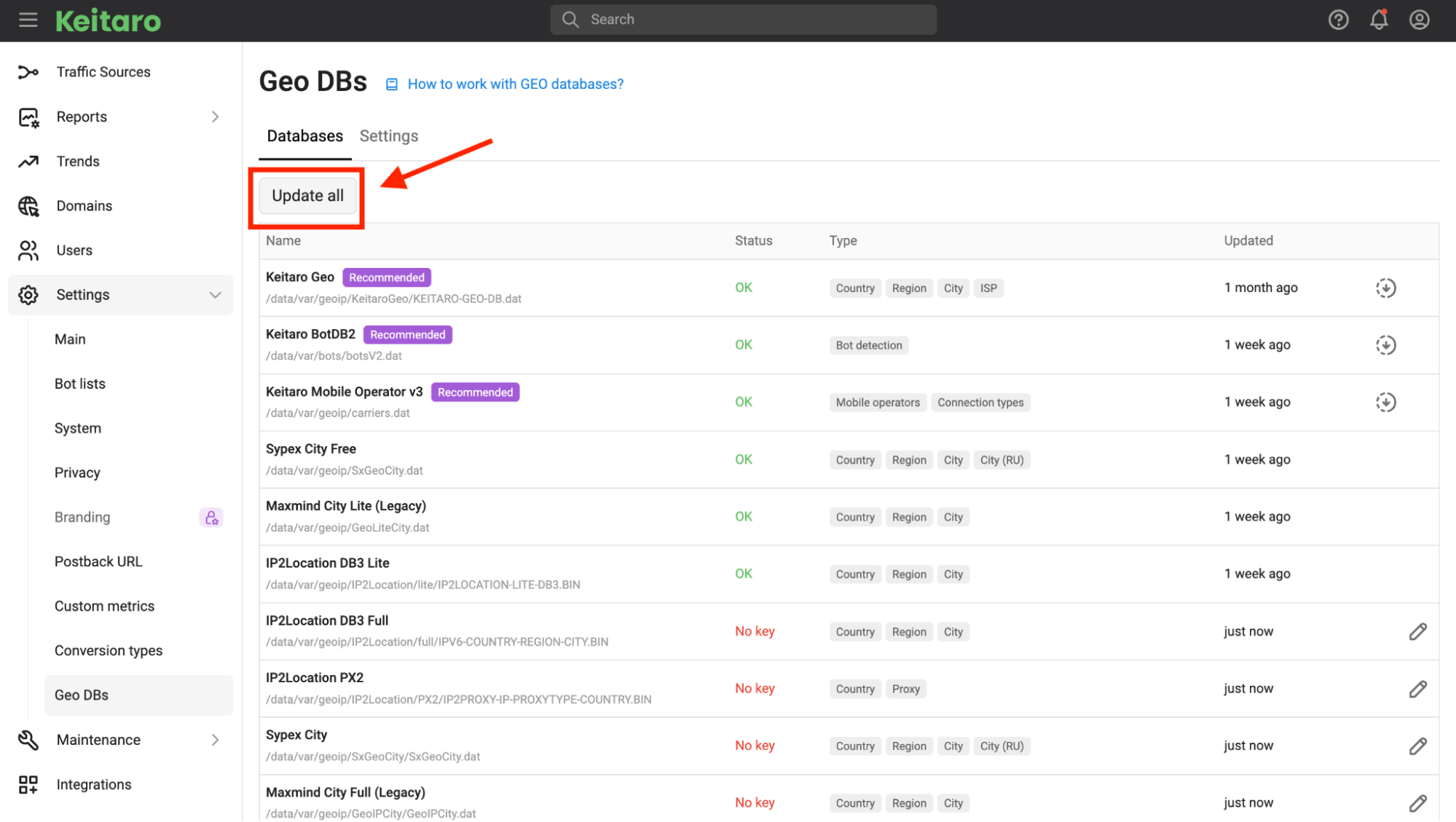
After that, make sure to update the IP address and mobile operator databases. In the left sidebar, open Settings, go to the Geo DB tab and click the Update All button. This will prevent errors when the tracker confuses the user's country and sends targeted traffic to the White Page.
Step 2. Adding a nutra affiliate network
For the tracker to understand when a lead comes from your ad, you need to configure data exchange between Keitaro and the affiliate network.
-
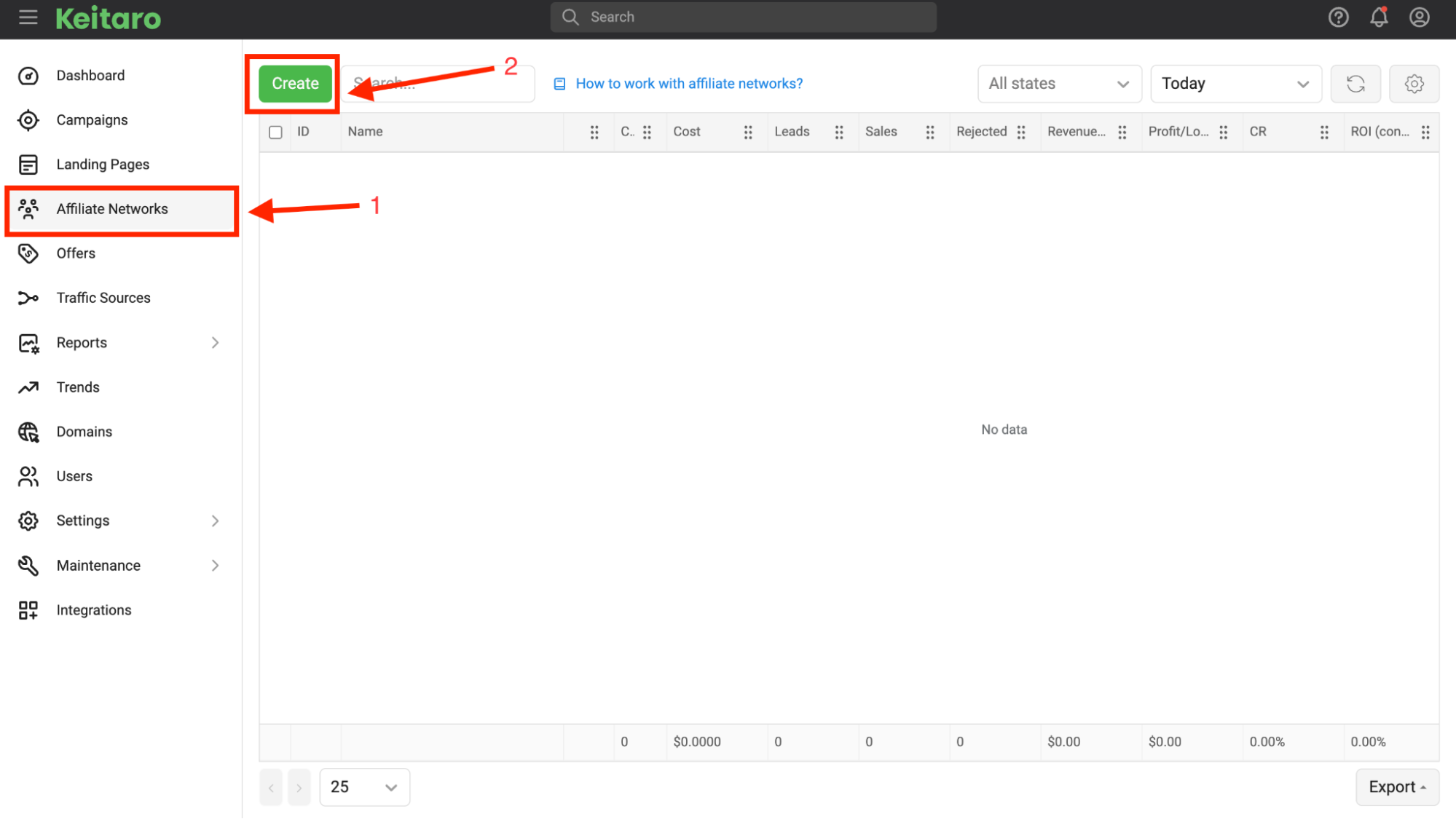
In the left menu, open Affiliate Networks and click Create.
-
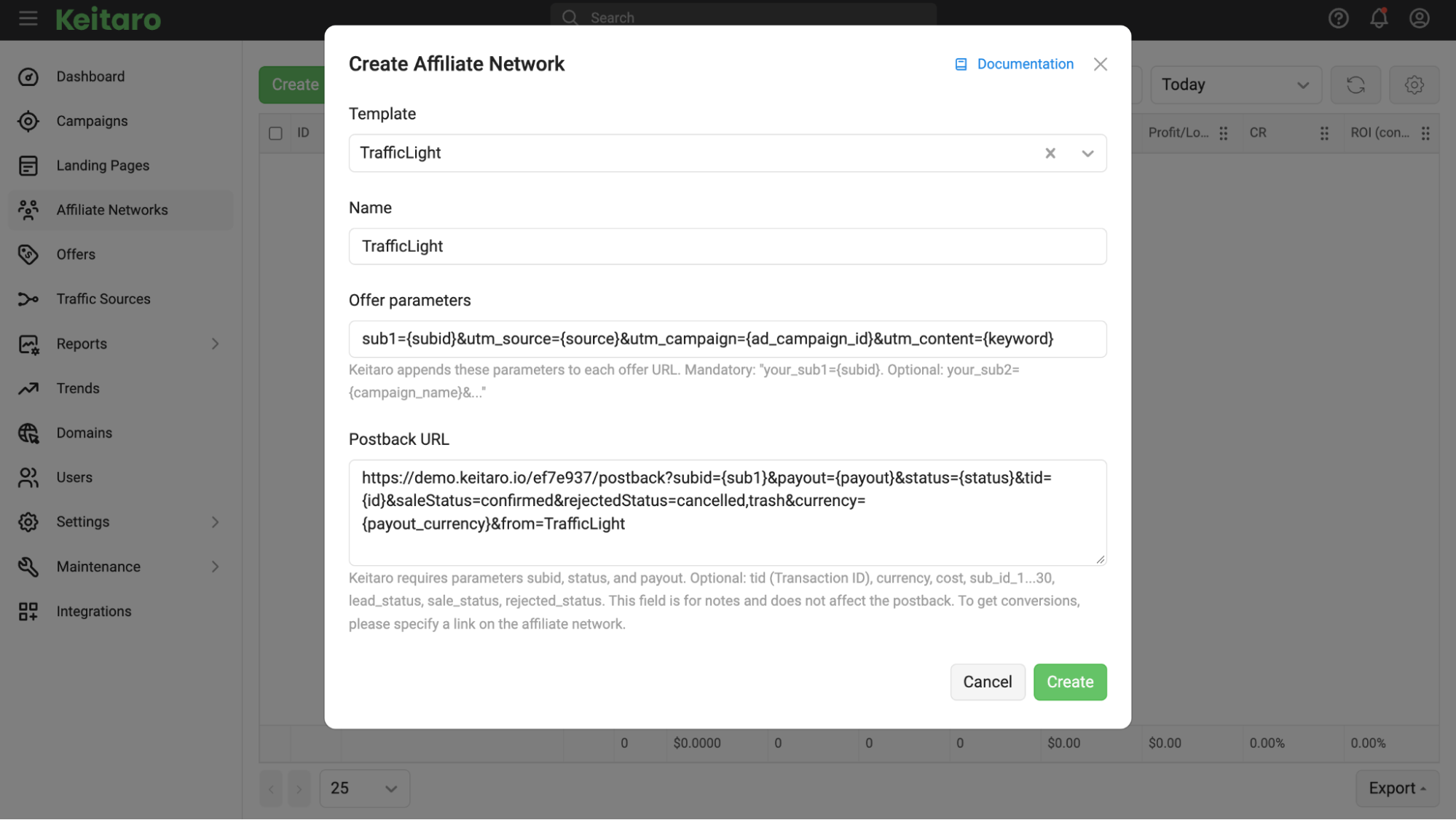
In the Template field, find your nutra network. Keitaro will automatically configure the parameters for transmitting lead statuses.
-
Copy the generated Postback URL and click the Create button at the bottom of the screen.
Paste the copied postback link into the Postback section of your affiliate network dashboard. For nutra, it is important that the affiliate network sends three basic statuses:
-
lead — the application was submitted on the website and sent to the call center;
-
sale — the operator reached the customer and confirmed the order (approval);
-
rejected or trash — the customer refused to purchase or entered an incorrect phone number.
Step 3. Adding an offer
Now connect the target landing page of the nutra offer, where buyers will be redirected.
-
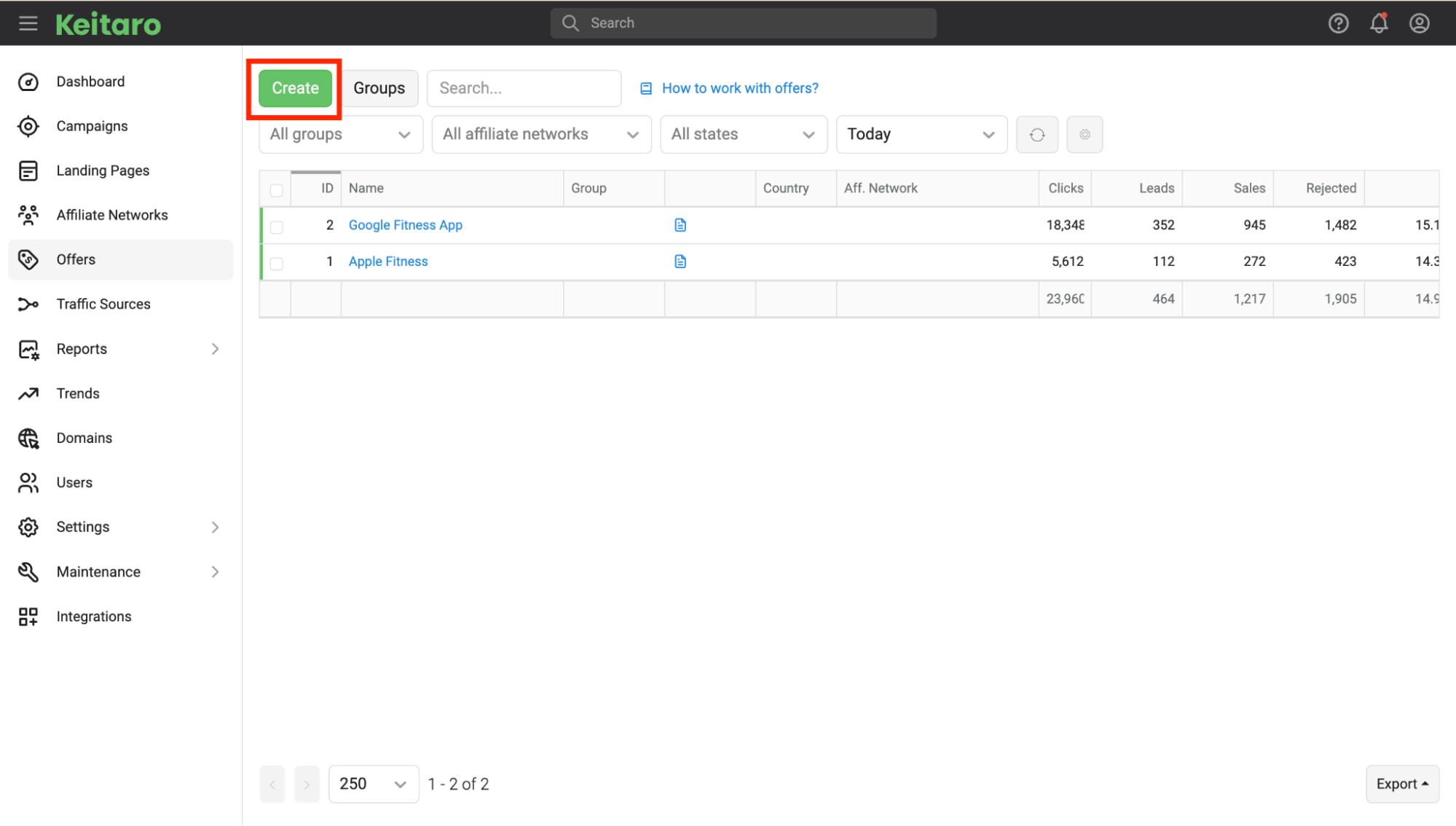
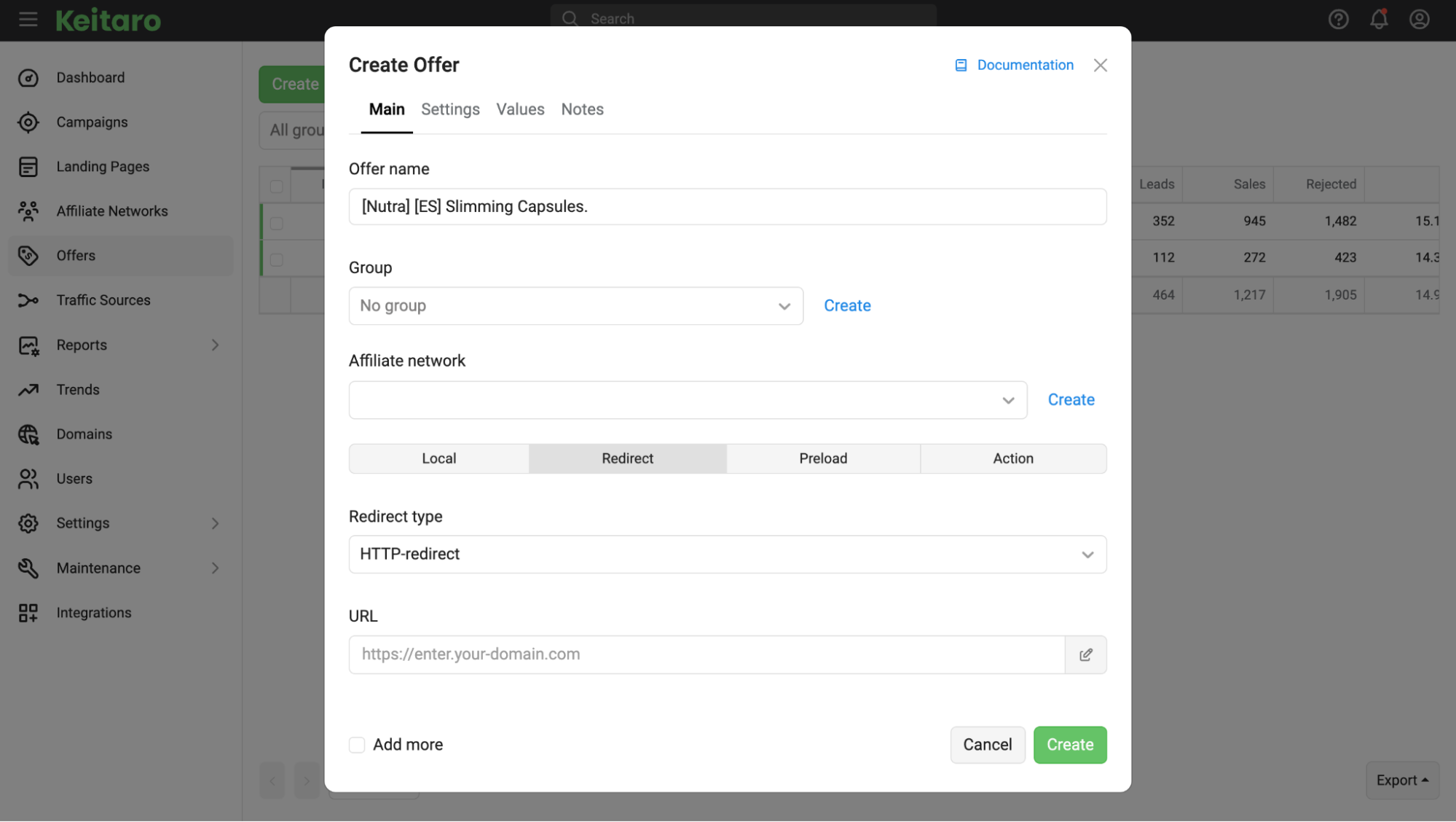
Go to the Offers section in the left menu and click Create.
-
In the Name field, enter a clear name for the setup, for example: [Nutra] [ES] Slimming Capsules.
-
In the Affiliate Network dropdown, select the affiliate network you added in the previous step.
-
In the Offer URL field, paste the tracking link from the affiliate network with the click tracking parameter {subid} at the end.
In nutra, landing pages are often downloaded and uploaded directly to the server so that the website opens without unnecessary delays.
If you use a local landing page, select Local instead of Redirect in the Type field and upload the page archive through the interface. If you send traffic through the affiliate network's direct link, leave Redirect selected. Click Create.
Step 4. Building the campaign and flow hierarchy
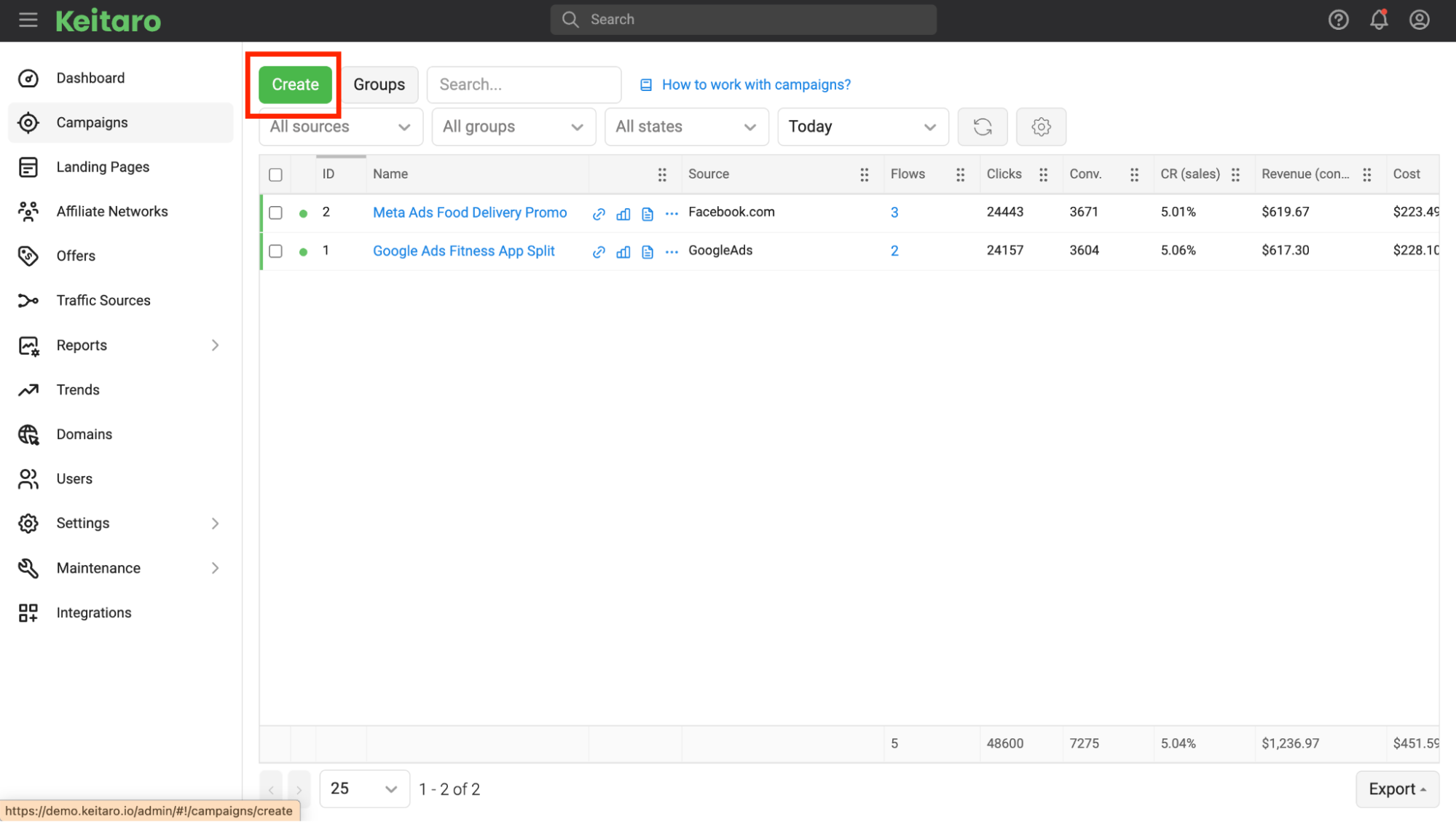
Now move on to traffic filtering setup. In the left menu, click Campaigns and then Create. Enter a campaign name, for example: FB_ES_Nutra_Test.
The entire cloaking logic relies on a strict hierarchy of three flows. Keitaro always checks the rules sequentially from top to bottom: from the first flow to the last. Our goal — is to build a chain of conditions in which a bot or moderator gets stopped at the very first check, while only real buyers reach the sales landing page.
Flow 1: White Page (Intercepting flow)
The purpose of this flow — is to catch any suspicious visits and immediately show them the White Page without allowing them further through the chain.
-
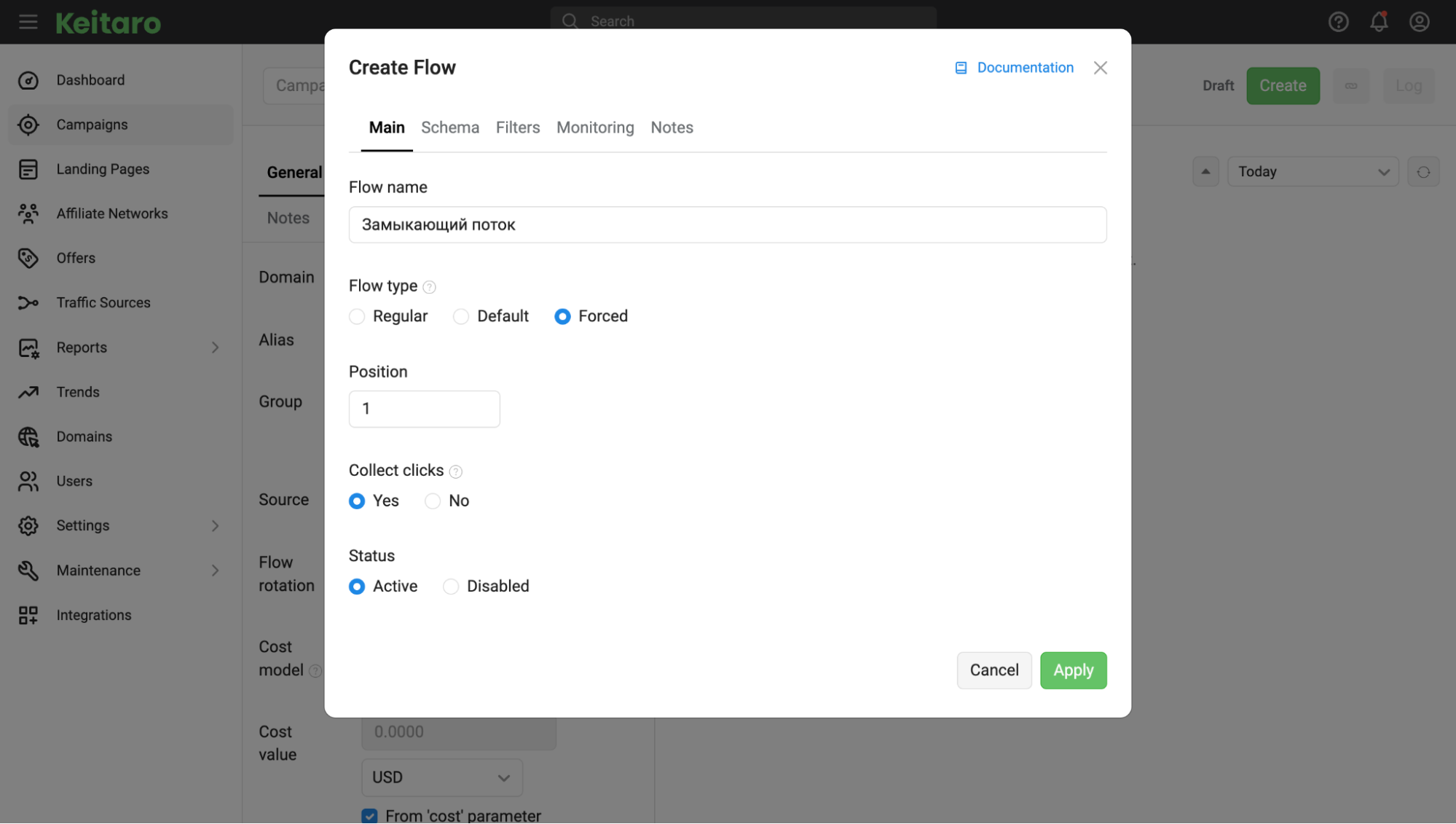
In the Main tab, enter the name White / Bots, select Forced under Flow type, and leave Position set to 1.
-
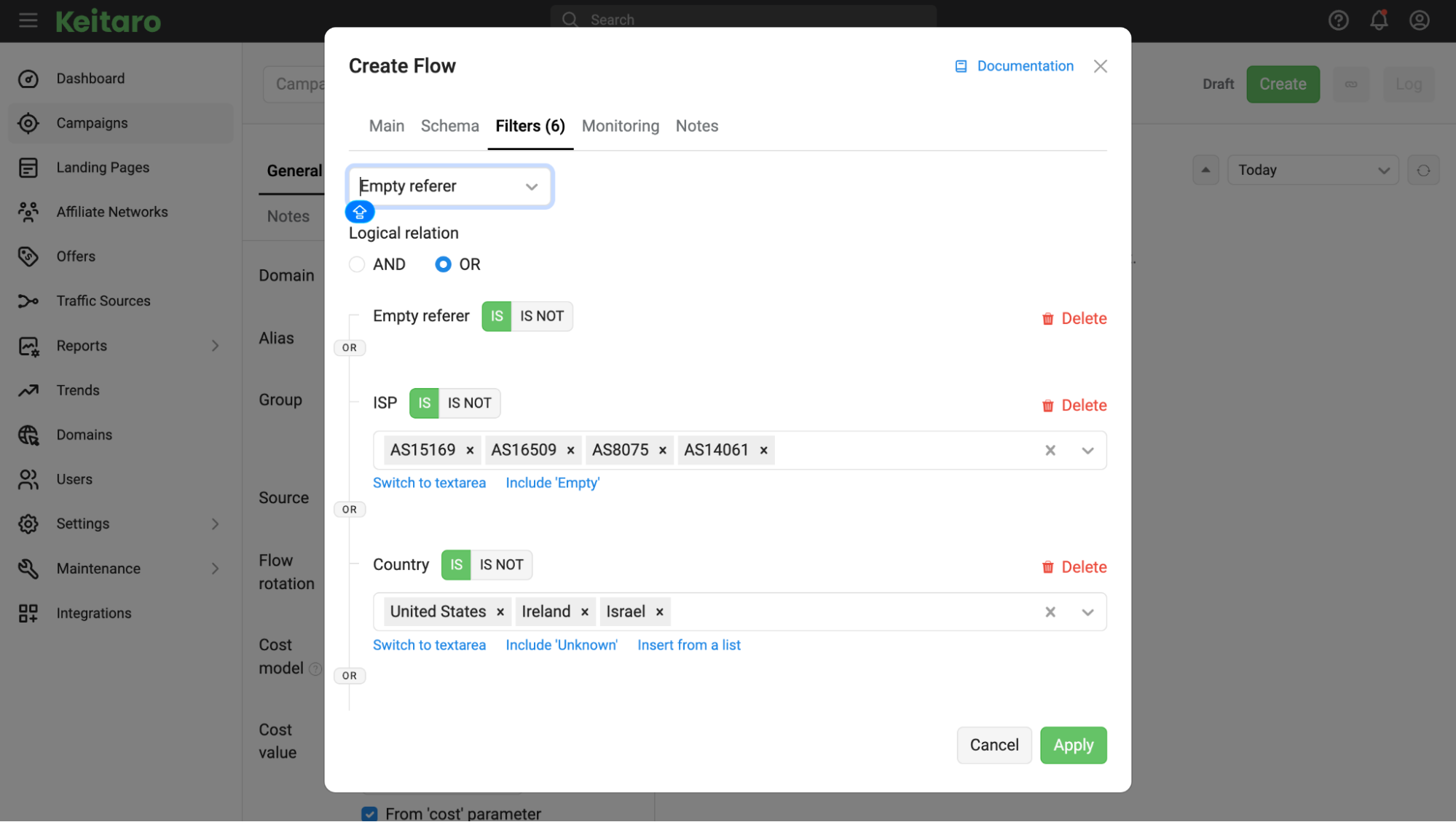
Go to the Filters tab. Switch Logical relation to OR. This is a key point: we need the user to be sent to the White Page if at least one suspicious rule from the list is triggered.
-
Set up the complete set of filters for reliable filtering:
-
Bot: set the value to Yes. This enables checking against Keitaro's built-in bot databases.
-
Proxy / VPN: set the value to Yes. Moderators often access websites through anonymizers, so these clicks are immediately isolated.
-
Country (Exclusion): select the campaign's target GEO (for example, Spain) and click No. Additionally, be sure to add the countries where Facebook's main moderation offices are located to this exclusion list: the United States, Ireland and Israel. Any visit from these countries is immediately sent to the White Page.
-
ISP (Autonomous Systems): enter the numbers of data centers and cloud servers used to run platform bots: Google (AS15169), Amazon (AS16509), Microsoft (AS8075), DigitalOcean (AS14061). If a click comes from a server rather than a residential provider, the system will show the White Page.
-
User-Agent: add bot and script signatures (facebookexternalhit, python-requests, wget, curl, zgrab).
-
Empty Referrer: set the value to Yes to filter out direct visits to the link without an ad click in the feed.
-
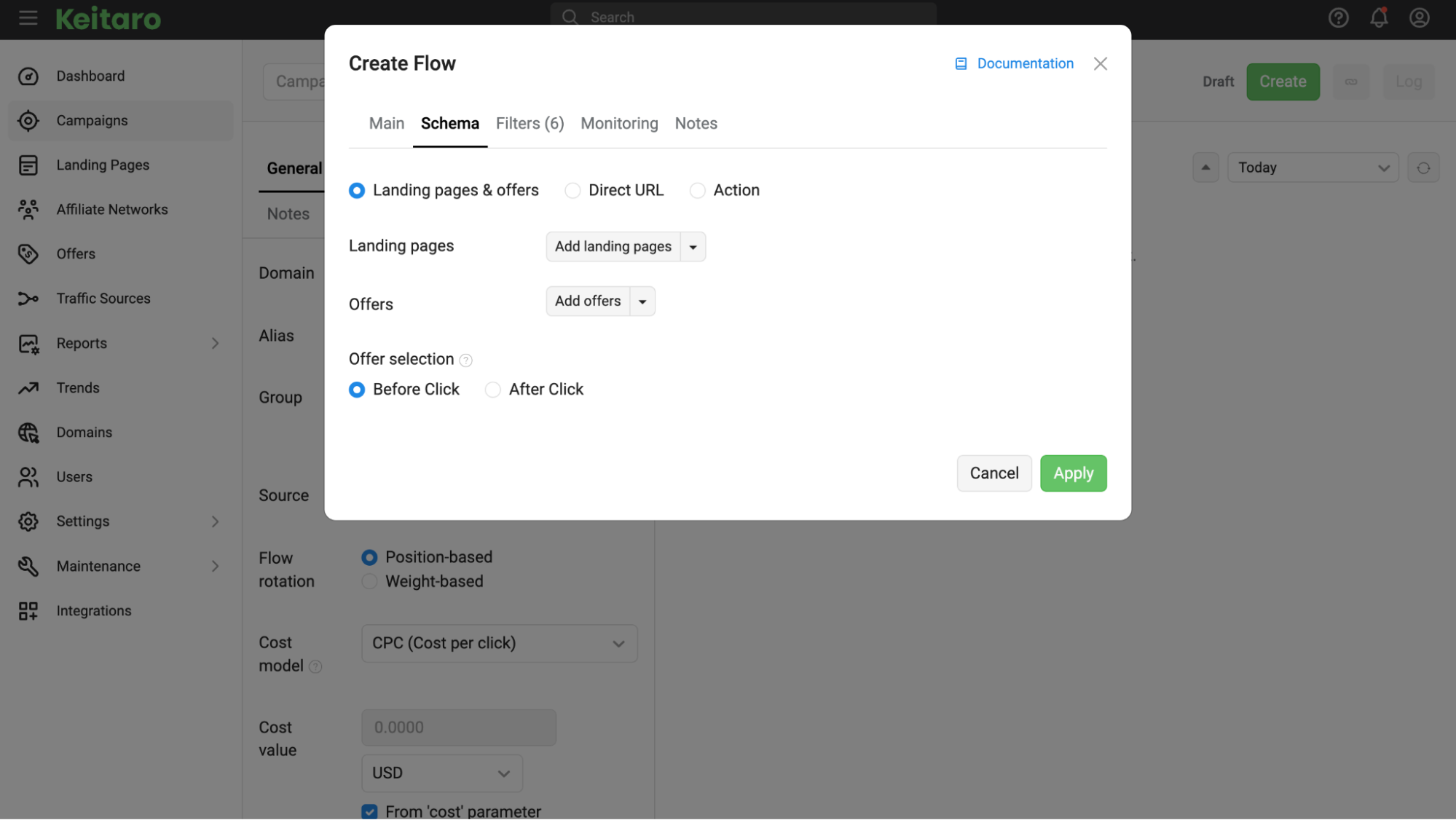
In the Schema tab, select how the White Page should be displayed. If the White Page opens through a link, select Direct URL and paste the address.
If the page is uploaded to the tracker, select Landing pages & offers and add the required White Page using the Add landing pages button. Click Apply.
Flow 2: Black Page (Regular flow)
Only our target audience that has passed the first check should reach this flow. Therefore, at this step, we set strict selection criteria to filter out irrelevant clicks and moderators using desktop computers.
-
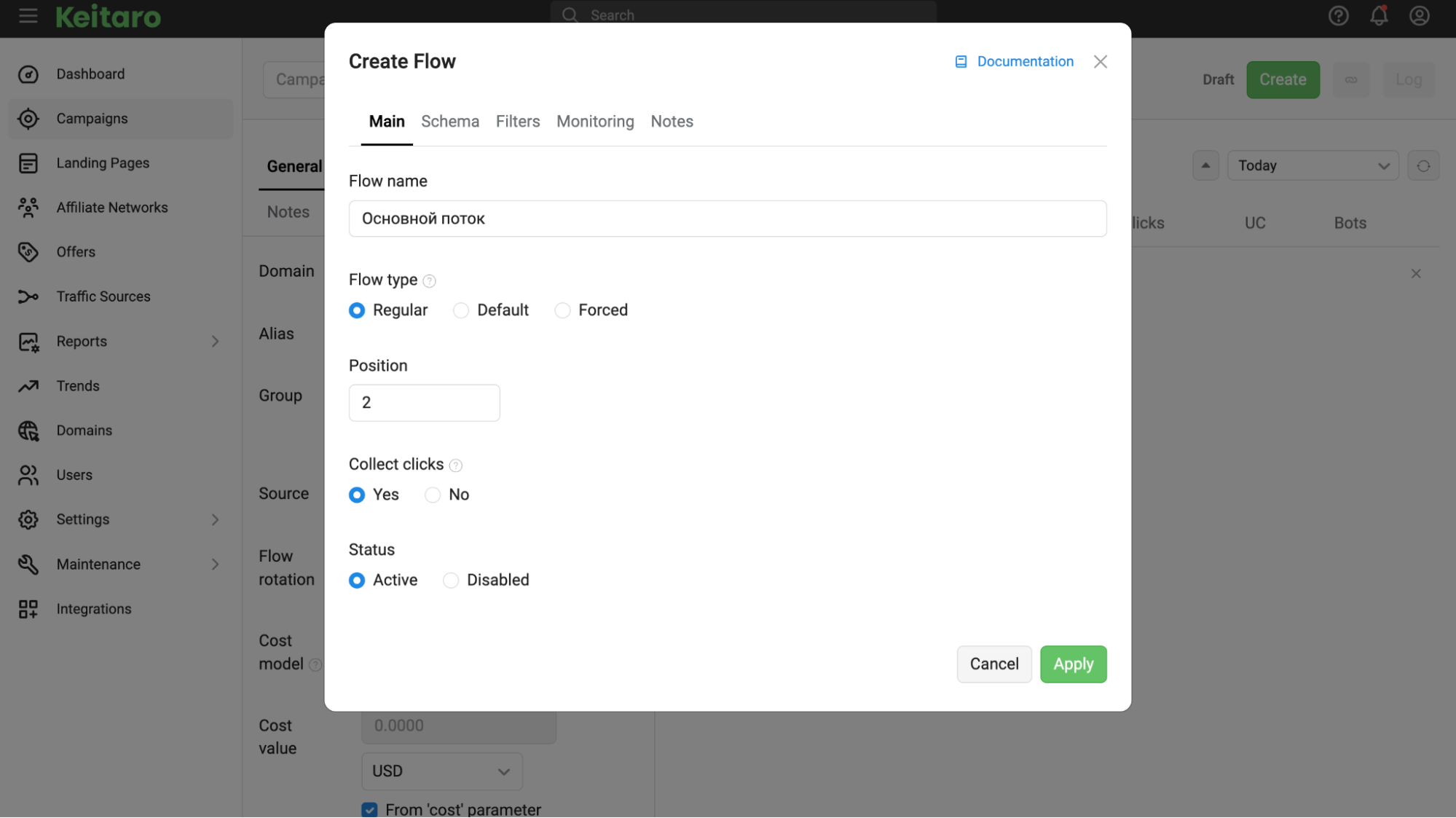
Click Create Flow again. In the Main tab, enter Black / Target, select Regular under Flow type, and set Position to 2.
-
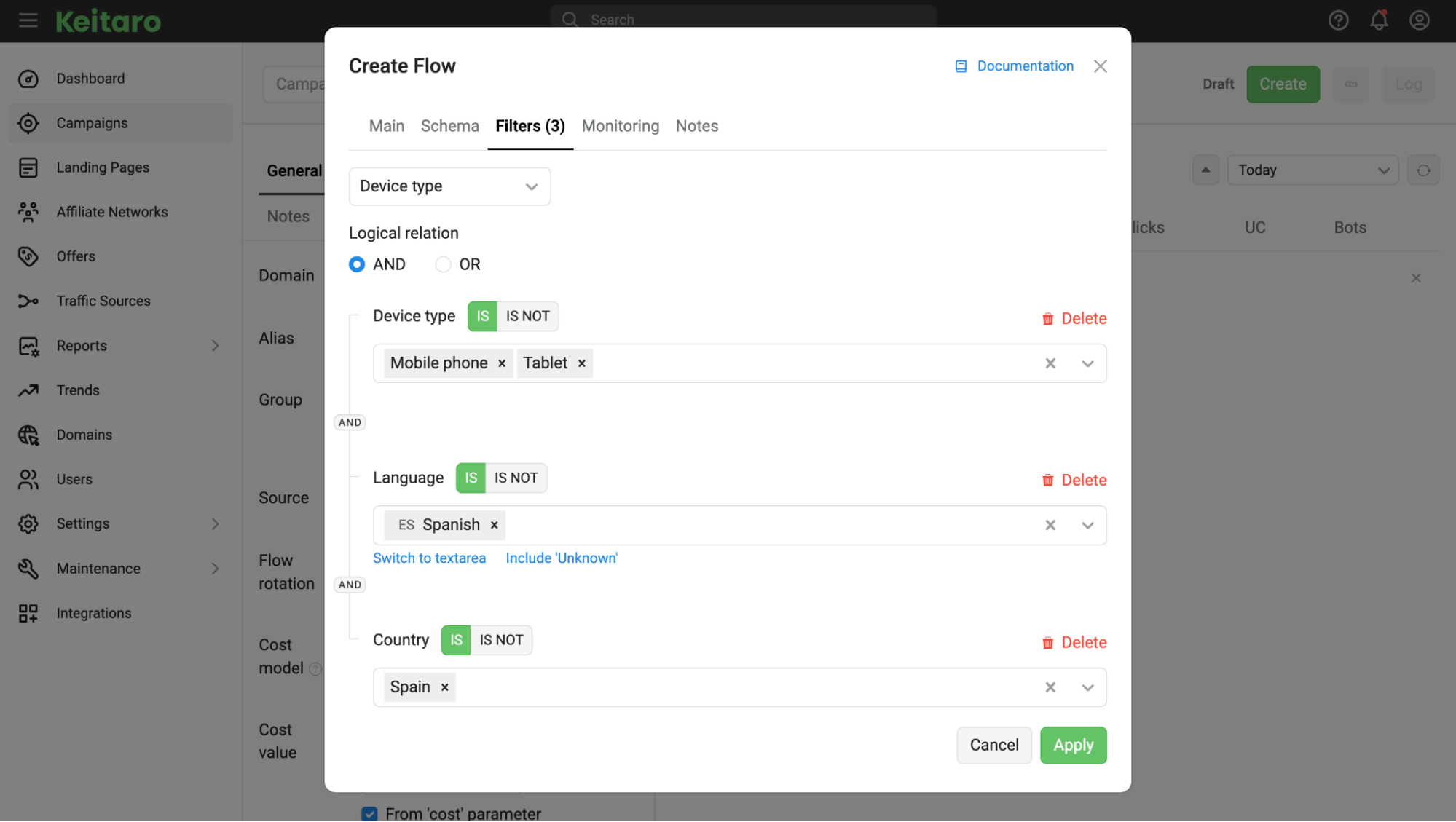
In the Filters tab, make sure to switch Logical relation to AND. This ensures that a user reaches the Black Page only when all the specified conditions are met simultaneously:
-
Country: specify the campaign's target country (for example, Spain) with the value Yes.
-
Device Type: select Mobile and Tablet. If the visit comes from a desktop computer running Windows or macOS, the flow will not trigger, and a moderator using their work PC will not see the offer page.
-
Language: set the system language of the target GEO (for example, Spanish). If the browser uses English or another language, the tracker will not allow the click into this flow.
-
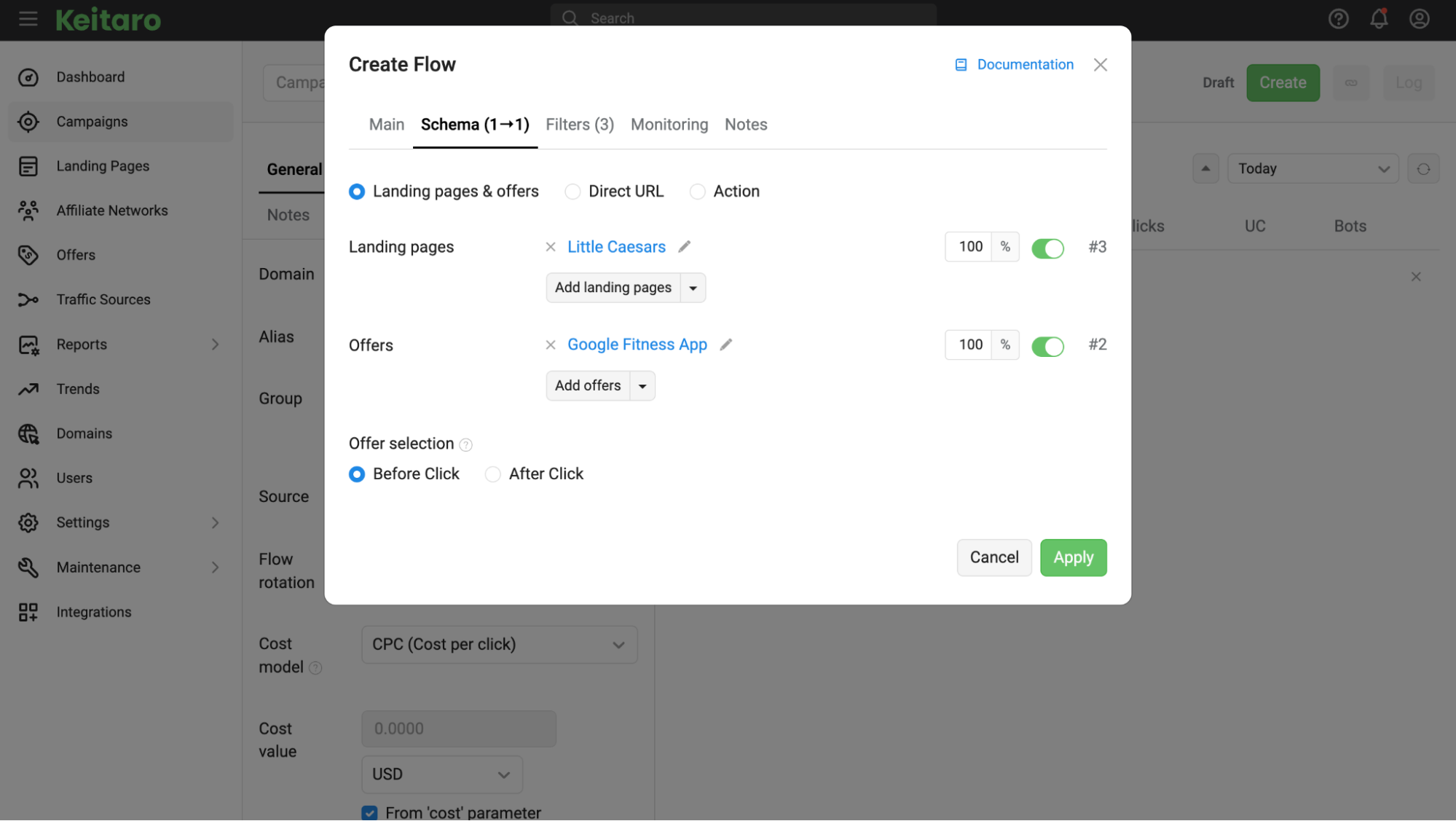
In the Schema tab, select Landing pages & offers. If traffic is sent through a pre-landing page, click Add landing pages in the Landing pages field and select the pre-landing page from the list.
If no pre-landing page is used and traffic goes directly to the landing page with the order form, leave this field empty. In the Offers field, click Add offers and select the target offer created in Step 3. Leave Offer selection set to Before Click and click the green Apply button.
Flow 3: Default flow (Fallback)
This flow is needed to protect the setup from bans.
Imagine a situation: a Facebook moderator decides to review an ad manually and opens the link directly from their work computer using a home internet connection or Spanish proxy.
They may not enter the first bot flow because they appear to be a real person. They will not pass the second flow either because it is configured strictly for smartphones. Without a third flow, the tracker simply will not know where to send such a click and, in the event of a technical failure, may display the offer page.
To eliminate any risks, we add a fallback flow and send these visitors to the White Page.
-
In the Flow name field, enter Default / White, and under Flow type, select Default. The tracker will assign the position in the list automatically.
-
Leave the Filters tab unchanged — no filters are needed here. This flow should capture all visitors who do not match the settings of the first two flows.
-
Go to the Schema tab and specify the same White Page used in the first flow.
As a result, the campaign has a clear operating structure:
-
At the top is the Forced flow — it catches bots and suspicious server IPs and immediately opens the White Page for them.
-
Next comes Regular — it allows real smartphone users to reach the offer page.
-
The list ends with Default — it captures any unusual visits (for example, visits from computers) and also sends them to the White Page.
Check the flow order and click the green Save button in the upper-right corner of the campaign.
Step 5. Connecting the White Page via KClient PHP
Once the campaign is configured in the tracker, all that remains is to connect it to your domain. We use integration through the KClient PHP script: in this case, the browser's address bar does not change, and page substitution takes place on the server before the website loads.
-
Open the created campaign, go to the Tracking tab and select KClient PHP from the tracking methods dropdown.
-
Download the kclient.php file and upload it through your hosting file manager to the website's root directory, where your White Page is located.
-
Open the index.php file of your White Page and insert the integration script from Keitaro at the very top (before the first <html> tag or any other code):
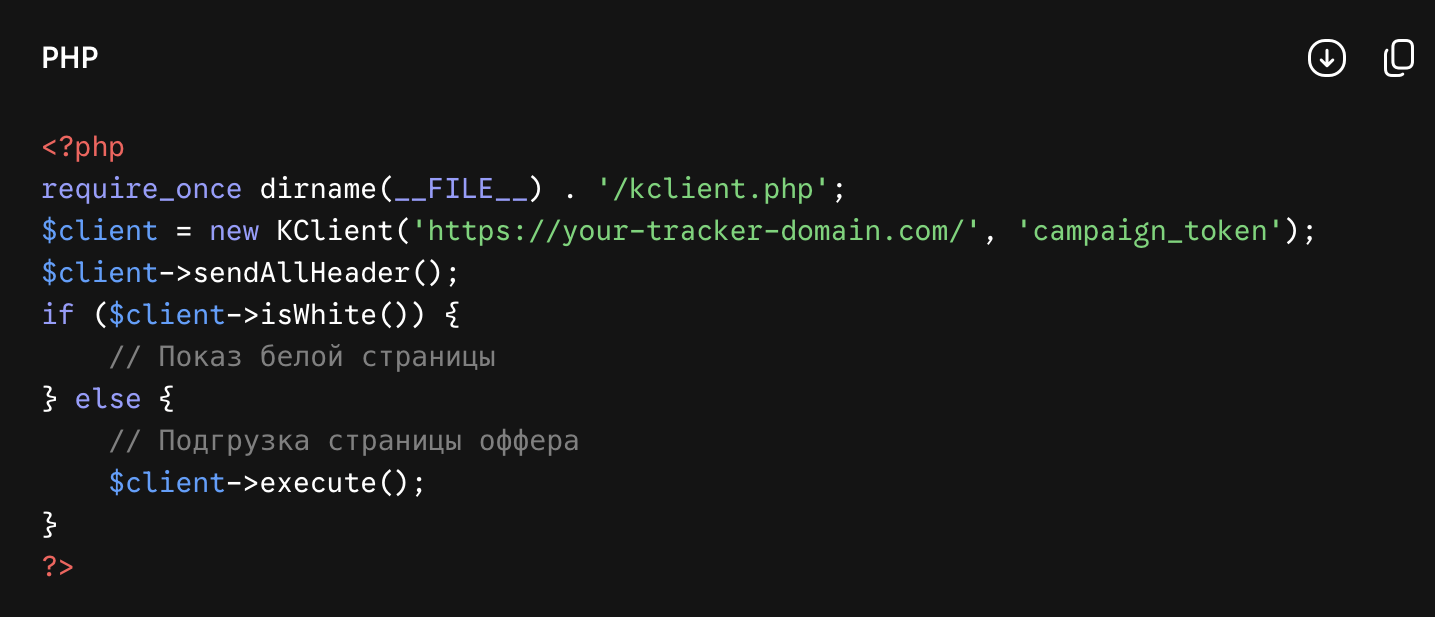
After saving the files, both visitors and platform bots will open the same address of your White Page website. Moderators will see the White Page articles, while the target audience will see the landing page with the offer under the same domain.
Conclusion: how to check cloaking before launching traffic
Before inserting the link into your Facebook advertising dashboard, make sure the filters are working correctly:
-
Checking the White Page display. Open your website link in a regular browser using your home internet connection. If you are not in the offer's target country, the website must open the White Page.
-
Checking the offer display. Connect a high-quality mobile proxy from the target country, open an incognito tab in a mobile browser and follow the same link. The landing page with the offer (or pre-landing page) should open.
-
Checking tracker reports. In Keitaro, go to Reports → Clicks. The first visit from your home internet connection should appear as an intercepted bot or a visit in the White flow, while the second visit through the proxy should appear as a targeted click in the Black flow.
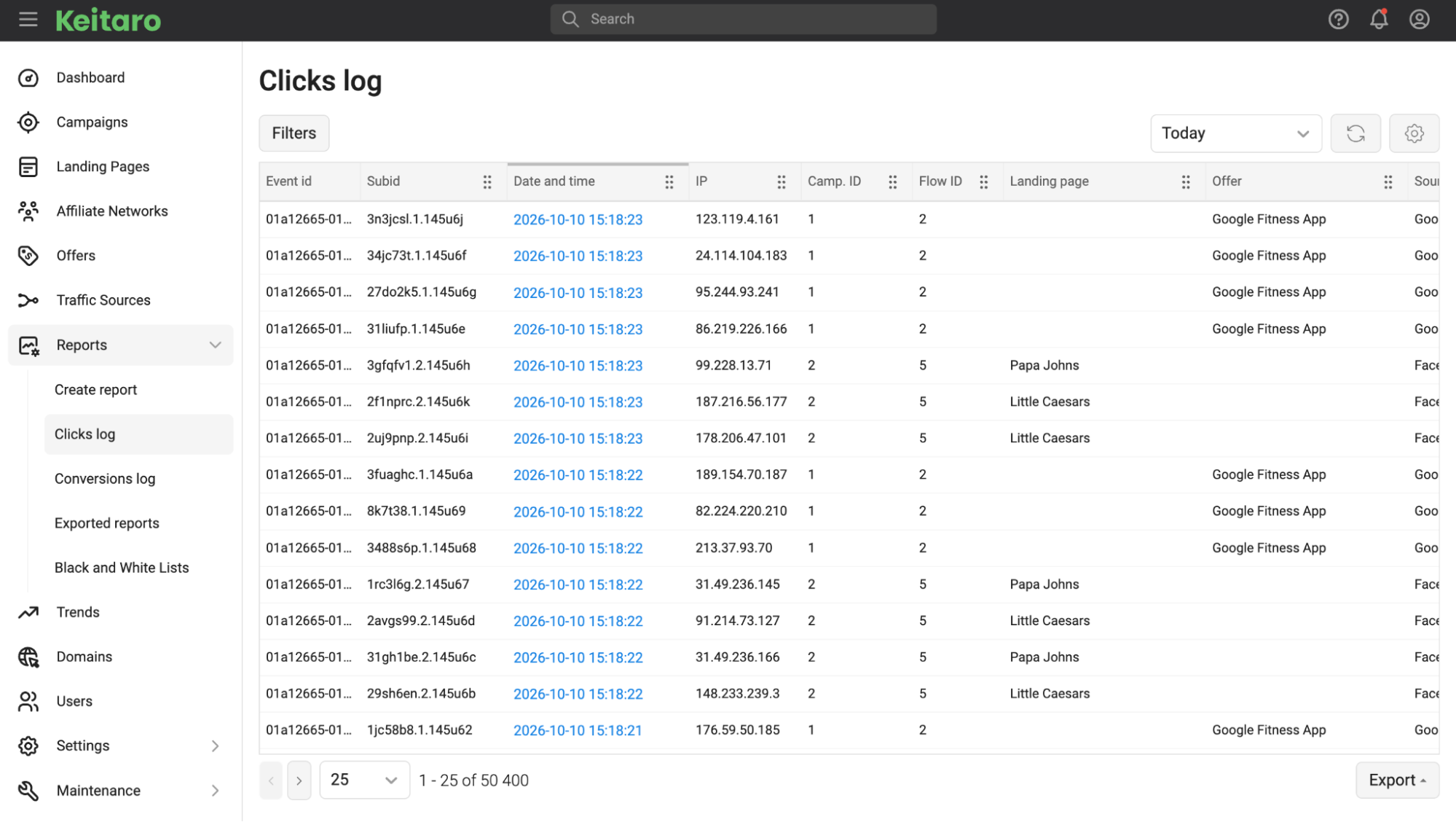
If both tests work correctly, you can submit the link to the advertising dashboard and launch the campaign for moderation.